Sometimes it is necessary to have a look at the components, which are attached to your network. The NetEye-Discovery, based on NeDi, is the right tool for this (see prior post). It discovers your network and all “nodes” attached to your network devices. However, sometimes it is not enough to just have the MAC Address or IP and eventually also the DNS name (if the IP’s are correctly managed in DNS) of your nodes. It may be handy to see also the type of node and eventually what OS is installed on it. The advantage here is that in this way you can easily compare the data obtained from NeDi with existing data within your asset management or your CMDB.
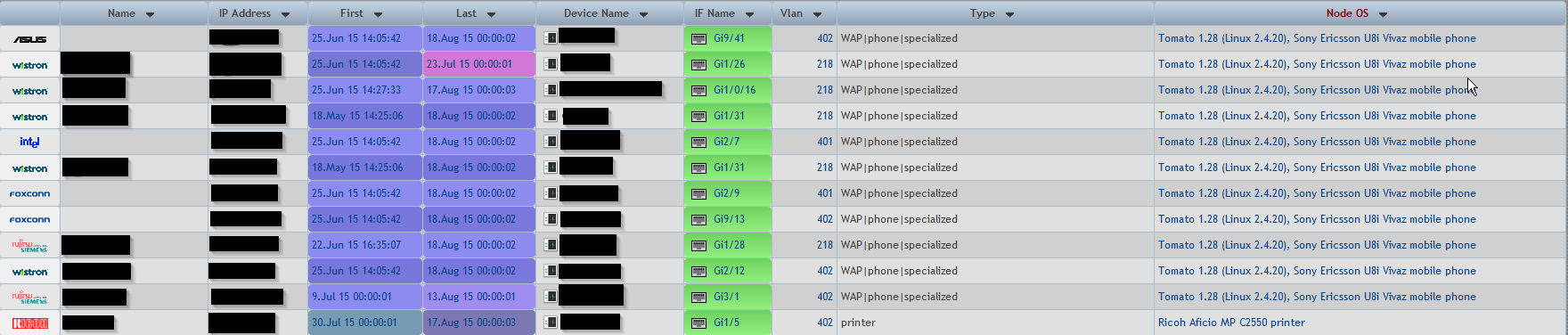
Now, how is this possible? Well, using NeDi as network discovery tool and making NeDi scan also your nodes, you are able to do this automatically. NeDi is able, if asked, to make an nmap scan over the nodes with the IP Address it previously discovered. On a positive scan (this means no firewall is blocking the network traffic to the node) it is able to set the node type and the node OS in the NeDi database and you’re able to list all your nodes with this additional data.
Here some technical detail: Call NeDi with these options (please be aware that this is only possible with the latest updates installed):
10.0.0.0/24 is the network you want NeDi to scan the nodes it discovered.
After this, you may have a look at your nodes:
The big deal here is, that NeDi does scan only the IP’s it discovered as nodes, in this way you are able to scan very big networks as not all possible IP’s are scanned, but only the ones needed.
I have over 20 years of experience in the IT branch. After first experiences in the field of software development for public transport companies, I finally decided to join the young and growing team of Würth Phoenix (now Würth IT Italy). Initially, I was responsible for the internal Linux/Unix infrastructure and the management of CVS software. Afterwards, my main challenge was to establish the meanwhile well-known IT System Management Solution WÜRTHPHOENIX NetEye. As a Product Manager I started building NetEye from scratch, analyzing existing open source models, extending and finally joining them into one single powerful solution. After that, my job turned into a passion: Constant developments, customer installations and support became a matter of personal. Today I use my knowledge as a NetEye Senior Consultant as well as NetEye Solution Architect at Würth Phoenix.
Author
Juergen Vigna
I have over 20 years of experience in the IT branch. After first experiences in the field of software development for public transport companies, I finally decided to join the young and growing team of Würth Phoenix (now Würth IT Italy). Initially, I was responsible for the internal Linux/Unix infrastructure and the management of CVS software. Afterwards, my main challenge was to establish the meanwhile well-known IT System Management Solution WÜRTHPHOENIX NetEye. As a Product Manager I started building NetEye from scratch, analyzing existing open source models, extending and finally joining them into one single powerful solution. After that, my job turned into a passion: Constant developments, customer installations and support became a matter of personal. Today I use my knowledge as a NetEye Senior Consultant as well as NetEye Solution Architect at Würth Phoenix.