
With the new NetEye 4.17 release, we’ve introduced a new feature: Smart Director.
What is Smart Director?
Smart Director is an extension of IcingaWeb2’s Director module that allows an operator to immediately deploy host and service changes without executing the classic Director deployment.
Why another Director?
The NetEye team implemented this fantastic feature to meet the needs of those customers who need to simplify the management of large configurations.
The process of deploying a large configuration can take several minutes and can be quite a nuisance, especially when there are multiple teams changing different parts of the configuration, and the deployment has to be performed multiple times in a day.
We thus tried to make it possible for several operators to work on the configuration at the same time, and then immediately test the changes in the monitoring pages without requiring a full deployment.
With this goal in mind, Smart Director was born with the new Instant Deploy functionality.
How Does it Work?
To take an example, suppose an operator needs to modify a service linked to satellite B.
In the figure below we see two different approaches:
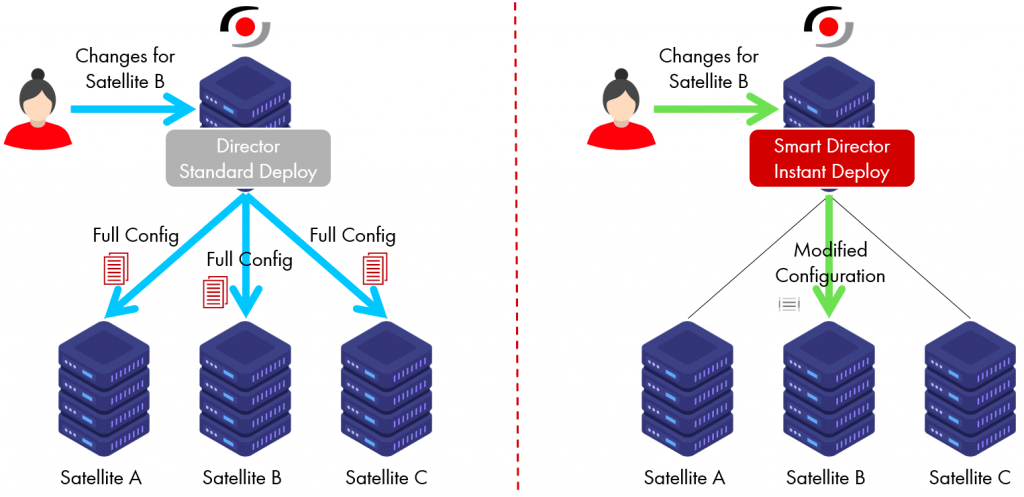
With the classic Director approach, the user will need to perform a deployment at some point.
The entire configuration will then be rewritten and all satellites will be re-synchronized. As I mentioned above, this procedure can take several minutes.
On the other hand, by using the Instant Deploy feature of Smart Director, as soon as the user saves the new service changes, only those specific changes will be immediately sent to satellite B. Without the overhead of writing out the entire configuration, the user will be able to immediately see the changes just made in the monitoring section.
How is it Implemented?
The Smart Director adds this new Instant Deploy capability as a new flag on the host and service form.

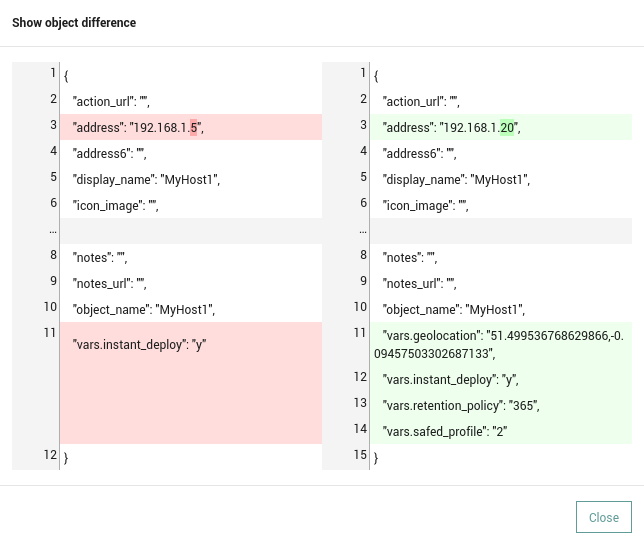
This way it’s completely up to the operator whether to use it or not. Next to the new field, a new icon allows him or her to see via a popup the differences that will be applied through instant deployment, thus giving them greater awareness of the changes that will be made when this operation is performed.

Mattia Codato
Software Developer - IT System & Service Management Solutions at Würth IT Italy
Author

Latest posts by Mattia Codato
17. 12. 2025
Development, DevOps, Kubernetes
A K3s Cluster Based on Raspberry Pi’s – The Hardware Adventure