
Reducing Alert Noise with Elastic Workflows
How to Supercharge Threat Triage with Elastic Workflows
Security Operations Centers are constantly battling alert fatigue, largely because analysts must repeatedly gather and validate context whenever an alert is generated.
As a result, they often have to move between different screens and manually run the same queries. However, Elastic Workflows can automate this initial triage natively within the Elastic Stack, making the process faster and more consistent.
In this article, we will explore how Elastic Workflows validate alert data, query historical logs and automatically take action based on the context they collect. More specifically, the use case focuses on Active Directory brute-force alerts that may be explained by a recent successful password change or password reset.
Before this workflow was implemented, analysts had to perform the same backward-looking investigation for every alert; consequently, this repetitive task increased the analysts’ workload and delayed the investigation of alerts that genuinely required attention.
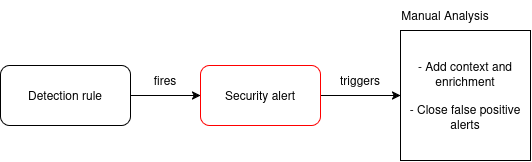
The workflow now performs this validation automatically, so alerts associated to a false positive behavior are closed as false positives before they reach the SOC’s queue.
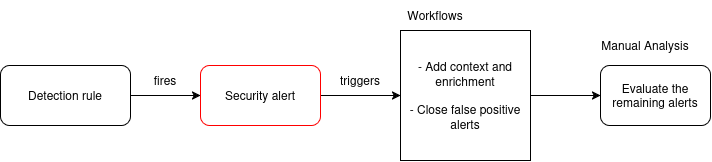
As a result, analysts can immediately focus on the alerts that remain open, without repeating the same historical query for every alert.
What are Elastic Workflows?
Elastic Workflows are the native automation layer of the Elasticsearch Platform, defined in YAML and run inside Kibana.
A workflow is built around three main concepts:
- Triggers determine when the workflow runs. For example, a trigger can start the workflow when a detection rule generates an alert.
- Steps define what the workflow does. Steps can enrich data, query indices, apply logic and perform actions.
- Data flow describes how information moves between steps. Each step can use data produced by previous steps, allowing the workflow to build context and make decisions dynamically.
This model moves part of the investigation process directly into the detection pipeline. Instead of asking an analyst to manually search for related events after every alert, the workflow performs the first contextual check automatically.
The use case: Active Directory brute-force alerts
The workflow described in this article was implemented to reduce noise associated with Active Directory brute-force detection rule.
In particular, these rules identify suspicious authentication patterns that may indicate credential guessing, password spraying or another unauthorized access attempt. However, not every alert requires the same level of investigation – this is where workflows come into play.
A recent password change or password reset can generate authentication failures when users, services or applications continue trying to authenticate with the previous credentials. Depending on the available telemetry, this activity may resemble brute-force behavior and trigger the detection rule.
The workflow adds an automated contextual check:
When an Active Directory brute-force alert is generated, search the previous 48 hours for a successful password-change or password-reset event related to the identity involved in the alert. If a matching event is found, close the alert as a false positive. Otherwise, leave it open for investigation.
The workflow does not replace or disable the detection rule. It adds a controlled post-detection triage layer.
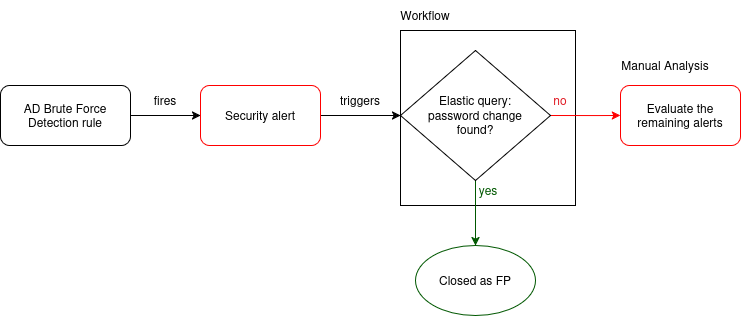
From Alert to Automated Decision
The complete workflow follows this path:
- The Active Directory brute-force detection rule generates an alert.
- The workflow is triggered by that alert.
- The workflow extracts the relevant identity and timestamp from the alert.
- An Elastic query searches the previous 48 hours for a related successful password change or password reset.
- The workflow evaluates the query result.
- If a matching event is found, the alert is closed as a false positive.
- If no matching event is found, the alert remains open for further investigation.
The key element is the temporal correlation between the brute-force alert and the historical password-change or password-reset event.
This additional context allows the workflow to distinguish between alerts with a plausible benign explanation and alerts that still require analyst attention.
End-to-end execution
Once the workflow is active, the complete process runs automatically:
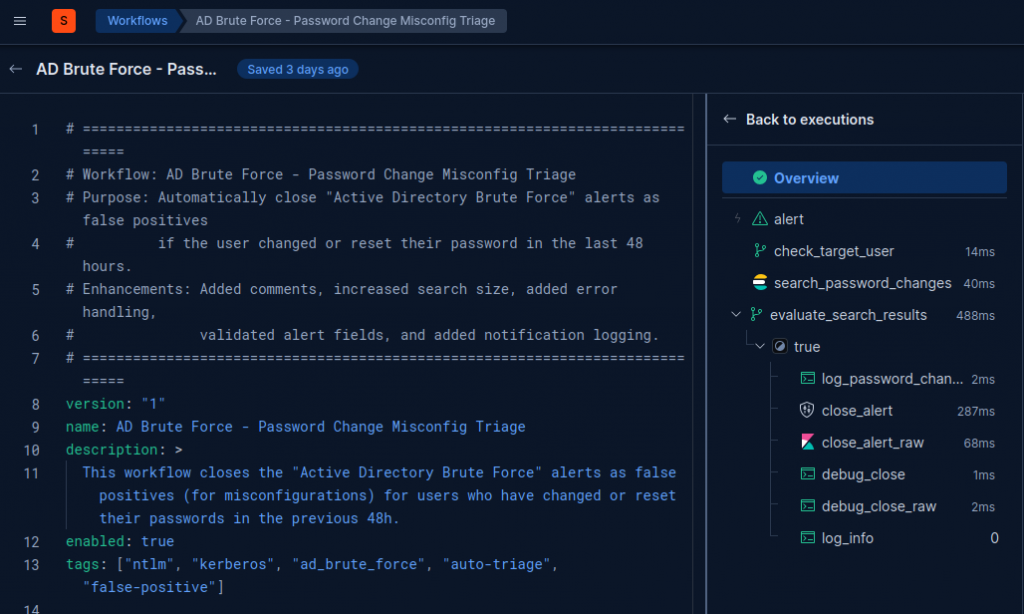
The result is a more focused alert queue. Alerts with the expected contextual signal can be handled automatically, while alerts without that signal continue through the normal security operations process.
Benefits of the approach
This workflow provides several practical benefits:
- Less manual investigation: analysts no longer need to run the same 48-hour query for every alert.
- Faster triage: contextual validation starts immediately after the alert is generated.
- More consistent decisions: the same criteria are applied to every alert.
- Better use of existing data: the workflow uses logs already available in Elastic.
- Reduced alert noise: alerts explained by a successful password change or reset are removed from the active queue automatically.
- No additional orchestration layer: the complete process runs inside Elastic, without requiring an external automation platform.
- A tunable suppression layer: the detection rule remains enabled and can be adjusted independently from the workflow logic.
Most importantly, analysts can focus on the alerts that remain open. They know that the automated 48-hour validation has already been performed and that the remaining alerts require different investigative activities.
Considerations Before Deployment
Automated alert closure should always be based on conditions that are meaningful in the target environment.
Before deploying this pattern, validate that:
- password-change and password-reset events are collected reliably;
- the relevant event fields are populated consistently;
- the identity can be matched unambiguously between the alert and the historical event;
- the 48-hour lookback window reflects the actual behavior of users, services and applications;
- the false-positive classification and closure reason are visible to analysts;
- workflow failures, query errors or missing data do not cause alerts to be closed incorrectly.
The workflow should be tested against different scenarios, including:
- an alert with a matching successful password-change event;
- an alert with no matching event;
- an alert with missing or ambiguous identity fields;
- multiple password-change or password-reset events in the lookback window.
Conclusion
Elastic Workflows provide a practical way to add automated context and decision-making to the alert lifecycle.
In this Active Directory brute-force use case, the workflow searches the previous 48 hours for a related successful password change or password reset. When the event is found, the alert is automatically closed as a false positive. When no matching event is found, the alert remains open for investigation.
This approach reduces alert noise without weakening the underlying detection rule. It transforms a repetitive manual triage task into a transparent, repeatable and auditable automation step inside Kibana.
The same pattern can be extended to other use cases, including case creation, alert assignment, analyst notifications and additional contextual enrichment.
Further Reading
These Solutions are Engineered by Humans
Did you learn from this article? Perhaps you’re already familiar with some of the techniques above? If you find cyber security issues interesting, maybe you could start in a cyber security or similar position here at Würth IT Italy.

Lorena Goldoni
Author
