18. 12. 2020
Log Management, Log-SIEM, NetEye

Scenario
Exchange Web Services (EWS) is a documented SOAP-based protocol introduced with Exchange Server 2007: in the beginning, it was a programming interface that lets external apps connect to email mailboxes.
Later on, it became is a cross-platform API that enables applications to access mailbox items such as email messages, meetings, and contacts from Exchange Online, Exchange Online as part of Office 365, or on-premises versions of Exchange starting with Exchange Server 2007. EWS applications can access mailbox items locally or remotely by sending a request in a SOAP-based XML message. The SOAP message is embedded in an HTTP message when sent between the application and the server, which means that as long as your application can post XML through HTTP, it can use EWS to access Exchange.
Exchange Web Services is used also by the latest version of Microsoft Entourage for Mac and Microsoft Outlook for Mac – since the release of Mac OS X Snow Leopard Mac computers running OS X include some support for this technology via Apple’s Mail application.
To communicate with an Exchange server, EWS applications must support the following protocols and standards:
HTTPS, SOAP 1.0, WSDL 1.0, Transport Layer Security (TLS)/SSL, XML/XSD.
EWS deprecation
In 2018, Microsoft announced that Exchange Web Services (EWS) will no longer receive functionality updates.
In 2023, Microsoft announced that EWS will be disabled in Exchange Online in October 2026.
The Midnight Blizzard security incident in January 2024 involved EWS and elevated the urgency of the EWS deprecation effort. The scope was also widened from third party applications to include all Microsoft applications.
Microsoft is working diligently to remove EWS dependencies in all of their products. For example:
- Microsoft Outlook
- Microsoft Office
- Microsoft Teams
- Microsoft Dynamics 365
This work accelerated the need to close parity gaps between EWS and Microsoft Graph for many scenarios.
Other efforts are underway in the following scenarios:
- Close the remaining parity gaps that affect specific scenarios for third party applications.
- Provide guidance for alternative solutions.
October 2026 deadline
Since October 2026, the EWS retirement model uses the existing EWSEnabled organization-level setting together with the new EWSAllowedAppIDs allow list.
Before October 2026, the behavior is intentionally permissive to give customers time to inventory dependencies, deploy an AppID allow list, and validate which applications still require EWS.
Beginning in October 2026, Exchange Online starts transitioning tenants into retirement enforcement behavior.
At that point, enabling EWS without configuring an AppID allow list will no longer act as an unrestricted “allow everything” mode: all EWS is still allowed, but tenant will have EWSEnabled set to False at some point as part of phased rollout by Microsoft causing all EWS traffic blocked!
What to do in the short period
First thing to do is identify which applications are still using the EWS interface: there is a page “EWS Usage Reports” (https://admin.cloud.microsoft/#/reportsUsage/EWSWeeklyUsage) in Microsoft 365 Admin Center to identify App IDs currently making EWS calls.
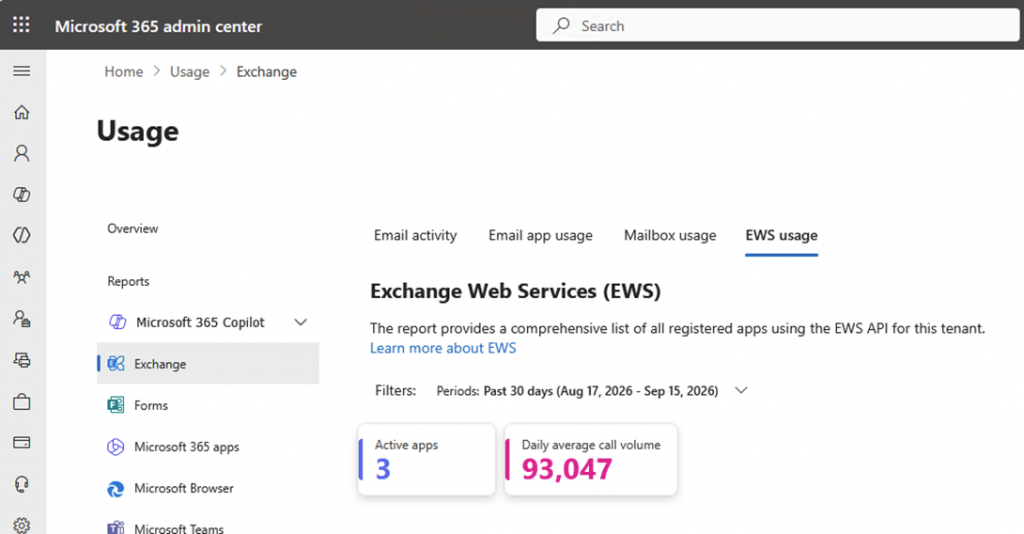
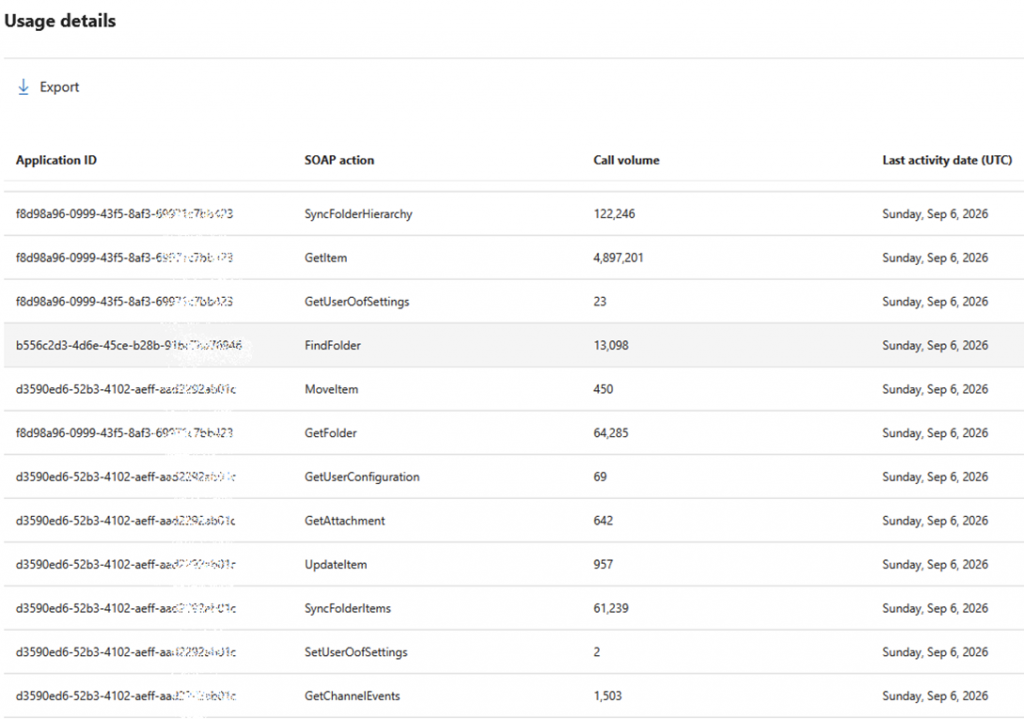
Then the following Exchange OnLine settings must be set:
Set-OrganizationConfig -EwsEnabled $trueSet-OrganizationConfig -EwsAllowedAppIDs "11111111-2222-3333-4444-555555555555,aaaaaaaa-bbbb-cccc-dddd-eeeeeeeeeeee" with the list of all the Application IDs which should keep the EWS access.
For the future
Starting from April 1, 2027, EWS will be fully and permanently shut down for all tenants in Exchange Online with no further extensions: this means that all the applications which use EWS must switch to Microsoft Graph before that date.
No further delay will be possible.

Alessandro Romboli
Site Reliability Engineer at Würth IT Italy
My name is Alessandro and I joined Würth Phoenix (now Würth IT Italy) early in 2013. I have over 20 years of experience in the IT sector: For a long time I've worked for a big Italian bank in a very complex environment, managing the software provisioning for all the branch offices. Then I've worked as a system administrator for an international IT provider supporting several big companies in their infrastructures, providing high availability solutions and disaster recovery implementations. I've joined the VMware virtual infrastructure in early stage, since version 2: it was one of the first productive Server Farms in Italy. I always like to study and compare different technologies: I work with Linux, MAC OSX, Windows and VMWare. Since I joined Würth Phoenix, I could also expand my experience on Firewalls, Storage Area Networks, Local Area Networks, designing and implementing complete solutions for our customers. Primarily, I'm a system administrator and solution designer, certified as VMware VCP6 DCV, Microsoft MCP for Windows Server, Hyper-V and System Center Virtual Machine Manager, SQL Server, SharePoint. Besides computers, I also like photography, sport and trekking in the mountains.
Author

Latest posts by Alessandro Romboli
17. 06. 2026
Microsoft
UEFI Secure Boot Nightmare
03. 12. 2025
Microsoft
Single Sign-On for Power BI Report Server
08. 09. 2025
Service Management
VMware ESXi Transparent Page Sharing
12. 06. 2025
Microsoft
Terminal Server User Profiles with FSLogix