Have you ever had the need to manage in your inventory the location and the content of your racks?
The plugin Bays Management for GLPI can also be adopted to meet this need. With the plugin it is possible to create and manage your rack and to locate the various components. In this way it is possible to know the space, the power consumption and the heat dissipation. Bays management, at a glance, deals with the setting of all your racks by allowing to configure their size, weight and total number of units. In addition, you can define the model specifications and materials used.
For each rack it is possible to set up the following parameters:
Name
Weight
Place and location in the room
Manufacturer
Date of installation or activation of financial management
For the devices contained in the racks you can configure the following attributes:
Type
Model
2-way power (dropdown) for electricity consumption (VA)
Number of required cords and amperage
Current consumed / Total Current (amps)
Flow of fresh air / Flow Rate (m3 / h)
Heat dissipation (BTUs / hour)
Weight
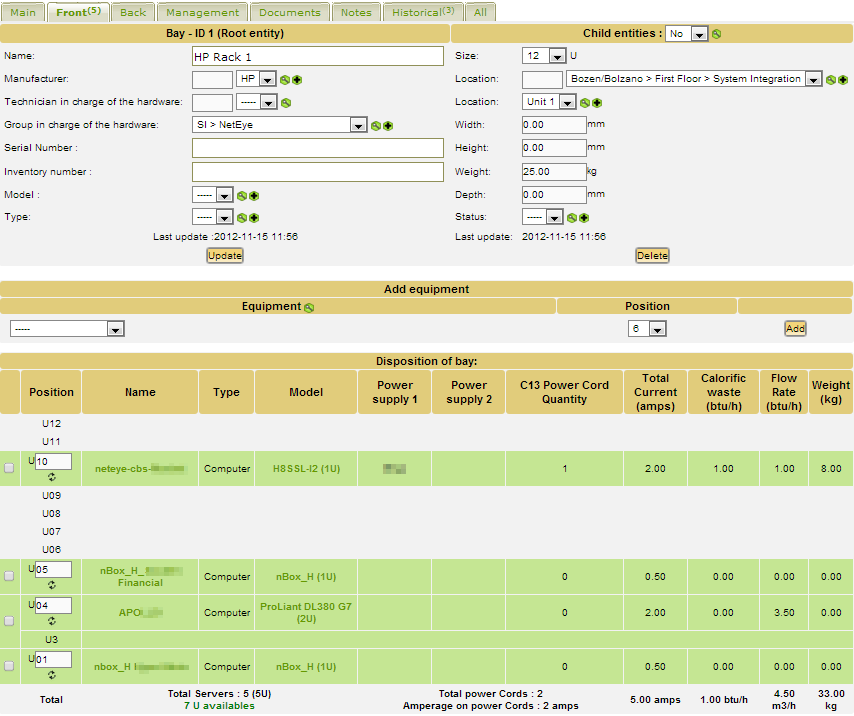
The display of items in the rack is in the form of a table, by Units. A total is calculated for weight, consumption and dissipation.
Configuration of the size, weight, position, power consumption and contents of a rack with GLPI
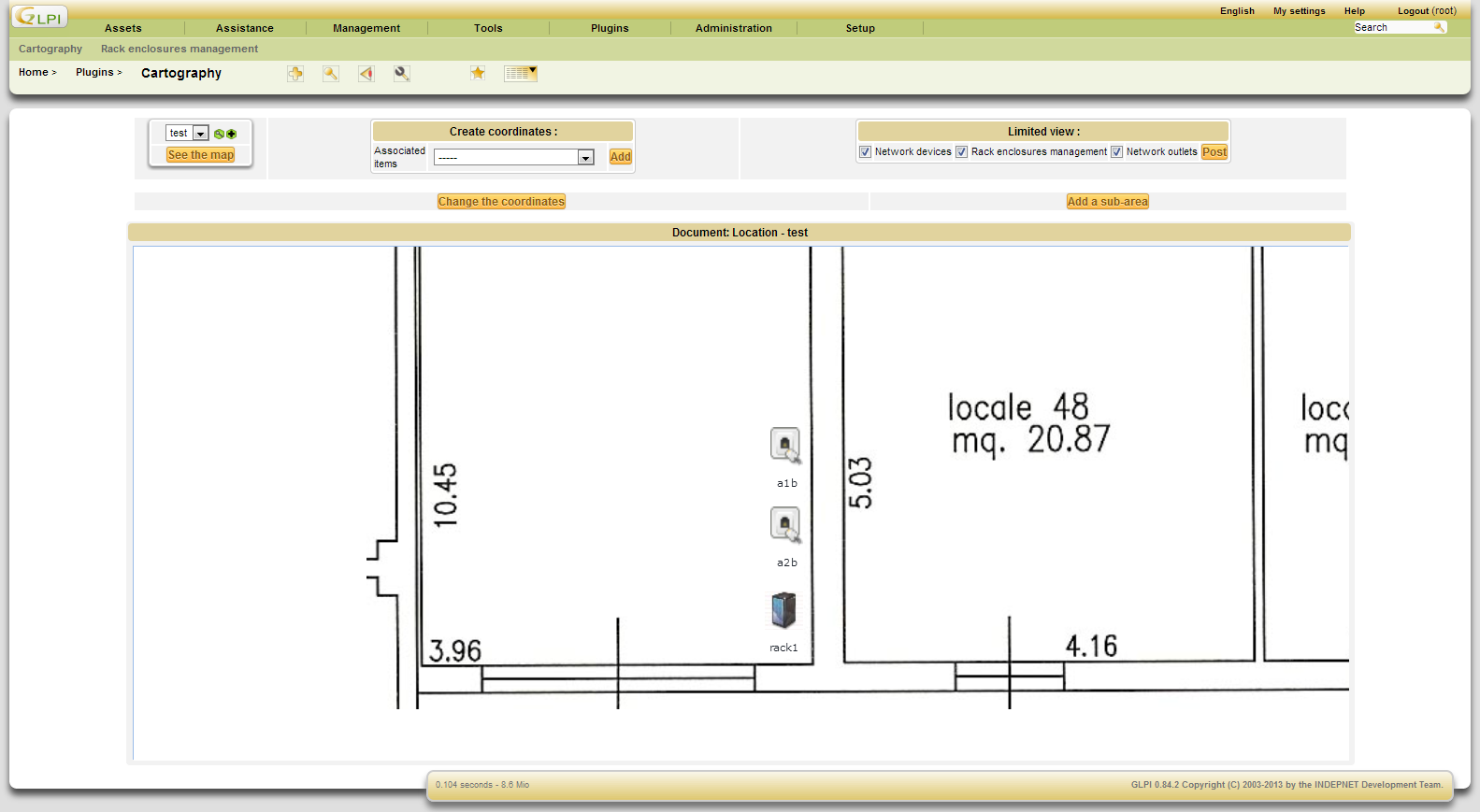
To display on a map the location and composition of the racks, I suggest to use Cartographie, that is a GLPI plugin designed to read the coordinates of the assets and locate them on a map.
Displaying the rack positions with the Cartographie plugin of GLPI
Important: PHP security update Type/Severity NetEye Product Security has rated this update as having a CRITICAL security impact. Topic Updates for the php and glpi packages are now available for NetEye 4. Security Fix for All NetEye Releases php-7.4.33-8.module+el8.10.0+25117+30337cca php-7.4.33-8.module+el8.10.0+25117+30337cca php-cli-7.4.33-8.module+el8.10.0+25117+30337cca php-common-7.4.33-8.module+el8.10.0+25117+30337cca php-fpm-7.4.33-8.module+el8.10.0+25117+30337cca php-gd-7.4.33-8.module+el8.10.0+25117+30337cca php-gmp-7.4.33-8.module+el8.10.0+25117+30337cca php-intl-7.4.33-8.module+el8.10.0+25117+30337cca php-json-7.4.33-8.module+el8.10.0+25117+30337cca php-ldap-7.4.33-8.module+el8.10.0+25117+30337cca php-mbstring-7.4.33-8.module+el8.10.0+25117+30337cca php-mysqlnd-7.4.33-8.module+el8.10.0+25117+30337cca php-opcache-7.4.33-8.module+el8.10.0+25117+30337cca php-pdo-7.4.33-8.module+el8.10.0+25117+30337cca php-pgsql-7.4.33-8.module+el8.10.0+25117+30337cca php-process-7.4.33-8.module+el8.10.0+25117+30337cca php-soap-7.4.33-8.module+el8.10.0+25117+30337cca php-xml-7.4.33-8.module+el8.10.0+25117+30337cca php-xmlrpc-7.4.33-8.module+el8.10.0+25117+30337cca Security Fix for NetEye 4.50 glpi-11.0.11_neteye1.25.7-1 glpi-11.0.11_neteye1.25.7-1 glpi-autosetup-11.0.11_neteye1.25.7-1 glpi-configurator-11.0.11_neteye1.25.7-1 glpi-neteye-config-11.0.11_neteye1.25.7-1 Security Read More
Important: GLPI security update Type/Severity NetEye Product Security has rated this update as having a medium security impact. Topic An update for the glpi packages is now available for NetEye 4. Security Fix for NetEye 4.50 glpi-11.0.11_neteye1.25.5-1 glpi-autosetup-11.0.11_neteye1.25.5-1 glpi-configurator-11.0.11_neteye1.25.5-1 glpi-neteye-config-11.0.11_neteye1.25.5-1 Summary The list Read More
Important: GLPI security update Type/Severity NetEye Product Security has rated this update as having a high security impact. Topic An update for the glpi packages is now available for NetEye 4. Security Fix for NetEye 4.50 glpi-11.0.11_neteye1.25.3-1 glpi-autosetup-11.0.11_neteye1.25.3-1 glpi-configurator-11.0.11_neteye1.25.3-1 glpi-neteye-config-11.0.11_neteye1.25.3-1 Summary This is Read More
New features, remaining gaps to the roadmap, and operating-system compatibility Starting in 2026, Teclib, the company behind GLPI, is moving from major releases every three to four years to a fixed annual release cycle, with a new major version planned Read More
When you create custom fields with the Fields plugin for GLPI, the container defines which itemtypes show the new tab. If you later need to add more itemtypes (for example Certificate or Domain), the web interface isn't enough: you have Read More