14. 08. 2026
NetEye

29. 06. 2026
Fabiana Pittalis
Atlassian
Cloud-to-Cloud Migration: The 7 Challenges No One Tells You About
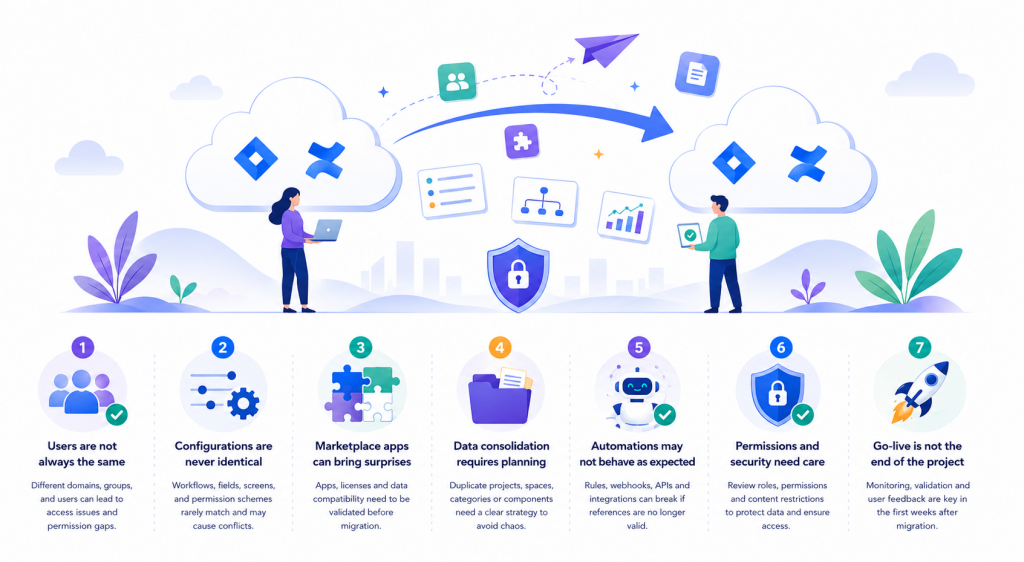
Company mergers, acquisitions, internal reorganizations, tenant consolidation, or the need to centralize collaboration tools are just some of the reasons organizations undertake a Cloud-to-Cloud migration.
When people talk about Atlassian migrations, they’re almost always referring to moving from Server or Data Center to the Cloud. In recent years, however, another scenario has become increasingly common: Migrating between two Atlassian Cloud instances.
At first glance, it may seem like a straightforward process: Both instances are already in the Cloud, so it should simply be a matter of “moving the data.” In reality, this is where the biggest challenges often arise.
Let’s take a look at the seven most common challenges, which are frequently underestimated during project planning.
1. Users Are Not Always the Same
The first challenge concerns identity management.
Even if both instances run on Atlassian Cloud, users may be managed differently:
- Different verified domains
- Separate Atlassian Organizations
- Groups with different naming conventions
- Duplicate users or users whose email addresses have changed over time
Insufficient planning can lead to lost assignments, incorrect permissions, or login issues after the migration.
Tip: Before starting, create a complete inventory of your users and carefully identify any duplicates or conflicts.
2. Configurations Are Never Identical
It’s rare for two Cloud instances to have perfectly aligned configurations.
Workflows, custom fields, permission schemes, issue types, screens, and automation rules are often created at different times and according to different standards.
When these configurations are merged, complex conflicts can emerge. For this reason, a migration is also an excellent opportunity to streamline and standardize your platform instead of simply transferring everything as-is.
3. Marketplace Apps Can Bring Unexpected Challenges
Many organizations assume that because both instances are already in the Cloud, all Marketplace apps will continue to work seamlessly.
In reality, each Atlassian site has its own set of apps, licenses, and configurations.
Before migrating, make sure to verify:
- Which apps are installed on both instances
- Whether their configurations are consistent
- Whether app-related data can be migrated
- Any additional licensing costs
Overlooking this aspect can impact critical functionality and create unexpected issues after go-live.
4. Data Consolidation Requires Careful Planning
A Cloud-to-Cloud migration is much more than copying projects or spaces.
You need a consolidation strategy that accounts for potential overlaps, such as:
- Two projects using the same project key
- Confluence spaces with identical names
- Duplicate categories
- Components with the same name but different configurations
Identifying these situations early helps avoid costly and time-consuming corrective actions later.
5. Automation Rules May Not Behave as Expected
Automation has become an essential part of business processes and deserves special attention.
During the migration, it’s important to review:
- References to specific projects
- Rule actors
- Web-hooks
- Integrations with external systems
- API connections and linked services
A rule that appears to be correctly configured may stop working simply because some references no longer exist in the target instance.
6. Permissions and Security Require Thorough Validation
Security is one of the most critical aspects of any migration.
After consolidating users and groups, verify that:
- Permission schemes are still appropriate
- Project roles provide the correct level of access
- Users retain only the permissions they actually need
- Confluence page restrictions remain intact
A thorough review reduces the risk of exposing sensitive information – or, conversely, unnecessarily restricting user access.
7. Go-Live Is Not the End of the Project
Many organizations consider the migration complete once the data has been transferred.
In reality, the work continues after go-live.
It’s considered best practice to monitor:
- User-reported issues
- Automation failures
- Broken integrations
- Platform performance
- Feedback from end users
The first few weeks after migration are critical for identifying issues quickly and ensuring a smooth transition.
A Successful Migration Starts Long Before Go-Live
Cloud-to-Cloud migrations are far more than a technical exercise. They provide an opportunity to improve platform governance, remove obsolete configurations, and establish consistent standards across your Atlassian environment.
Before starting your migration, make sure you’ve reviewed at least the following:
✅ Users, groups, and verified domains
✅ Jira and Confluence configurations
✅ Marketplace apps
✅ Workflows and automation rules
✅ Permissions and security settings
✅ Data consolidation strategy
✅ Testing and post-migration validation plan
Conclusion
Every migration is unique, but one thing remains true: The most complex challenges rarely involve simply moving data. More often, they involve configuration consistency, governance, and the ability to integrate environments that have evolved independently over time.
Addressing these challenges from the earliest stages of the project significantly reduces risk, improves the user experience, and transforms a migration into a genuine opportunity for optimization.
Ultimately, the success of a Cloud-to-Cloud migration is not measured by the amount of data transferred, but by the ability to build an Atlassian environment that is more efficient, secure, well-governed, and easier to manage in the long term.
Additional resources
Cloud Migration Center – Planning guides, best practices, and migration strategy.
Jira Cloud Migration Assistant – Assess users, apps, and migrate Jira data.
Confluence Cloud Migration Assistant – Guidance for migrating Confluence spaces, users, and permissions.
Migration Utility APIs – APIs for link fixing, ID mapping, and post-migration validation.
These Solutions are Engineered by Humans
Did you find this article interesting? Does it match your skill set? Our customers often present us with problems that need customized solutions. In fact, we’re currently hiring for roles just like this and others here at Würth IT Italy.

Fabiana Pittalis
Author

Latest posts by Fabiana Pittalis
15. 12. 2025
Atlassian
Jira Forms vs JSM Forms: The Magic of Forms
29. 09. 2025
Atlassian
Who Does What? A Useful Guide to User Roles
26. 06. 2025
Atlassian
Confused by Atlassian Teams, Groups, and Managed Teams? Here’s the Difference
31. 03. 2025
Atlassian, Service Management
Perfect Synergy: JSM and Confluence, a Winning Combination for Your Support