
Introduction
As Confluence adoption expands across organizations, automated notifications tend to multiply rapidly. What initially helps collaboration can quickly become a source of frustration: Users feel overwhelmed, important alerts get buried, and attention slowly fades. This is the classic effect of notification fatigue.
To tackle this challenge, we designed a more intentional and sustainable automation approach. Instead of flooding users with constant alerts, the system delivers focused, meaningful notifications only when action is genuinely required.
The objective is simple:
- Identify neglected or aging content
- Notify only the space owner(s)
- Orchestrate reminders through a structured escalation flow
- Dramatically reduce unnecessary communication noise
This case study highlights how Confluence automation can evolve from a background utility into a surprisingly powerful governance mechanism.
The Solution: Rule-based Automation
We built our solution around a lightweight but effective set of automation rules. These rules combine scheduled triggers, activity checks, and label-based tracking to create a clean and self-regulating workflow.
The result is a notification system that feels far less intrusive while remaining highly reliable.
1. Detecting outdated pages
The first automation focuses on identifying stale content before it quietly loses relevance.
How it works
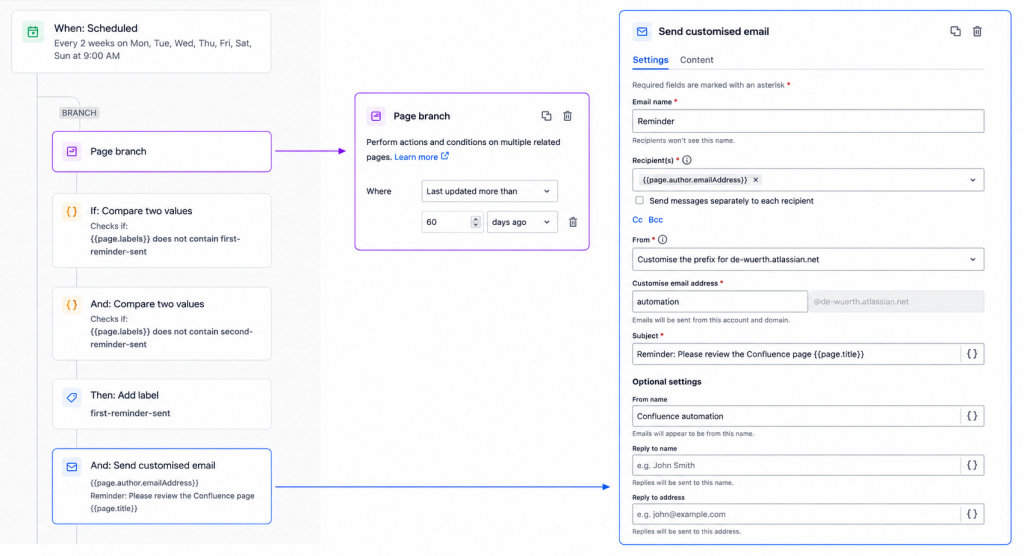
- A scheduled rule runs regularly (every 2 weeks)
- It identifies pages that have remained untouched for more than 60 days
- It finds the pages where the following labels are not present:
first-reminder-sentandsecond-reminder-sent
Once a page matches these conditions, the system automatically sends a notification to the space owner(s) and requests a review of the content.
This simple mechanism prevents valuable knowledge from slowly becoming obsolete or forgotten.
To keep the workflow organized and avoid chaotic repetitions, the automation uses labels as lightweight status markers.
When the first reminder goes out:
- The system adds the label
first-reminder-sent
This creates a transparent and traceable reminder lifecycle
The label allows the system to:
- Track pages that have already received a notification
- Prevent duplicate reminders
- Maintain a clear overview of each page’s status
It’s a small detail, but it makes the automation remarkably efficient.
2. Follow-up reminders with controlled escalation
If nobody updates the page after the first reminder, a second automation rule activates two weeks later.
This rule verifies:
- The presence of the
first-reminder-sentlabel - The lack of activity in the last 14 days (
page.dateLastUpdated)
If both conditions remain true, the system escalates the reminder flow:
- Removing
first-reminder-sent - Adding
second-reminder-sent - Sending a follow-up email to the page owner
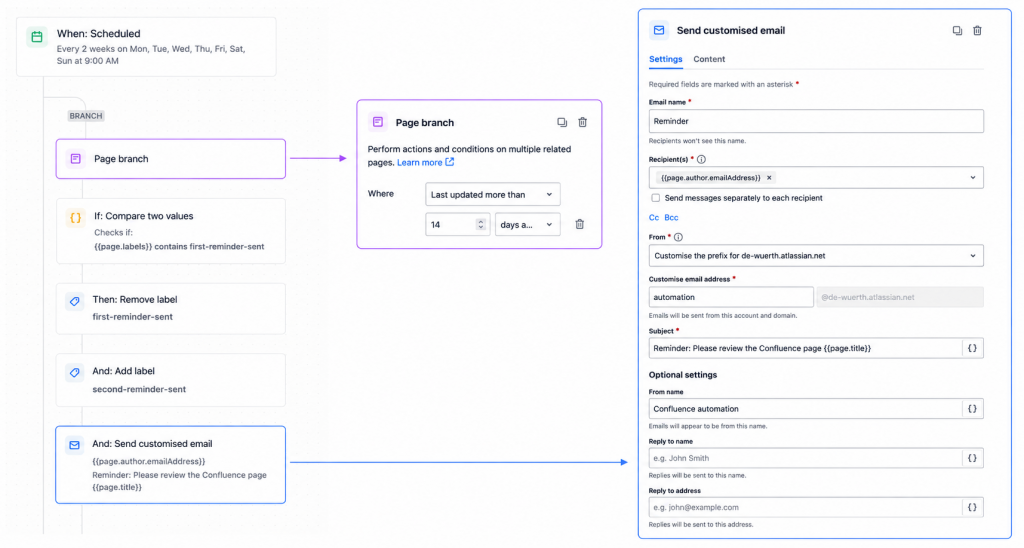
The email includes:
- A direct link to the page
- The date of the last modification
- A clear and actionable request to review or update the content
This escalation strategy keeps the process persistent without becoming aggressive or disruptive. Instead of generating endless noise, the automation nudges users at the right moment with the right context.
3. Resetting the workflow automatically
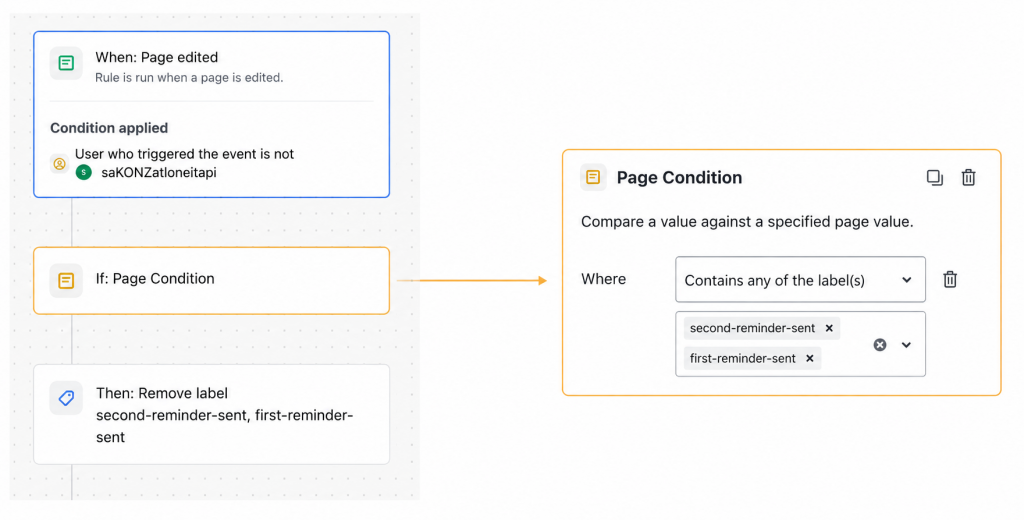
To keep the process clean and self-maintaining, we implemented a third automation dedicated to resetting the notification state.
As soon as someone updates the page, the system:
- Removes
first-reminder-sent - Removes
second-reminder-sent
This instantly resets the lifecycle and stops any further reminders.
The result is a surprisingly elegant process:
- Active pages automatically leave the reminder flow
- Labels always reflect the real state of the content
- Administrators never need to manually clean up outdated statuses
Key benefits
Less noise, more clarity
Users receive fewer notifications, but every message carries genuine value and relevance.
Stronger content governance
The automation continuously surfaces aging pages before they become unreliable or forgotten.
Clear ownership and accountability
Only the responsible space owners receive notifications, creating a far more focused and accountable process.
A scalable and resilient workflow
The same automation model can easily support additional governance scenarios, from documentation reviews to archival processes.
Final thoughts
This automation setup transforms Confluence notifications from a distracting background process into a smart and disciplined governance system. By combining scheduled checks, intelligent labels, and controlled escalation, organizations can maintain healthier documentation ecosystems without overwhelming their users.
Sometimes the most effective automation isn’t the loudest one – it’s the one users barely notice, yet quietly keeps everything under control.
These Solutions are Engineered by Humans
Did you find this article interesting? Does it match your skill set? Our customers often present us with problems that need customized solutions. In fact, we’re currently hiring for roles just like this and others here at Würth IT Italy.

Fabiana Pittalis
Author
