

In many companies, there are installed SNMP devices on segregated networks, which we cannot directly access. A typical example are backup networks on which the transmission of Jumbo Frames is enabled. Conventionally, there are positioned iSCSI devices and NAS, to reduce overheads and CPU cycles and hence, to increase transmission performance.
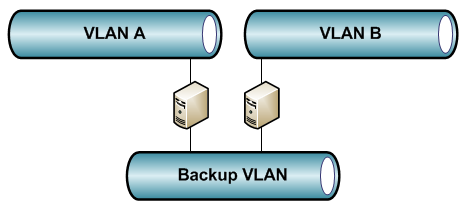
Usually, backup networks are visible just from the backup server.
How can I monitor devices in segregated networks?
How can I recognize problems on a backup NAS?
To face these challenges we can benefit from the open source project net-snmp, which is available on the SourceForge portal.
This cross-platform product allows us to extend the monitoring over SNMP with a server that acts as proxy. If we install the package on a server that is reachable from the monitoring server and that has access to the segregated network, it is possible to distribute the SNMP requests on the devices (which normally would not be reachable).
Moreover, we can further protect the communication between monitoring server and SNMP gateway by using an SSH tunnel.
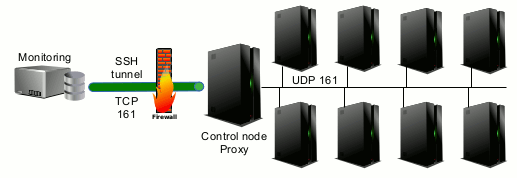
There exist several compiled versions of the net-snmp package, including one for Windows environments that is able substitute the native SNMP implementation of Windows.
Example for how to monitor two Buffalo NAS through a Windows backup server
Let’s assume we want to monitor the disk state of two NAS, which are used for backup and are hence installed on a separate network where they are visible just from the Windows backup server.
After having downloaded and installed the compiled net-snmp package on the Windows server, we will find the batch file in the installation directory. The batch file registeragent.bat registers snmp and activates it on the server.
The test file snmpd.conf will then be configured in the subdirectory etc/nmp, where the operations to be executed are described. The parameters are documented on the net-snmp website.
Now, the security parameters for the server access (community and network) and those of the proxy functionalities have to be configured.
In our example, this is made in the following way:
proxy -v 2c -c public 192.168.0.2 .1.3.6.1.4.1.5227
proxy -v 2c -c public 192.168.0.3 .1.3.6.1.4.1.5228 .1.3.6.1.4.1.5227
We see the snmp version, the community for remote access on the devices, the OID to be forwarded and the IP address to which it should be sent.
In the above described example we see that even in case of equal OIDs of several devices (.1.3.6.1.4.1.5227) it is possible to show different OIDs(.1.3.6.1.4.1.5228) to the monitoring server. This is very beneficial for accessing multiple devices without ambiguity.
When the monitoring server requests the disk state of the first NAS on the net-snmp server (OID .1.3.6.1.4.1.5227.27.1.2.1.2.1), it forwards the request to the devices in the segregated network 192.168.0.2 and sends the obtained answer back.
As soon as the request has been translated with the correct OID (OID .1.3.6.1.4.1.5227.27.1.2.1.2.1), the same monitoring request will be done for the second NAS (OID .1.3.6.1.4.1.5228.27.1.2.1.2.1) to the device in the segregated network 192.168.0.3.
Conclusion
The net-snmp package is versatile and very useful for expanding the monitoring to difficultly reachable areas in the local network.

Alessandro Romboli
Author
