01. 10. 2026
Downloads / Release Notes, NetEye, Unified Monitoring

01. 06. 2026
Davide Sbetti
Downloads / Release Notes, NetEye, Unified Monitoring
NetEye 4.48 Release Notes

Welcome to version 4.48 of our NetEye v4 Unified Monitoring Platform.
As you log in, you’ll be greeted by the Earth Pyramids of Lengmoos, viewed from above as they rise from the forests of South Tyrol. These ancient terracotta-hued rock formations, shaped over thousands of years by erosion, spread across the landscape in a striking star-like pattern, surrounded by a dense cloak of green woodland. One of South Tyrol’s most fascinating geological wonders, the Earth Pyramids of Lengmoos are a testament to the quiet, relentless power of nature.
General
NetEye Backup and Restore
Disaster recovery is only as strong as its weakest gap – and with NetEye 4.48, we’ve closed a few more of them.
Building on the groundwork laid in recent releases, this version extends native backup and restore capabilities to a new set of core services:
- Logstash
- Elastic Agent
- Icinga DB
- Icinga DB Web
- Redis
With these additions, your recovery toolkit now reaches deeper into the data pipeline and monitoring stack – from log ingestion and agent management to in-memory caching and monitoring data – all handled natively.
Cluster Installation Improvements – With AWS Support
NetEye 4.48 revises the cluster installation procedure to reduce the number of manual steps required, improve resilience, and automate the installation of additional feature modules.
New: AWS Cluster Support
NetEye 4.48 also introduces support for cluster installations on AWS, featuring dedicated configuration parameters and a guided Terraform workflow for provisioning the required infrastructure.
For full details, refer to the AWS section of the NetEye Guide.
Unified Monitoring
Icinga DB Migration
With NetEye 4.48, the migration to Icinga DB is now fully complete, and all legacy IDO/Monitoring-based components have been either replaced or removed.
Monitoring Module removed
To ensure a clean and consistent Icinga DB-based experience across the NetEye platform, the legacy Icinga Web 2 Monitoring module is now disabled in NetEye 4.48 in favor of the Icinga DB module, and is no longer enabled by default on new installations. Before upgrading, please make sure to migrate any custom Icinga Web 2 modules that still depend on the legacy Monitoring module to use the Icinga DB module, as they will no longer work correctly after the upgrade.
IDO and IDO Reports decommissioning
As part of the migration to Icinga DB, the IDO backend is no longer supported; all monitoring data sources and integrations must be migrated to Icinga DB before upgrading. For this reason, the Icinga 2 IDO feature, responsible for writing monitoring states and events into the legacy Icinga database, has been disabled in NetEye 4.48.
As a consequence, IDO Reports, which provided historical availability and SLA reports based on IDO database data, are also no longer supported and are replaced by Icinga DB Reports.
If you want to fully clean up the legacy stack, the User Guide includes a procedure to remove the old IDO database.
SLM contract filters
As a final step in the migration of SLM to Icinga DB, SLM contract filters now also use the Icinga DB syntax for object filtering. For more information, please refer to the User Guide.
Performance Graphs Improvements
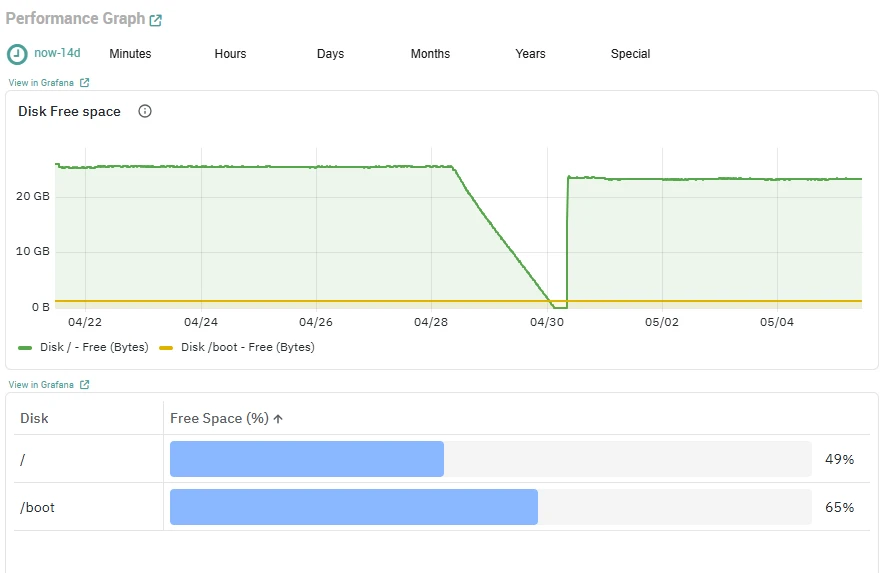
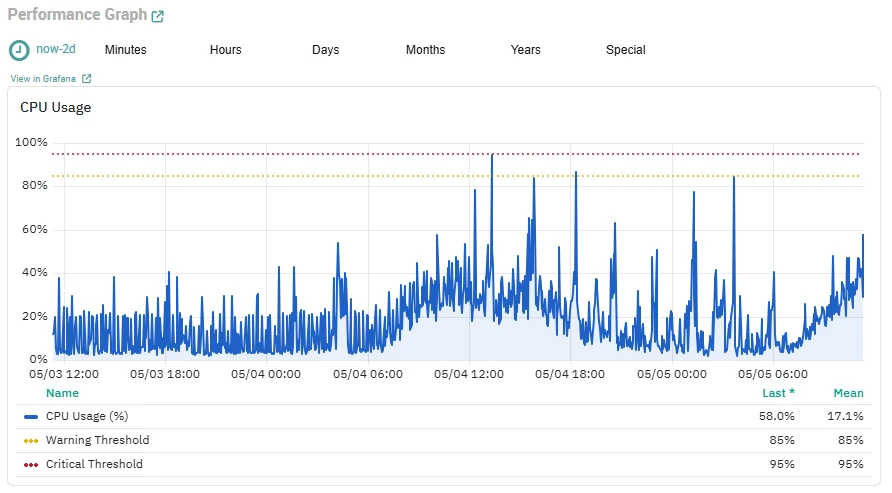
We introduced a new set of improved default Performance Graphs for the most commonly used monitoring checks. These updates are designed to provide a clearer and more consistent visualization experience, including:
- Clearly defined units of measurement
- Improved readability
- Consistent and standardized graph styling
The new default panels cover the following monitoring checks:
- Disk usage (Linux and Windows hosts)
- Load and uptime (Windows hosts)
Additional improvements will be shipped with NEP updates, adding new Performance Graphs for NEP-provided monitoring commands.
Here are some examples of the new Performance Graphs:
 |  |
Telegraf Metrics Consumers Architecture Optimization
With NetEye 4.48, Local Telegraf Consumers are now consolidated into a shared architecture per node, replacing the previous per-tenant setup. This enhancement significantly reduces resource consumption, lowers operational overhead, and improves scalability, especially in environments with many tenants.
In addition, Telegraf has been updated to version 1.38.2, ensuring access to the latest features, performance improvements, and bug fixes. For more details on the new architecture and related changes, please refer to the dedicated user guide documentation section about this improvement.
Elastic Stack
Elastic Stack updated to version 9.4
To ensure all Elastic SIEM and Observability users benefit from the latest features, performance enhancements and bug fixes, NetEye has upgraded the Elastic Stack from version 9.3 to version 9.4.
This update introduces exciting features like new skills for Elastic Agent Builder, GA of Elastic Workflows, Native Prometheus & PromQL Support and much more.
To learn more, check out the feature highlights for version 9.4 or explore to the official Release Notes.
Enterprise License as default for new installations
Starting with NetEye version 4.48, all new installations will use the Elastic Enterprise license by default, in order to fully benefit from the complete set of capabilities available in the Elastic Stack.
If your installation is currently using the Platinum license, it will remain unchanged after the upgrade. However, if you want to switch to the Enterprise license, you can do so at any time by updating your contract with NetEye Sales and activating the new license with a simple command.
Additionally, with this release, both the Platinum and Enterprise licenses have been renewed to cover the full duration of the NetEye contract.
Log Manager Module removed
The legacy Log Manager module and its database will be removed in favor of the Elastic Stack-based log management solution, which is the actively maintained and recommended approach in NetEye. With the Monitoring module being disabled as part of the Icinga DB migration, the Log Manager UI is now removed as well.
For more information on the impact of these changes, refer to the User Guide.
Alyvix
Alyvix Session Live Preview
Understanding what happens while monitoring an application is essential for effective troubleshooting and reliable results. The same is true for Alyvix Test Cases running within Alyvix Sessions: when a Test Case fails, gets stuck, or times out, it is important to quickly identify the cause.
To address this need, starting with NetEye 4.48, you can visually inspect Alyvix Sessions in real time without interrupting their execution. The new Live Preview feature in the Alyvix UI provides direct visibility into the current state of a running session, making it easier to spot where a Test Case is blocked or behaving unexpectedly.
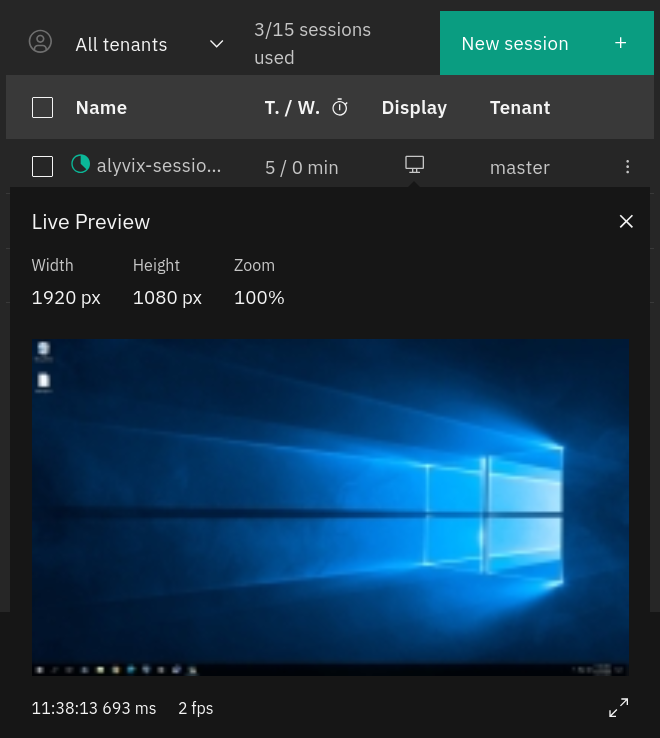
With Live Preview, troubleshooting becomes faster and more intuitive.
Asset Management
OCS Inventory Module removed
The OCS Inventory module and its database, which have been deprecated for several releases, will be removed once upgrading to NetEye 4.48. Asset management in NetEye continues to rely on the more integrated and actively maintained GLPI.
For more information on the impact of these changes, please check out our update User Guide.

Davide Sbetti
Hi! I'm Davide and I'm a Software Developer with the R&D Team in the "IT System & Service Management Solutions" group here at Würth IT Italy. IT has been a passion for me ever since I was a child, and so the direction of my studies was...never in any doubt! Lately, my interests have focused in particular on data science techniques and the training of machine learning models.
Author

Latest posts by Davide Sbetti
30. 09. 2026
Automation, Development, Kubernetes, NetEye
Fewer Builds, More Testing: The New CI Behind the NetEye Operator
30. 06. 2026
AI, Kubernetes
Load-balancing Requests to LLMs in Kubernetes: A KV-cache Approach with llm-d!