
Keeping Microsoft Foundry EU Deployments Honest with eu-azfoundry-scout
TL;DR
When designing GDPR-conscious AI workloads in Azure, the model name is not enough. The version matters, the region matters, the deprecation date matters, and the deployment type matters, too.
For EU-bound workloads, the practical question is often this: which exact model versions can I deploy in European Azure regions using Data Zone Standard (DataZoneStandard)?
I could not find a practical filter for that in Azure Foundry, so I built a small repository that asks Azure directly, filters the results, and commits the answer as a versioned Markdown artifact: eu-azfoundry-scout.
Repository: https://github.com/macel94/eu-azfoundry-scout
Why eu-azfoundry-scout Exists
If you’ve ever tried to design an Azure AI architecture with data residency constraints, you already know the problem: Model availability is a moving target. New models appear, versions change, regions gain or lose support, and deployment options evolve. Guessing model availability when building infrastructure with Bicep or Terraform is a bad habit – it might work today, but then break your pipelines next week.
The model name alone is not enough. You also need the version, the region, the deprecation date, and confirmation that the required deployment type is actually supported. For European workloads, that means verifying support for Data Zone Standard (DataZoneStandard), the Azure SKU that keeps prompts and responses within the EU data zone while offering broader routing than a strict single-region deployment.
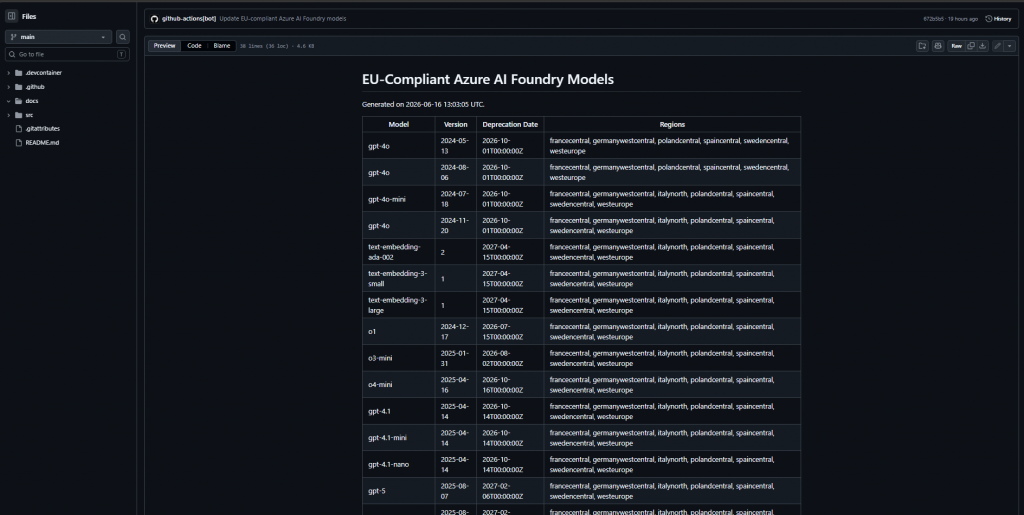
`eu-azfoundry-scout` was built to eliminate this guesswork and the many necessary manual clicks in the portal. It’s a simple DevOps utility that scans European Azure regions and generates a Markdown table of Microsoft Foundry models supporting the `DataZoneStandard` SKU. For each match it records the model name, version, deprecation date, and supported regions.
Instead of adding a dashboard or another service to maintain, the repository relies on a simple and boring, reliable pattern: a single Bash script and a GitHub Actions workflow. It asks Azure directly, filters the results, and commits the updated Markdown artifact into the README.
How It Works
The repository contains a script called src/GetModelsFromFoundry.sh.
At a high level, the workflow is straightforward:
- Query Azure for all regions where
metadata.geographyGroup == 'Europe' - For each European region, run:
az cognitiveservices model list --location "region"
- Filter the regional response to keep only entries where:
- lifecycle status is not
Deprecated - at least one SKU is named
DataZoneStandard
- lifecycle status is not
- Extract these fields:
- model name
- model version
- deprecation date
- region
- Group the result by model name and version
- Write the generated table to
docs/eu-compliant-models.md - Update the generated table block inside
README.md
The deprecation date logic is also slightly more careful than a simple field lookup. The script checks Azure metadata in this order:
- model-level inference deprecation date
- then model-level fine-tune deprecation date
- then the DataZoneStandard SKU deprecation date
- otherwise
N/A
If the first matching region has no deprecation date but a later region does, the script keeps the first non-empty value it finds.
So every run produces two useful outputs:
- A full generated artifact in
docs/eu-compliant-models.md, and - A summary table directly in the repository README
That turns a moving platform detail into a reviewable Git diff.
The GitHub Actions Part
The workflow is .github/workflows/update-eu-models.yml.
It runs:
- Weekly on Monday at
05:00 UTC, and - On demand via
workflow_dispatch
The job flow is simple:
- Check out the repository
- Log in to Azure
- Run the Bash script
- Commit
README.mdanddocs/eu-compliant-models.mdif the generated output changed
The useful security detail is that the workflow does not require a long-lived Azure client secret.
It uses azure/login with:
AZURE_CLIENT_IDAZURE_TENANT_IDAZURE_SUBSCRIPTION_ID
and the workflow grants:
id-token: writecontents: write
This allows GitHub Actions to request an OIDC token and exchange it for an Azure access token through Microsoft Entra ID, provided the Entra application or managed identity has the correct federated identity credential.
In practice, that means there is no Azure password or client secret sitting in GitHub Secrets waiting to be rotated, copied, or reused somewhere it should not be.
Why the Security Model Matters
This is the part I care about most.
In this setup, the Microsoft Entra federated credential can be scoped tightly to the repository and branch. For a branch-based trust, GitHub documents the subject pattern as:
repo:ORG-NAME/REPO-NAME:ref:refs/heads/BRANCH-NAME
For this repository, the trust can therefore be bound to:
repo:macel94/eu-azfoundry-scout:ref:refs/heads/main
That means the identity is useful only when this workflow runs from the intended branch of the intended repository. It’s not a reusable secret that can be pasted into a laptop, copied into another repository, or replayed later.
Of course, this does not magically make every pipeline secure. You still need:
- Minimal Azure role assignments
- Ccorrect workflow permissions
- Branch protection
- Repository governance, and
- Sensible review controls
But the authentication model is materially better than storing a long-lived service principal secret.
Where This Helps in Practice
The obvious use case is planning.
If a team wants to deploy a Microsoft Foundry model under EU data residency constraints, this repository gives them a current shortlist of:
- Model names
- Versions
- Candidate regions, and
- Visible deprecation timelines
The second use case is automation.
Because the result is committed to Git, downstream tooling or reviewers can track changes over time:
- A new model/version appears
- A region gains support
- A deprecation date changes
- An entry disappears
DataZoneStandardis no longer exposed
Each of those changes becomes visible as a diff.
The third use case is governance.
This doesn’t replace architecture review, policy, or deployment guardrails. But it gives those controls a fresher input. Instead of relying on memory or screenshots, teams can point to a generated artifact and then encode approved choices in IaC.
A Few Things It Doesn’t Claim
This repository does not claim that:
- Every listed model is appropriate for every workload
- Quota is automatically available
- Deployment is guaranteed for every subscription or tenant
- Legal or compliance review is no longer necessary
DataZoneStandardis the only valid architecture choice
It’s also worth being explicit about one assumption: This tool reflects what Azure returns through the CLI at runtime. That’s exactly what makes it useful, but also why it should be treated as an operational snapshot rather than a universal guarantee.
What the repository does is narrower and more useful: It asks Azure which non-deprecated model/version pairs currently expose DataZoneStandard in European regions, records the reported deprecation date, and writes the answer down.
That removes a surprising amount of guesswork and manual clicks in the portal.
Why I Like This Pattern
I like tools like this because they solve the right kind of problem.
They don’t add another service, dashboard, or abstraction layer.
They take a moving cloud fact, query it from the source of truth, turn it into a versioned artifact, and let Git show the change over time.
For platform teams and SREs, that’s often enough.
And often, that is exactly what’s needed, just a simple thing giving a clear simple answer.
Useful References
- Azure CLI reference for model listing:
https://learn.microsoft.com/en-us/cli/azure/cognitiveservices/model?view=azure-cli-latest
- Deployment types documentation:
https://github.com/MicrosoftDocs/azure-ai-docs/blob/main/articles/foundry/foundry-models/includes/concepts-deployment-types-content.md
- GitHub Actions OIDC hardening guidance:
https://docs.github.com/en/actions/how-tos/secure-your-work/security-harden-deployments/oidc-in-azure
- GitHub OIDC token reference:
https://docs.github.com/en/actions/reference/openid-connect-reference
- Azure login with OpenID Connect:
https://learn.microsoft.com/en-us/azure/developer/github/connect-from-azure-openid-connect
- Microsoft Entra workload identity federation trust setup:
https://learn.microsoft.com/en-us/entra/workload-id/workload-identity-federation-create-trust
These Solutions are Engineered by Humans
Did you find this article interesting? Are you an “under the hood” kind of person? We’re really big on automation and we’re always looking for people in a similar vein to fill roles like this one as well as other roles here at Würth IT Italy.

Francesco Belacca
Author
