29. 09. 2026
AI, NetEye, Unified Monitoring

In this blog post, we’ll explore the power of custom branding in NetEye reports.
The reporting module offers the ability to filter specific hosts and services while also enabling the configuration of custom thresholds to visually emphasize unmet SLAs. Users have the flexibility to generate reports manually or automatically, such as on a weekly or monthly basis. These reports are subsequently delivered as PDF attachments via email.
To enhance your reports, you can easily customize their appearance using custom templates. This feature is particularly valuable when sharing reports with your customers. This means that you can incorporate your organization logos, color schemes, and other brand elements into the report layout.
Instructions for Leveraging Reporting Templates
When it comes to using these reporting templates, there are several essential steps worth highlighting:
- Accessing Reports Templates: Start by accessing the available report templates from Reporting – Reports – Templates
- Customizing Report Template Parameters: Create and customize one or more templates customizing Cover Page, Header and Footer settings
- Generating Reports: Once configured, you can select an existing template to generate comprehensive reports based on your selected parameters
Template example

Details of a Template
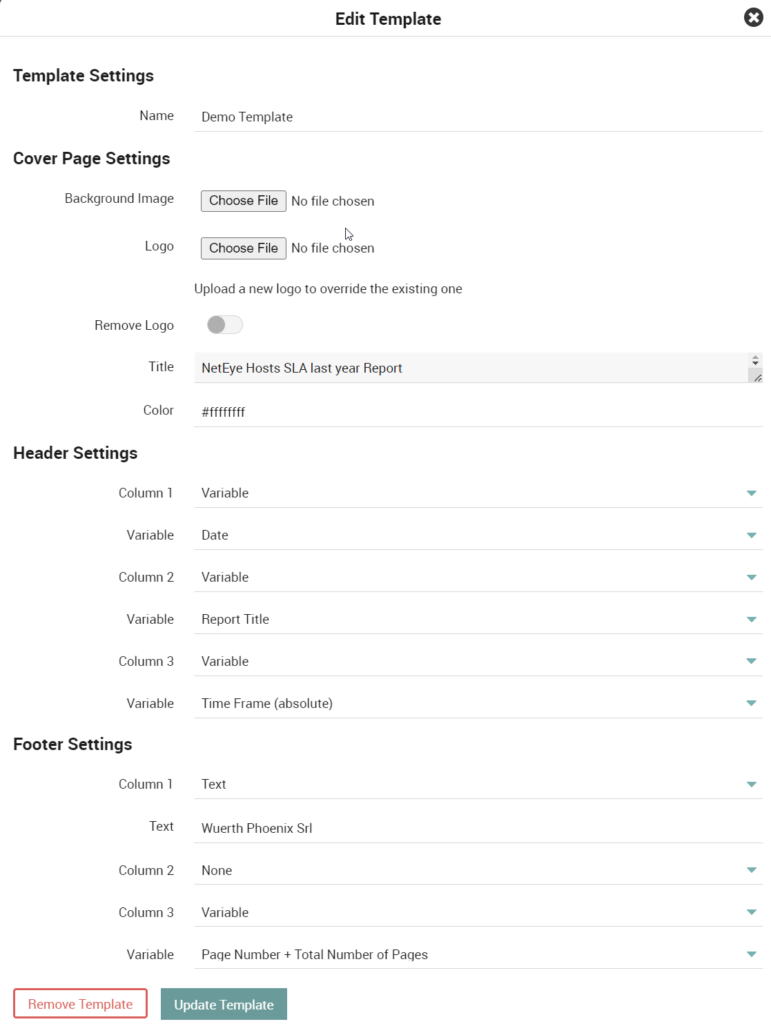
Cover Page Settings
The cover page serves as the initial introduction to your report. You have the flexibility to precisely tailor its appearance by adjusting various settings:
- Background Image: This image will serve as the backdrop, ranging from a solid color to an intricate background image
- Logo: A central visual element for the cover page
- Title: Customize a unique title for the report, positioned just below the logo
- Color: Select a specific color scheme for the title
Header and Footer Settings
The header and footer are divided into three columns (left, center, right), each of which can be customized with specific properties to personalize your report:
- Text: Enter any desired text freely
- Image: Incorporate an image, such as a scaled-down version of your logo
- Variable: Utilize built-in variables that render dynamically based on the current state:
- Report Title: The specified title used in the “Cover Page Settings”
- Time Frame: The time frame configured in the report (e.g., Last Month, Last Year, …)
- Time Frame (absolute): The resolved exact time frame of the report
- Page Number: Current page number
- Total Number of Pages: Total pages based on the size of the report
- Date: Date when the report was generated
These elements contribute towards creating a polished and informative presentation of your data and insights within the report.
How to use templates
After creating the templates, it’s possible to assign them to one or more existing reports.
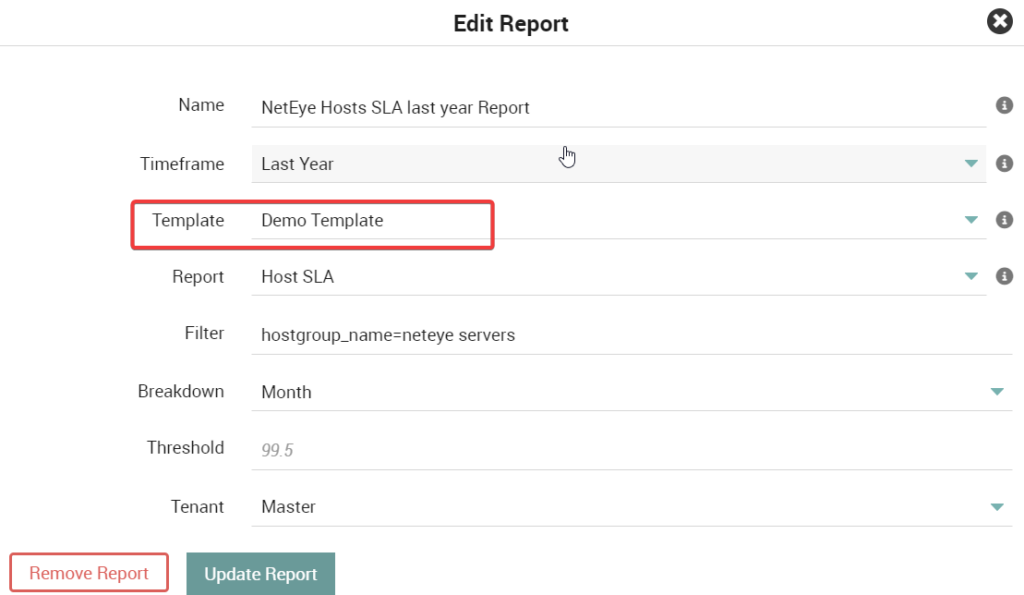
Finally, it’s possible to generate or schedule the delivery of a report that will include the selected template.
Here’s an example of a generated report:
These Solutions are Engineered by Humans
Did you find this article interesting? Does it match your skill set? Our customers often present us with problems that need customized solutions. In fact, we’re currently hiring for roles just like this and others here at Würth Phoenix.

Giuseppe Di Garbo
Consultant at Würth IT Italy
Hi everybody. I’m Giuseppe and I was born in Milan in 1979. Since the early years of university, I was attracted by the Open Source world and operating system GNU\Linux. After graduation I had the opportunity to participate in a project of a startup for the realization of an Internet Service Provider. Before joining Würth Phoenix (now Würth IT Italy) as SI consultant, I gained great experience as an IT consultant on projects related to business continuity and implementation of open source software compliant to ITIL processes of incident, change and service catalog management. My free time is completely dedicated to my wife and, as soon as possible, run away from Milan and his caotic time and trekking discover our beautiful mountain near Lecco for relax and lookup the (clean) sky.
Author

Latest posts by Giuseppe Di Garbo
30. 09. 2026
Atlassian
Workforce Management in Jira Service Management: From Ticket Assignment to Capacity Management
23. 06. 2026
Atlassian
Customer Feedback in Jira Service Management: CSAT and Native Surveys Explained
19. 12. 2025
Atlassian, Service Management
Jira Service Management Customer Detail Fields: A Practical Use Case
29. 09. 2025
Atlassian, Service Management
Streamlining Service Request Management with ITIL4 and Jira Service Management