
30. 09. 2026
Atlassian

30. 09. 2026
Fabrizio Dovesi
Atlassian, Service Management
Jira Formula Fields: A Long-Awaited Native Calculation Tool
A quick overview of the new native numerical calculation feature available in Jira systems. It's something we've been waiting for a long time.

Introduction
The ability to perform calculations within an integrated management system is one of our most requested features. This need is most pressing in large organizations, where such data increasingly forms the basis for decisions, whether operational or strategic.
Since I started working on Jira some 10 years ago now, I’ve always noticed the absence of a genuine calculation tool within the system. To be more precise, until just a few months ago, this need within Jira had always been addressed through other, non-native solutions: custom app development, add-ons available on the marketplace, or the creation of fairly complex automations relying on smart-value functions.
All of this simply to perform even the simplest calculations, such as converting man-days into hours for estimates and governance purposes, or summing the values of two numeric fields.
A few months ago, Atlassian finally rolled out “formula” fields as a stable feature to meet exactly this kind of need. While it’s still a newly introduced tool in Jira and consequently still has considerable room for improvement going forward, for us “veterans” of the Atlassian world it already opens up, right from the start, an endless series of ideas and possibilities that we couldn’t even have imagined… until today!
In this post, we’ll provide a general introduction to this feature, covering its key characteristics and notable limitations, as well as all the recommended tools available to help you get started with your first configurations and usage in your own systems.
What’s a Formula Field, and What Does It Do?
Assuming readers already have at least a basic level of Jira knowledge, we’re talking about a simple custom field that can be displayed directly within the work item itself, just like other fields such as Assignee, Due date, Priority, and so on. It can also be the subject of JQL searches, making it possible to filter work items by numeric values or scores, and it can likewise be used as a column in views such as List or Queue, or simply within filters. In other words, it’s a simple, straightforward type of custom field, and you can create and configure as many of them as you like, tailored to your own needs.
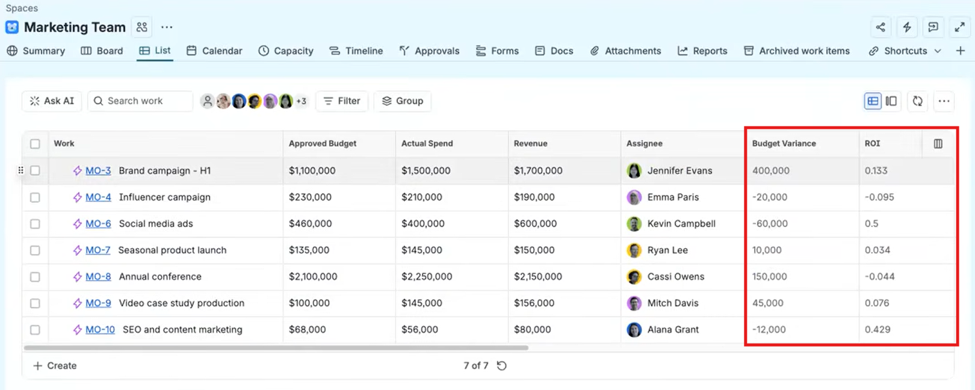
This feature works in real time. That means that the results within the formula field are recalculated instantly whenever the other fields (set as variables within the formula itself) change.
In the next few paragraphs, we’ll briefly outline the strengths and the limitations found in this first version of formula fields in Jira Cloud.
How to Create, Edit, and Configure Formula Fields
To start, it’s possible to create formula fields both on team-managed projects (with Space administration permissions) and on company-managed projects (with Jira administration permissions). For a detailed guide on how to proceed with creation and editing on both project types, you can refer to this page.
As for configuration, there’s a wide range of functions available that can be applied to formulas to perform even complex calculations involving multiple values and variables. The full list of functions currently available can be found on this page.
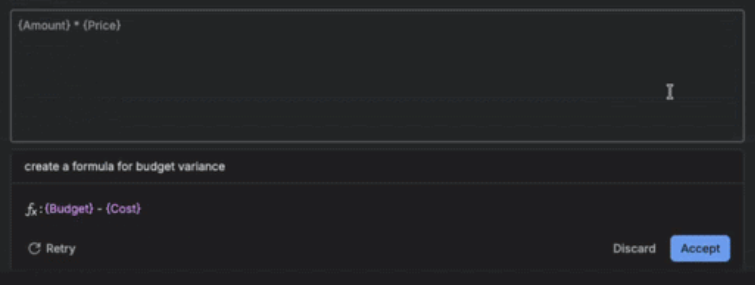
Coming back to one of the “key features and capabilities” mentioned earlier, I’d like to stress how useful it can be during configuration, especially if you’re just getting started with this kind of task, to ask Rovo for support in building your formula.
Key Features & Capabilities
Output Types. Formula fields can return a Number, Text, Date, or Duration, which lets one field type cover very different reporting needs. For example, a Number output could calculate a RICE score (Reach Impact Confidence Effort), a Text output could label an item as “At Risk” or “On Track” based on a condition, a Date output could project a deadline by adding a duration to the start date, and a Duration output could show “days until due date.” You choose the format at creation time (e.g., displaying a duration as days/hours, or a number as currency).
Real-Time Updates. Formula fields are live calculations rather than static snapshots! The value automatically recalculates the moment any referenced source field on that same work item changes. For instance, if a formula computes “Budget Remaining” from a Budget field minus a Spent field, updating Spent instantly refreshes Budget Remaining with no manual recalculation, export, or script needed. This eliminates the “what’s the latest number?” problem teams previously solved with spreadsheets or babysat automation rules.
JQL Support. Formula results are fully indexed and searchable in JQL (e.g. Variance > 100), meaning they behave like native fields for filtering, sorting, and dashboarding. This lets a calculated “at risk” flag automatically populate a saved filter, feed a dashboard gadget, or trigger an automation rule, turning a derived value into an actionable, queryable data point across the whole platform.
Space Coverage. Formula fields work in both team-managed and company-managed spaces, and are enabled by default across all Jira Cloud editions (Free, Standard, Premium, Enterprise). This ensures consistent calculation logic regardless of which project template or governance model a team uses, so organizations don’t get fragmented behavior between project types.
AI Assistance. Last but not least, Atlassian Rovo can generate a formula from a plain-language prompt (e.g., “show me budget remaining” or “days until the due date”) and produce a working formula, removing the need to memorize dozens of function signatures. Rovo can also run a “Fix formula” pass to correct syntax errors when a formula doesn’t validate, which matters because formula syntax barely overlaps with everyday JQL knowledge, so most users build these too infrequently to memorize the function library.
Important Limitations
Single Work Item Scope. A formula can only reference fields that live on the same work item. It can’t reach into child or parent issues. This means you can’t natively sum subtask story points onto an Epic, roll-up child-issue counts, or aggregate values across a hierarchy. That still requires third party apps or custom automation rules that write a value back onto the parent. Practically, formula fields are best suited for single-item logic (risk scores, status labels, date math) rather than hierarchical reporting.
Propagation Time. When you edit a formula field’s configuration (the formula itself, not just source data), Jira needs to re-index and recalculate results across all affected work items before the new logic is reflected everywhere it’s used: in the issue view, JQL search results, and dashboards. Depending on the size of the site (number of work items/spaces using that field), this recalculation can take anywhere from a few minutes to longer; so admins should expect a delay rather than an instant refresh after saving changes, and should avoid assuming search results are current immediately after an edit.
Conclusion
Personally, I’ve been waiting a long time for this feature in Jira, and that makes me, on one hand, very happy to finally have it. On the other hand, it also makes me realize that this feature still has a few aspects to complete before it can deliver smooth, precise management that can life up to its real potential.
As mentioned, in the coming months we’ll likely be able to explore in depth how to extract value from what has been made available so far. This first version alone will certainly prompt a review of many existing solutions, since, for example, it opens up the possibility to significantly lighten the load of automations or customizations that were originally built to fill this gap. So, all that’s left to do is dive in and start experimenting with this new feature.
These Solutions are Engineered by Humans
Do solutions like this interest you? A big part of our job is integrating customized Knowledge Management solutions for our clients, and we’re always looking out for people who can help with that. Check out our open positions.
Author

Latest posts by Fabrizio Dovesi
01. 07. 2026
AI, Atlassian, Service Management
A Hybrid IT Operating Model: PMBOK® Guide (Eighth Edition), ITIL® , and Agile Working Together
31. 03. 2026
AI, Atlassian, Service Management
When Agile at Scale Meets Atlassian: Choosing the Right Scaling Model for Global IT Organizations
30. 12. 2025
AI, Atlassian, Service Management
Atlassian Rovo Today: Architecture, Technologies, and Enterprise Trust
01. 10. 2025
Atlassian, Service Management
Project Managers Are rAIsing the Bar: Redefining the Rules of the AI Game
30. 06. 2025
Atlassian, Service Management
Where ITIL® 4 Meets Atlassian: Elevating IT Service Management