
27. 02. 2026
Reinhold Trocker
Log Management, Log-SIEM
Elastic Integration: Which New Features Can Be Activated?
From a Technical Consultant’s Perspective
“How can I tell if a new Elastic Integration feature or PR is already included in my NetEye version?”
Elastic adds new features quite often. However, these features do not always appear in NetEye right away. That’s because each integration requires a specific Kibana version. If NetEye doesn’t yet ship with that particular Kibana version, the integration cannot be upgraded. As a result, some features become available only later on.
Below is a simple, clear example of how to check feature availability in a given install.
Example: Checking Whether a PR Is Active
Assume you want to verify whether the following PR is included in your Microsoft Defender integration:
👉 PR #15226 – Extract process.name from process.command_line
https://github.com/elastic/integrations/pull/15226
This PR improves process information for Microsoft Defender logs, so many users would like to have it.
Step 1: Check the Installed Integration Version
Start by opening Kibana and navigating to:
Integrations → Microsoft Defender XDR → Settings
You will see something like:
- Installed version: 3.14.2
- Latest available version: 3.14.2
At first glance, everything appears up‑to‑date. However, even though this is the latest version available inside NetEye, the PR is still missing. To understand why, we need to dig a little deeper.
But… the PR is not available in this version. Why?
Step 2: Check the Elastic Integration Changelog
Every Elastic integration has a public changelog. For Microsoft Defender:
https://www.elastic.co/docs/reference/integrations/m365_defender/#changelog
Here you can see when major and minor versions introduce which new features.
The process‑extraction PR (#15226) is not included in the 3.x versions. Instead, it lands in:
- 4.0.0 – initial compatibility changes
- 4.0.1 – where the PR is finally implemented
So the feature you want only exists from version 4.0.1 onward.
Step 3: Check the Integration’s Kibana Compatibility
Elastic integrations define their required Kibana version in a manifest.yml file.
The PR introducing version 4.0.0 shows a crucial change:
https://github.com/elastic/integrations/pull/14809#pullrequestreview-3088854059
The Kibana version requirement changes from:
kibana:
  version: "^8.18.0 || ^9.0.0"
to:
kibana:
  version: "^8.19.0 || ^9.1.0"
Looking at the GitHub diff file between 2 specific versions, you can see something like this:
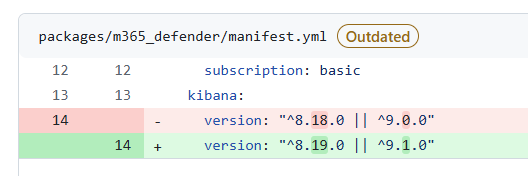
➡️ Integration 4.0.0 and newer require:
- Kibana ≥ 9.1.0 for major version 9
or - Kibana ≥ 8.19.0 for major version 8
This means that integration versions 4.0.0 and higher no longer support Kibana 8.18.x or 9.0.x. Therefore, the integration cannot be installed unless NetEye is upgraded to a compatible Kibana version.
Step 4: Compare with NetEye’s Kibana Version
| NetEye Version | Kibana Version | Compatible with Defender integration 4.x? |
|---|---|---|
| 4.43 | 8.18.6 | ❌ No — requires ≥ 8.19.0 |
| 4.44 | 9.0.8 | ❌ No — requires ≥ 9.1.0 |
| 4.45 | 9.2.1 | ✅ Yes |
Summary
To determine whether a new Elastic integration feature is active on your NetEye system:
1. Check the installed integration version in Kibana.
If it’s already the “latest available” but is missing the feature, continue below.
2. Look up the feature in the integration’s GitHub PR or changelog.
Find out which integration version includes the feature.
3. Open the integration’s manifest.yml and check its Kibana version requirements.
This tells you whether the version can be installed.
4. Compare compatibility with the Kibana version shipped by your NetEye release.
If your Kibana version is too low, the feature will not be available yet.
This simple workflow helps you understand why certain upstream features are not yet visible in NetEye, and when they may become available in future releases.
Fortunately, a new version of NetEye is released every two months!
These Solutions are Engineered by Humans
Did you find this article interesting? Does it match your skill set? Our customers often present us with problems that need customized solutions. In fact, we’re currently hiring for roles just like this and others here at Würth IT Italy.

Reinhold Trocker
IT professional, IT security, (ISC)2 CISSP, technical consultant
Author

Latest posts by Reinhold Trocker
15. 12. 2025
Log Management, Log-SIEM
Strange Query Results in Kibana: Understanding the Behavior of event.original and Similar Fields
20. 06. 2025
Unified Monitoring
Elastic Integration with Huge Memory Usage? Keep That Host Accessible!
29. 01. 2025
Log Management, Log-SIEM
Understanding Headers in Elastic Agents: Normal Mode vs. Fleet Server Mode