30. 09. 2026
Atlassian, Service Management

30. 09. 2026
Giuseppe Di Garbo
Atlassian
Workforce Management in Jira Service Management: From Ticket Assignment to Capacity Management
Introduction
Managing a service desk is usually straightforward when the team is small. A request comes in, someone picks it up, and the work gets done. Things become more complicated when the service desk grows. Different teams start supporting different services, people work in shifts, some requests require specific skills, and workload is no longer evenly distributed.
At that point, assigning a ticket is no longer just a matter of finding the right queue.
Who is actually available right now?
Who has the required skills?
Who is already overloaded?
Who is scheduled to work?
This is where Workforce Management (WFM) in Jira Service Management becomes interesting.
Atlassian has introduced Workforce Management to bring scheduling, availability, capacity and routing directly into JSM. Instead of managing this information through spreadsheets, manual processes or increasingly complex Automation rules, WFM can use it as part of the assignment decision.
For a small service desk where everybody does a bit of everything, this may be more complexity than necessary.
For a service operation with different teams, specialised skills and shifts, the problem is quite different.
The problem is not assigning the ticket. It is assigning it to the right person.
Let’s take a simple example. A VPN request arrives. Normally, I could route it to the Network team and let someone pick it up. That’s perfectly reasonable.
But imagine that the Network team has five agents:
- one is not working today;
- one is currently unavailable;
- one does not have the required skill;
- one already has a high workload;
- one is available and has the right skills.
The question is no longer:
Which team should receive the ticket?
We already know the answer. The question becomes:
Which person in that team should receive it now?
This is the problem Workforce Management tries to solve.
The service identifies the team responsible for the work. Workforce Management can then consider team membership, skills, schedule, availability and capacity before deciding who is eligible.
When automatic routing is enabled, the eligible agent with the lowest capacity utilisation can be selected automatically.
That is quite different from a simple round-robin assignment or an Automation rule based on a few fields.
How Workforce Management works
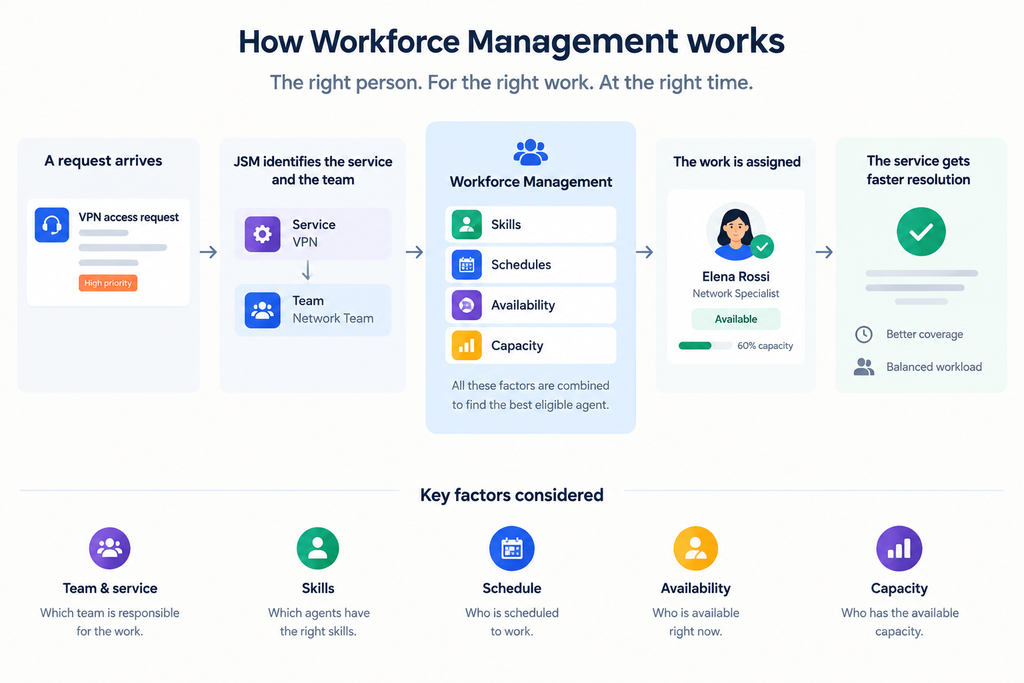
The interesting thing about WFM is that it connects information that normally lives in different places.
Services are connected to the teams responsible for them. Skills can be associated with services and agents. Schedules describe when people are expected to work, while availability provides a more immediate indication of whether they can currently receive work.
Capacity adds another dimension.
JSM can show the number of active work items assigned to each agent compared with their configured capacity. This gives the service manager a better view of where the workload is concentrated and where there is still room to take more work.
And capacity is not only a dashboard. It can influence routing. If several agents are eligible for a request because they belong to the right team, are scheduled, available and have the required skills, Workforce Management can select the eligible agent with the lowest capacity utilisation.
So the routing decision becomes something like:
These three people can do the job. Which one currently has the most capacity?
That is much more useful than simply asking who has the next turn.
There is an important limitation, though.
Capacity is based on assigned work items. It does not understand the real effort behind every ticket. Five simple password-reset requests and five complex database incidents are both five work items. So I would treat capacity as a useful operational indicator, rather than a perfect measurement of workload.
Skills, schedules and availability make the difference
Team membership alone is often not enough. In a real service desk, not everyone in the Network team necessarily handles every type of network request. One person may specialise in firewalls, another in VPN, another in Wi-Fi.
Skills allow JSM to reduce the eligible pool to people who can actually handle the work.
Schedules solve a different problem: A person may have the right skills but simply not be working at that time. This becomes particularly useful in environments with rotating shifts, extended support hours or 24/7 coverage.
Availability adds another level by indicating whether the agent can currently receive work.
Together, these elements make the routing model much closer to how a technical team actually operates.
Manual recommendations or automatic assignment?
Workforce Management does not require everything to be automated.
JSM can recommend suitable agents while leaving the final assignment to the dispatcher or team leader. Automatic assignment can then be enabled when the routing model is mature enough. For a new feature like this, this distinction is particularly interesting.
There is still relatively little real-world experience with Workforce Management compared with more established JSM capabilities. I would therefore see the first implementations more as a learning process than as something where there is already a proven recipe for every scenario.
The important thing is to understand how the service, team, skill, schedule and capacity model behaves with real work.
Forecasting: from today’s workload to tomorrow’s staffing
Workforce Management is not limited to deciding who gets the next ticket. On Premium and Enterprise plans, Atlassian also provides forecasting based on historical work-item data.
The forecast uses previous workload to estimate future request volumes, required agents and potential staffing gaps. It covers the following 30 days and is recalculated daily. This is potentially useful for service managers because it moves the discussion from:
We have too many tickets today.
to:
Based on the current trend, are we going to have enough people next week?
The obvious limitation is that a new WFM implementation does not have years of historical data behind it. The quality of the forecast will depend on the quality and amount of historical JSM data available.
Advantages and limitations
The main advantage is that assignment becomes much more contextual. JSM can consider who should handle the work, whether that person is scheduled, whether they are available, whether they have the required skills and how much work they are already carrying. This can reduce the amount of custom routing logic implemented through queues, Automation rules and manual processes.
It also gives service managers a better view of the team itself, rather than looking only at the backlog.
There are, however, some clear limitations.
Workforce Management is not a complete enterprise workforce-management platform. Organisations with complex HR planning, leave management, labour rules or sophisticated workforce scheduling may still need dedicated tools.
The capacity model is also relatively simple because it is primarily based on the number of assigned work items rather than their actual effort or complexity.
And because teams, services, skills and schedules directly influence routing, their configuration becomes operationally important.
When does Workforce Management make sense?
I don’t see Workforce Management as something that every JSM project needs.
If I have a small team of four agents, everyone works the same hours, handles the same requests and workload is reasonably balanced, adding schedules, skills and capacity may create more administration than value.
The situation changes when the service operation has:
- different teams supporting different services;
- specialised agents;
- rotating shifts;
- uneven workload distribution;
- high ticket volumes;
- extended or 24/7 support;
- a need to balance work automatically;
- a need to understand future staffing requirements.
The key point is not simply the size of the JSM project. It is the complexity of the workforce behind it.
The real change is in the assignment model
The most interesting part of Workforce Management is not the scheduling screen or the capacity dashboard.
It is the change in the assignment model.
Traditionally, I would look at a request, identify the team and assign the ticket. With Workforce Management, the decision can also consider the service, required skills, working schedule, current availability and workload.
That is a meaningful evolution when “who should get this ticket?” becomes a problem in its own right.
At the same time, WFM is still a very recent JSM capability. There is not yet the depth of practical experience that exists around more established JSM features, so some of its real-world value and limitations will become clearer as organisations start using it at scale.
For service desks where workforce constraints are becoming as important as ticket classification, this is the part I find most interesting: the workforce is no longer something managed around Jira Service Management. It becomes part of the service management model itself.
References
- What is Workforce Management in Jira Service Management?
- Workforce Management in JSM is Now Generally Available!

Giuseppe Di Garbo
Consultant at Würth IT Italy
Hi everybody. I’m Giuseppe and I was born in Milan in 1979. Since the early years of university, I was attracted by the Open Source world and operating system GNU\Linux. After graduation I had the opportunity to participate in a project of a startup for the realization of an Internet Service Provider. Before joining Würth Phoenix (now Würth IT Italy) as SI consultant, I gained great experience as an IT consultant on projects related to business continuity and implementation of open source software compliant to ITIL processes of incident, change and service catalog management. My free time is completely dedicated to my wife and, as soon as possible, run away from Milan and his caotic time and trekking discover our beautiful mountain near Lecco for relax and lookup the (clean) sky.
Author

Latest posts by Giuseppe Di Garbo
23. 06. 2026
Atlassian
Customer Feedback in Jira Service Management: CSAT and Native Surveys Explained
19. 12. 2025
Atlassian, Service Management
Jira Service Management Customer Detail Fields: A Practical Use Case
29. 09. 2025
Atlassian, Service Management
Streamlining Service Request Management with ITIL4 and Jira Service Management
30. 06. 2025
Atlassian, Service Management
Creating Jira Service Management Requests from a Public Website? Here’s the Secure, No-API Way