30. 06. 2026
Azure, Cloud, Microsoft, NetEye, NetEye Extension Packs, Unified Monitoring

Aggiungere singolarmente nuovi host in Monarch con le rispettive informazioni come l’indirizzo, il sistema operativo o il profilo, richiede meno di un minuto ma nel momento in cui si devono svolgere tutte le configurazioni per diverse centinaia di host questa operazione potrà ovviamente richiederne oltre 100.
Per snellire il processo di configurazione esiste l’import di questi dati da file, in modo tale che si possano gestire ed inserire le informazioni su file di testo e caricarle più velocemente sul sistema invece di doverle aggiungere singolarmente a mano e associarle in seguito ai vari profili o gruppi di profili. I dati nel file per l’import possono, ad esmepio, essere reperiti attraverso l’export da database della propria infrastruttura.
Come caricare nuovi host in Monarch
Dopo aver inserito i dati in un file di testo, si può selezionare l’import direttamente da “Nagios Configuration Architect Monarch”.
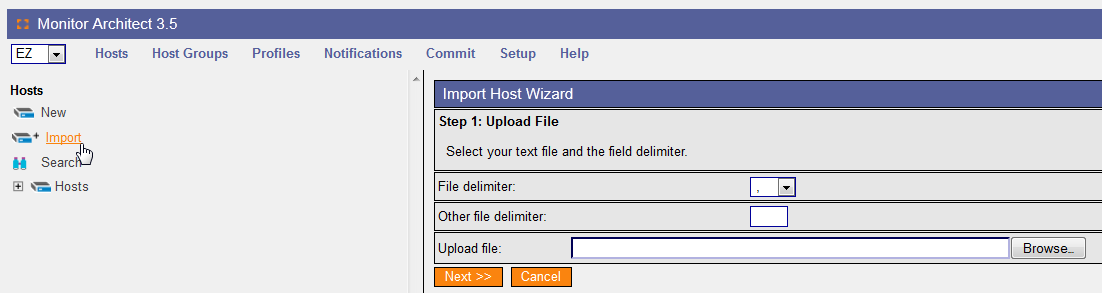
A questo punto, viene richiesto di selezionare il separatore utilizzato e il file da caricare, dopodiché apparirà una schermata dove è possibile fare un mapping che consente di associare ad ogni colonna l’esatto dato di NetEye.
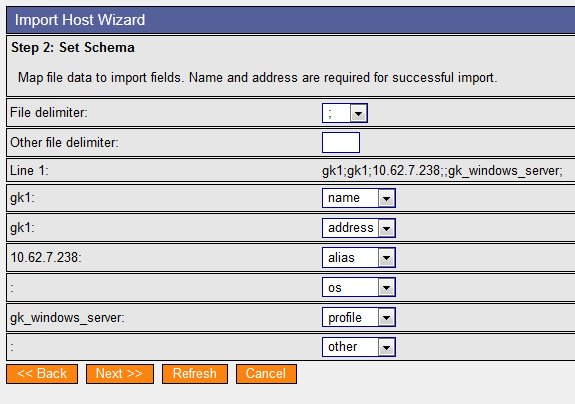
Infine, dopo aver associato i valori ai campi corrispondenti, apparirà una panoramica dell’import e si potranno così selezionare i vari host da associare ai vari profili o gruppi di profili.
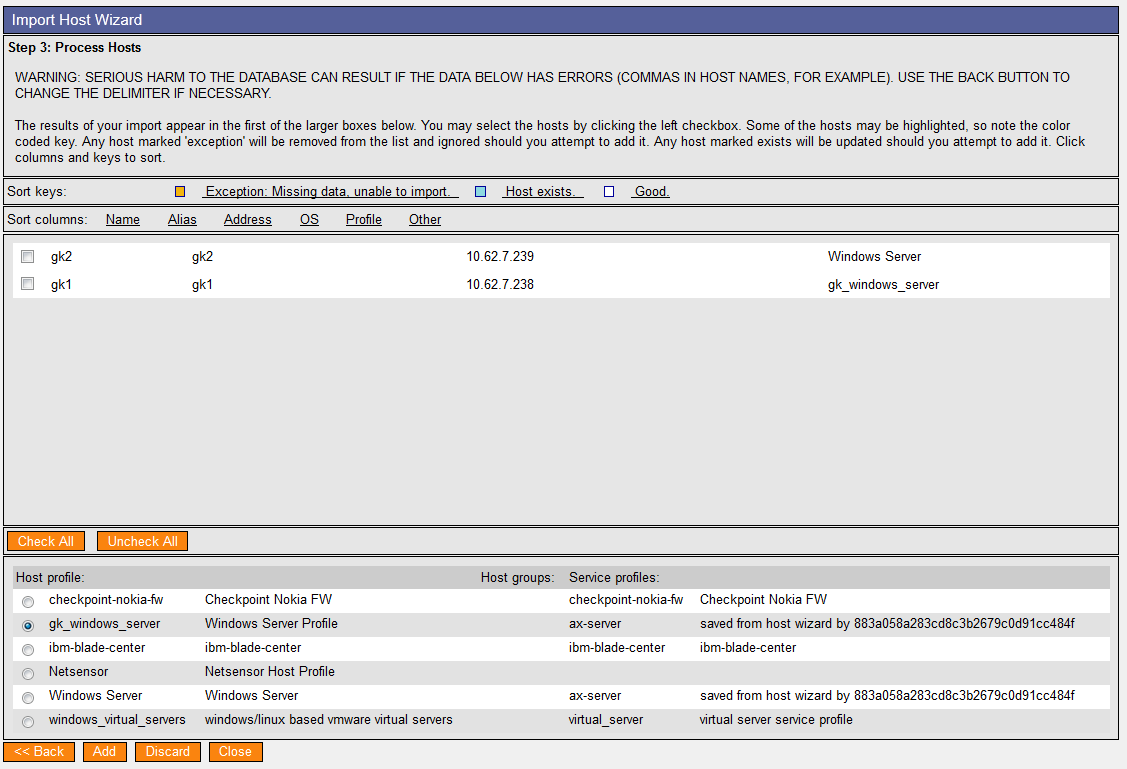
Aggiungendo queste informazioni i dati verranno caricati, riducendo così il tempo di configurazione. Basteranno, infatti, tre semplici click per concludere l’intero processo di configurazione evitando di doverli inserire manualmente.

Georg Kostner
Business Unit Manager at Würth IT Italy
I’m Georg, born in Bolzano in 1971. The IT has always been my true passion: my first computer was a Spectrum, maybe someone still remembers it… the first application I developed on it was the naval combat. Later on I started the implementation of ERP software using C, C++, Java, Informix, Oracle, Unix, Window. Recently I approached the Open Source technologies like Nagios, Cacti, MRTG, NagVis, OCS Inventory, GLPI, ntop with the vision to improve the working activities of the system administrators. In my free time I love hiking in the mountains, skiing, playing football as well as I like comparing different OS like Linux, Windows or Mac trying to find the potentialities and weaknesses.
Author

Latest posts by Georg Kostner
08. 05. 2018
Predictive Analysis
The Future of NetEye
05. 02. 2015
Uncategorized
Nuova Versione EriZone 3.1.7
05. 02. 2015
Uncategorized
EriZone: Neue Version 3.1.7 ab sofort verfügbar