An IT organization today needs to have all the hardware, software and licenses information in order to negotiate with suppliers through a target strategy or to perform timely updates. A complete inventory system is therefore a must.
As you may already know, NetEye provides the Inventory and Asset Management modules through the integration of GLPI and OCS Inventory. With the system you can create and maintain a database for all your technical resources such as computers, software or devices in your company. In addition, the solution archives all the data history and records all the changes in your infrastructure.
Perhaps if you are using GLPI and OCS Inventory you also had the necessity to put into the inventory not only the physical infrastructure but also the virtual one. Well, OCS Inventory and GLPI Inventory can meet your needs.
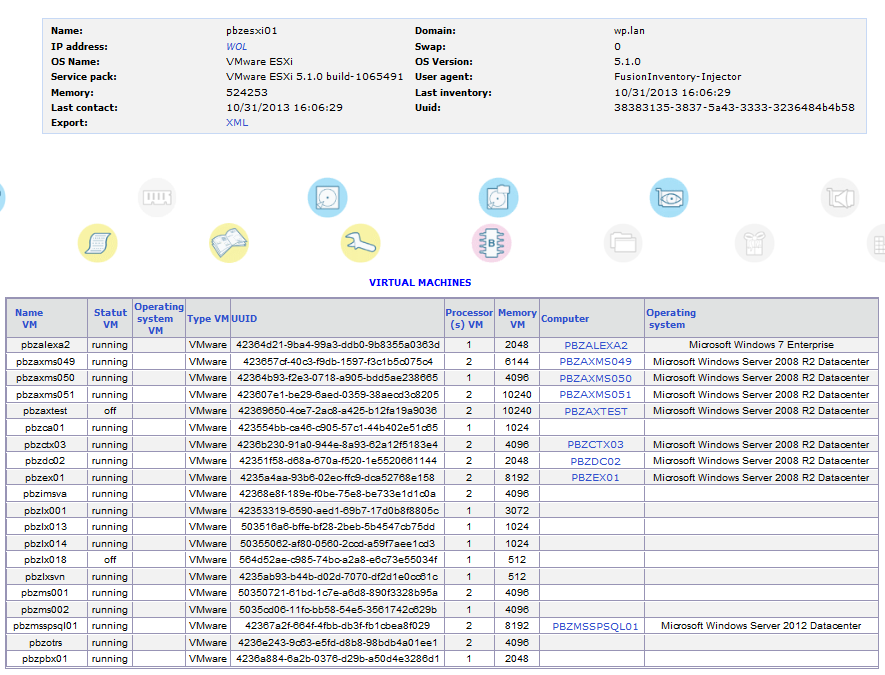
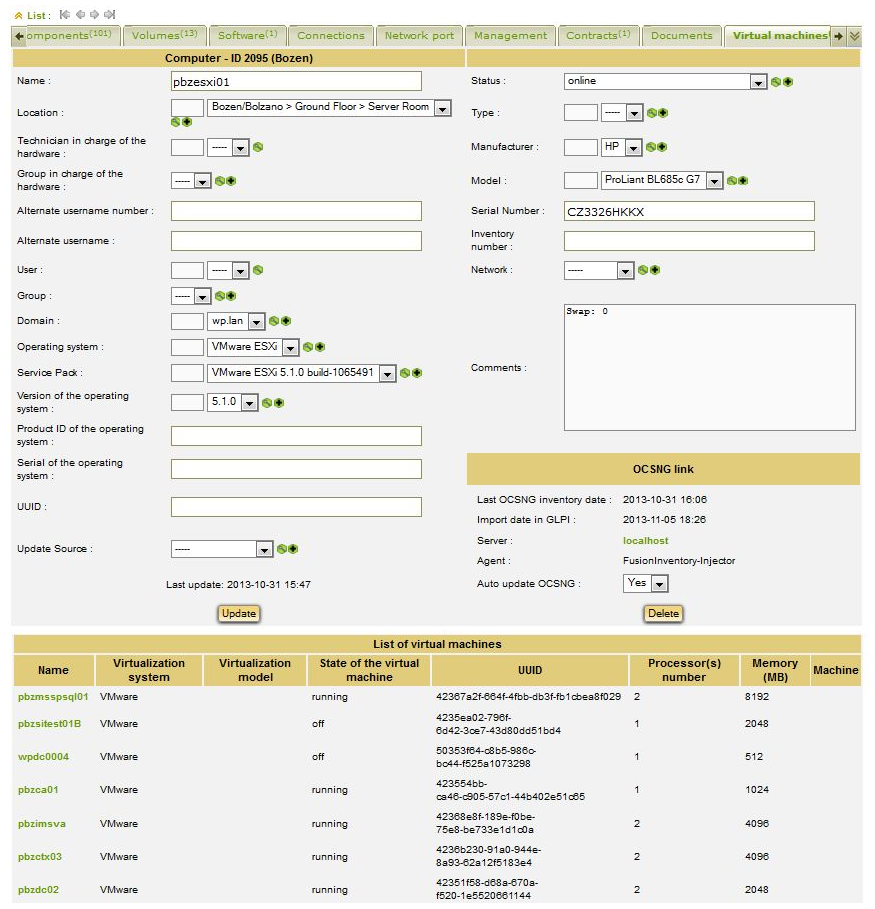
By setting specific OCS Inventory parameters it is possible to trace automatically all virtual machines information, and not only… In fact, GLPI will save virtual systems data associating them to the physical machines on which they are installed. If the virtual machine, in addition, have the OCS agent installed, in OCSNG they are not only listed as vm in the ESX host in which they are recognized, but if there is a UUID match a link will be created to the real vm in the inventory.
Virtual machine discovery with OCS inventory
GLPI displays virtual machine information associated with the physical machine
If you need any additional information on how to implement this solution in your infrastructure please feel free to contact me.
Important: PHP security update Type/Severity NetEye Product Security has rated this update as having a CRITICAL security impact. Topic Updates for the php and glpi packages are now available for NetEye 4. Security Fix for All NetEye Releases php-7.4.33-8.module+el8.10.0+25117+30337cca php-7.4.33-8.module+el8.10.0+25117+30337cca php-cli-7.4.33-8.module+el8.10.0+25117+30337cca php-common-7.4.33-8.module+el8.10.0+25117+30337cca php-fpm-7.4.33-8.module+el8.10.0+25117+30337cca php-gd-7.4.33-8.module+el8.10.0+25117+30337cca php-gmp-7.4.33-8.module+el8.10.0+25117+30337cca php-intl-7.4.33-8.module+el8.10.0+25117+30337cca php-json-7.4.33-8.module+el8.10.0+25117+30337cca php-ldap-7.4.33-8.module+el8.10.0+25117+30337cca php-mbstring-7.4.33-8.module+el8.10.0+25117+30337cca php-mysqlnd-7.4.33-8.module+el8.10.0+25117+30337cca php-opcache-7.4.33-8.module+el8.10.0+25117+30337cca php-pdo-7.4.33-8.module+el8.10.0+25117+30337cca php-pgsql-7.4.33-8.module+el8.10.0+25117+30337cca php-process-7.4.33-8.module+el8.10.0+25117+30337cca php-soap-7.4.33-8.module+el8.10.0+25117+30337cca php-xml-7.4.33-8.module+el8.10.0+25117+30337cca php-xmlrpc-7.4.33-8.module+el8.10.0+25117+30337cca Security Fix for NetEye 4.50 glpi-11.0.11_neteye1.25.7-1 glpi-11.0.11_neteye1.25.7-1 glpi-autosetup-11.0.11_neteye1.25.7-1 glpi-configurator-11.0.11_neteye1.25.7-1 glpi-neteye-config-11.0.11_neteye1.25.7-1 Security Read More
Important: GLPI security update Type/Severity NetEye Product Security has rated this update as having a medium security impact. Topic An update for the glpi packages is now available for NetEye 4. Security Fix for NetEye 4.50 glpi-11.0.11_neteye1.25.5-1 glpi-autosetup-11.0.11_neteye1.25.5-1 glpi-configurator-11.0.11_neteye1.25.5-1 glpi-neteye-config-11.0.11_neteye1.25.5-1 Summary The list Read More
Important: GLPI security update Type/Severity NetEye Product Security has rated this update as having a high security impact. Topic An update for the glpi packages is now available for NetEye 4. Security Fix for NetEye 4.50 glpi-11.0.11_neteye1.25.3-1 glpi-autosetup-11.0.11_neteye1.25.3-1 glpi-configurator-11.0.11_neteye1.25.3-1 glpi-neteye-config-11.0.11_neteye1.25.3-1 Summary This is Read More
New features, remaining gaps to the roadmap, and operating-system compatibility Starting in 2026, Teclib, the company behind GLPI, is moving from major releases every three to four years to a fixed annual release cycle, with a new major version planned Read More
More tools don't mean more intelligence. Especially when the model runs on your own hardware. Let's be honest: Ever since the Model Context Protocol became the de facto standard for connecting an LLM to the outside world, a sort of Read More

 An IT organization today needs to have all the hardware, software and licenses information in order to negotiate with suppliers through a target strategy or to perform timely updates. A complete inventory system is therefore a must.