21. 07. 2026
Offensive Cloud Security, Offensive Security, Red Team, SEC4U

10. 09. 2026
Simone Ragonesi
Offensive Security, Red Team, SEC4U
Red Team Phishing Operations: A Practical Guide to Mail Infrastructure

Every red team engagement that involves a phishing scenario runs into the same wall sooner or later: You need a mail server you fully control, one that behaves like a real corporate mail system, sends and receives reliably, and does not torch your reputation the moment you use it.
The answer is to compose your own infrastructure, on your own terms, with the same rigor you would expect from any production system.
This article walks through how we are building exactly that: a self-hosted mail server on AWS, provisioned as code, designed specifically to support authorized red team activity and security awareness exercises.
It covers the architecture, the deployment process, the operational details, the challenges and the practices we are putting in place to keep the whole thing manageable over time.
Why Build Your Own Mail Infrastructure
A red team mailbox is not just an inbox. It needs to send convincing mail, receive replies, pass basic authentication checks (SPF, DKIM, DMARC), and avoid landing in spam folders during a simulated campaign.
It also needs to be disposable and compartmentalized: One campaign’s domain reputation should never bleed into another’s, and a domain that gets burned during an exercise should be easy to retire without affecting the rest of the program.
Running the stack ourselves gives us three things a single managed service cannot:
- Full control over configuration, from TLS certificates to routing rules
- The ability to spin up and tear down domains and mailboxes as needed for different engagements
- A clean separation between the infrastructure used for internal communication and the infrastructure used to simulate attacks
The Stack
Our mail infrastructure is not a single monolithic box, and that’s by design. It’s a hybrid stack made up of a handful of purpose-built pieces, each doing one job well, tied together by DNS and automation rather than by living on the same host or even the same provider.
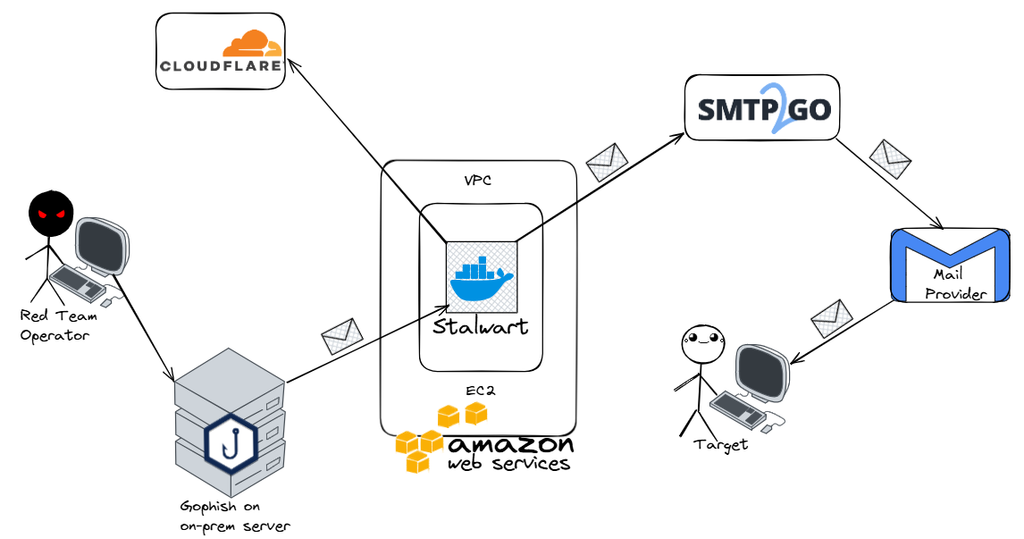
At the core of our mail setup is Stalwart, an open source mail server that handles SMTP, IMAP, and JMAP, and ships with a web-based admin console and strong security defaults.
Stalwart runs as a Docker container on a dedicated EC2 instance, managed as a systemd service, so it starts and stops cleanly with the machine.
Campaign execution, however, does not happen inside Stalwart itself. We run GoPhish (or proprietary tools) on premise, and it connects out to the Stalwart mail server whenever a campaign needs to launch phishing simulations. This split matters for a few reasons. Keeping GoPhish on prem means campaign results never leave infrastructure we directly control. Keeping the mail-sending function on Stalwart in AWS means we get proper uptime, security groups and public exposure, without needing to bolt all of that onto an on-prem box that was never designed to be internet-facing mail infrastructure.
Add Cloudflare for DNS and certificate automation, and an outbound SMTP relay, and the picture is clearly a diversified stack: different providers, different environments, on prem and cloud side by side. What keeps that diversity from turning into chaos is that none of it is clicked together by hand.
You may be wondering: what is the purpose of Stalwart? Wouldn’t it be sufficient to connect Gophish directly to an SMTP relay?
The answer depends on the specific use case, and in our case, the answer is no.
Stalwart automates and manages several aspects of the email infrastructure, including routing rules, DNS record provisioning and TLS certificate management for the domains, with fully automated certificate renewal.
It also provides the ability to create users and domain aliases and to receive email, which is an important requirement in our scenario:
not all phishing activities are performed through bulk email campaigns using Gophish.
Some campaigns are highly targeted and require individual, controlled message exchanges, including the ability to receive and respond to replies.
For these reasons, a fully featured mail server is essential to support the operational requirements of our use case, rather than relying solely on an outbound SMTP relay.
As stated in other articles, we usually define and manage all our infrastructure as code, via tools like Terraform: That means the mail server is not something anyone clicks together in the AWS console, it’s a repeatable, version-controlled deployment that can be destroyed and recreated on demand. The GoPhish side and the DNS/relay configuration follow the same principle, so the entire hybrid stack, cloud and on prem together, can be reasoned about, reviewed, and rebuilt from a single source of truth.
For a red team, this matters a lot: Engagements are time-boxed, and there is real value in being able to bring up a fresh mail environment for a campaign and tear it down cleanly once the exercise is over, rather than leaving long-lived infrastructure sitting around as an unnecessary attack surface.
A typical deployment produces:
- A dedicated EC2 instance with an Elastic IP, running Stalwart
- A persistent data volume for mail storage
- The DNS records the domain will need
- SSH access secured with a dedicated key pair generated specifically for the infrastructure
- An SMTP connection from the on-prem GoPhish instance, ready to launch campaigns once the domain is verified
The overall architecture looks like this:
DNS: The Part That Actually Determines Deliverability
None of the infrastructure work matters if the mail ends up in spam or gets rejected outright. DNS is where deliverability is won or lost, and it’s worth treating as a first-class part of the build rather than an afterthought.
At minimum, a domain needs:
- A record pointing the mail subdomain to the server’s Elastic IP
- MX record telling the world where to deliver mail for the domain
- SPF authorizing which servers are allowed to send mail on the domain’s behalf
- DKIM signing outgoing mail so receivers can verify it was not tampered with, generated automatically by Stalwart after the first boot
- DMARC telling receiving servers what to do with mail that fails SPF or DKIM
- TXT record for ACME challenge (Let’s Encrypt certificate)
Using a DNS provider with a solid API, such as Cloudflare, makes this whole process far less painful as records can be pushed automatically during setup, which matters when you are standing up multiple domains for different engagements and do not want to hand-enter the same 20-ish records every time. A few records, notably the A and MX, still need to be added manually before the automated pieces can take over.
Getting Outbound Mail to Actually Leave AWS
Here’s a detail that catches a lot of people off guard: AWS (as virtually any cloud provider) throttles or blocks outbound traffic on port 25 (and other ports) by default, precisely to prevent its infrastructure from being used to send spam. That’s a reasonable policy from AWS’s side, but it means a freshly deployed mail server will happily receive mail and will struggle to send any.
The practical fix is to route outbound mail through an SMTP relay service rather than sending directly from the EC2 instance. We are evaluating different services at the moment and testing trough SMTP2GO, although their User Agreement explicitly prohibits phishing campaigns, this is effectively the case with virtually every provider of this type, unless an enterprise agreement has been established directly with the provider.
Should we fail to identify a provider that allows this type of activity, we have several technical fallbacks available, one of which is leveraging Tailscale to route the EC2 instance through one of our on-premises public IPs.
Domain Segmentation as an Operational Discipline
One principle we apply strictly: The primary domain used for the admin console and day-to-day mail server management is never used to send simulated phishing mail.
Every campaign uses a separate domain or subdomain, configured independently on Stalwart, with its own DNS zone, its own DKIM keys, and its own relay verification.
Domain and IP reputation are cumulative and sticky. A domain that gets reported as phishing during an authorized exercise, even a successful one, can end up on blocklists that are slow to clear. Keeping the “infrastructure” domain separate from the “campaign” domains means a burned domain from one exercise never puts the whole platform’s reputation, or the team’s ability to run the next engagement, at risk.
Adding a new domain follows a repeatable pattern: Register the DNS zone (in our case through Cloudflare), point Stalwart at it with automatic certificate and DNS management via ACME and the Cloudflare API, create the mailbox users needed for the exercise, configure GoPhish with that mailbox, and verify the domain with the SMTP relay provider. Aliases and subdomains of an already-configured domain are even simpler, since the underlying mail routing and users are already in place.
Closing Thoughts
Building your own red team mail infrastructure is less about mail server software and more about the surrounding discipline: DNS hygiene, domain segmentation, credential management, and a deployment process that is boring and repeatable enough that it never becomes a liability itself.
Stalwart handles the actual mail serving well, and Terraform makes the AWS and Cloudflare side reproducible, but the real value comes from treating this like the piece of security-critical infrastructure it is, with the same authorization boundaries, documentation, and operational care you would apply to any tool used in an engagement.
Used responsibly and within a properly authorized scope, this kind of setup gives a red team exactly what it needs: reliable, controllable mail infrastructure that supports realistic testing without putting anyone’s reputation, or anyone’s inbox, at unnecessary risk.
These Solutions are Engineered by Humans
Did you learn from this article? Perhaps you’re already familiar with some of the techniques above? If you find cybersecurity issues interesting, maybe you could start in a cybersecurity or similar position here at Würth IT Italy.

Simone Ragonesi
Offensive Security Technical Lead | Würth IT Italy
Author

Latest posts by Simone Ragonesi
22. 04. 2026
Offensive Security, Red Team, SEC4U
The Ghost in the Kernel Machine
23. 03. 2026
Offensive Security, Red Team, SEC4U
Writing High Quality Pentesting Reports
27. 01. 2026
Automation, Development, DevOps, Offensive Security, Red Team, SEC4U
Architecting a Portable Red Team Engine
11. 01. 2026
Blue Team, Offensive Security, Red Team, SEC4U
Purple Teaming is a MUST, not a PLUS
26. 09. 2025
AI, Offensive Security, Red Team
The Evolving Security Landscape of MCP