
05. 12. 2018
Valentina Da Rold
NetEye, Unified Monitoring
How to create a new ZendForm element for Icinga Web 2
In one of the latest releases of the EventHandler module for NetEye 4 we introduce, for the first time, a completely customized form element. In order to satisfy certain EventHandler usage constraints, we needed to create a drop-down element that allows the user to enter a custom value in addition to choosing one of the automatically proposed options.
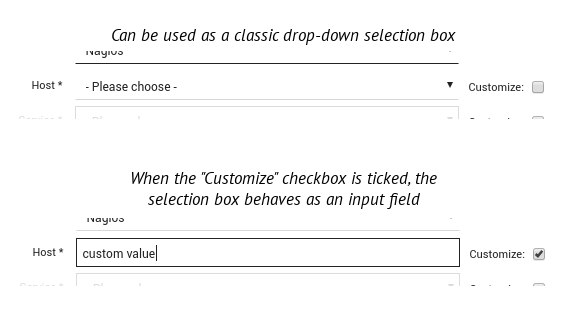
To create such a field we had to extend the ZendForm component library. Even though this is not a complex task, we found it to be less intuitive than we had expected. With the experience gained, I will now give you a short guide on how to create your own custom form element for ZendForm and Icinga Web 2.
- Define a
namespacewhere you can group all the new form elements you want to develop. - Extend the ZendForm class that is most similar to the element you are going to create. For example our aim was to create an advanced selection box, so we extended the Zend SelectElement class.
- Define the graphical structure and the validators for your new element.
<?php

namespace Icinga\Module\Path\To\Your\Custom\Element\Directory;

class CustomSelect extends \Zend_Form_Element_Select
{
    public function init()
    {
        // This way you can skip the validation of the element $this->setRegisterInArrayValidator(false);
        $this->clearValidators();

        parent::init();
    }

    public function render(\Zend_View_Interface $view = null)
    {
        $options = $this->getMultiOptions();
        $value = $this->getValue();
        if ($value !== null && !array_key_exists($value, $options)) {
            // An example of some custom manipulation you can do
            // before rendering the element
            $selectAttribs = $this->getAttribs();
            $selectAttribs['data-custom-value'] = $value;
            $this->setAttribs($selectAttribs);
        }
        return parent::render($view);
    }
}
Obviously, you can attach a jQuery plugin or effect to your new element.
How can you use your custom selection box in an Icinga Web 2 form now that you have created it?
You need to register the new form element namespace, as we did in the following code snippet:
$this->addPrefixPath(
     'Icinga\Module\Neteye\Html\Components\Form\Element',
      Icinga::app()->getBaseDir() . '/modules/neteye/library/Neteye/Html/Components/Forms/Element',
      'element'
);
As you can see the first argument passed to addPrefixPath represents the namespace, the second is the full path to the element’s class and the third defines which kind of class you are loading.
Once you explicitly load the new form-element class, you can use it as usual within an Icinga Form class:
$this->createElement('customSelect', 'new_form_element', array(
                'label' => 'New Custom Select',
                'required' => true,
            ));

Valentina Da Rold
Hi, I'm Valentina and I'm a Frontend Developer at Wuerth IT Italy. I started out my career applying my Cryptography skills to coding, but really quickly fell in love with the web. I have been making websites and applications since 2012 and I still can't get enough of it. Along the way I found a passion for front-end development, and I use this passion to create interfaces that solve problems. When I'm not creating beautiful solutions, I enjoy cooking or doing sport, while listening to beautiful music.
Author

Latest posts by Valentina Da Rold
30. 09. 2026
Atlassian, Automation
Link Jira Issues Across Separate Atlassian Cloud Sites with Automation
30. 06. 2026
Atlassian, Development
Build a Readable List of Confluence Spaces with the REST API and an Auto-Generated Page
30. 03. 2026
Atlassian, Automation
Automating Confluence Page Status at Scale: A Practical Workaround
11. 12. 2025
Atlassian, Development
Boosting Atlassian Integrations with the atlassian-python-api Library
29. 09. 2025
Atlassian, Development
Syncing Entra ID Groups and Members to Jira CMDB via Atlassian SCIM API: Key Lessons Learned