
Depending on your network configuration it might be useful to import reachable devices in NetEye 4.
This operation can be accomplished using the Nmap tool (already installed on your machine) and an Icingaweb module.
Follow these steps to install the module:
- Download the archive from here
- Put the contents of the archive in the NetEye directory /usr/share/icingaweb2/modules/
- Open the web interface and go to Configuration > Modules
- Search for the “nmap” module and enable it
Once you are done, a new import source will be available in the section Director > Import data sources.
If you add a new import source you will see the new “Nmap module” option in the Source Type field.
By selecting it you will be prompted to enter a Key column name (usually “host”) and a subnet to discover. The option Require DNS hostname will skip all addresses that don’t return a host name.
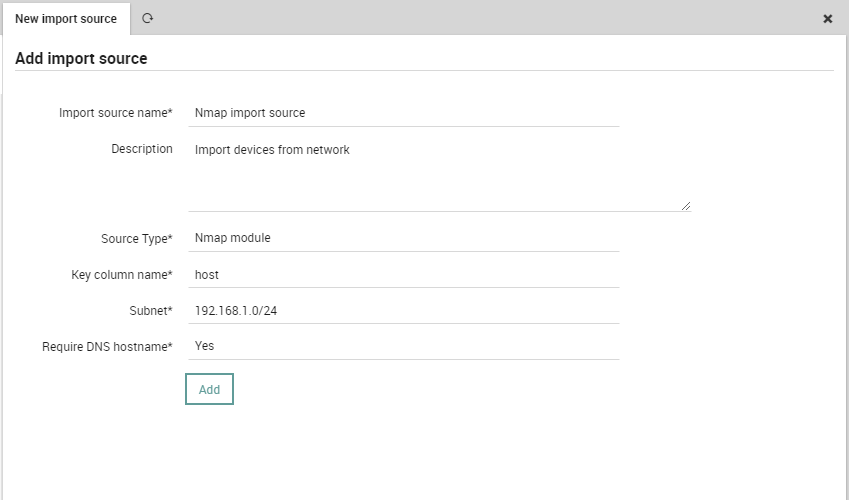
Once you add your import source configuration, you should see all hosts found by Nmap discovery under the Preview tab.
Proceed with normal operation to complete the import source configuration. You can find more regarding this latter topic in the User Guide (User Guide > Monitoring Basics > Automating Imports for Monitoring).

Luca Franzoi
Service & Support Engineer at Würth IT Italy
Author

Latest posts by Luca Franzoi
03. 12. 2025
Front-end, Icinga Web 2, UX
Introducing a New Monitoring Interface: A Fresh, Flexible Experience
05. 05. 2025
Unified Monitoring
How to Reduce Icinga 2 Log Verbosity, and Regularly Clean Them from Event Viewer
05. 02. 2025
AI
Will AI Take Over the World?
13. 03. 2020
Bug Fixes, Log Management, Log-SIEM, NetEye, Unified Monitoring
Bug discovered on NetEye module logmanagement and SIEM