30. 09. 2026
Atlassian, Service Management

Ready to transfer your projects from another tool to Jira? Here’s how to do it quickly and easily:
1. Prepare your file: Organize your data in a format that Jira recognizes, such as a CSV file. Make sure the fields match those in Jira (title, description, etc.). Here’s an example of what the file should look like:

2. Configure the import: In Jira, select the import option, choose your file and select the project to which you want to import data.
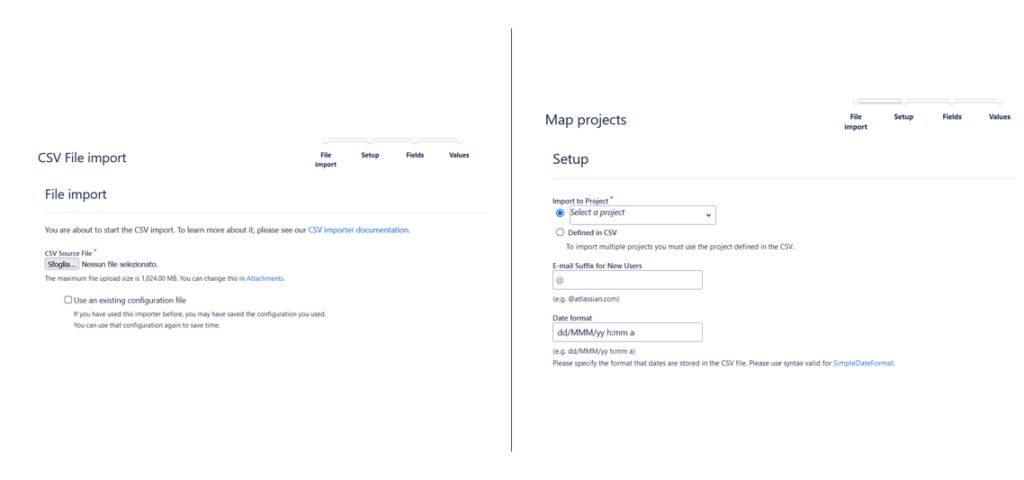
The most important part of the configuration is the mapping of the fields in your file to the corresponding fields in Jira.
⚠Remember that assignees and reporters (the same goes for watchers) will only be imported if they are identified by the ID. If you have this information in your file, remember to map it this way:
🧙♀️ Assignee ID -> Assignee
🧙♂️ Reporter ID-> Reporter

If there are e.g. Epics and Subtasks in the file, then in order not to lose the parent-child relationship between Epics and Task and between Task and Subtask, you must remember to map the Issue ID, Issue Type and Parent fields.
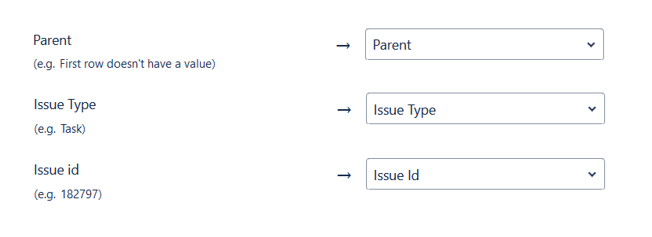
- Start the import: once the fields are correctly mapped, click “Import” and wait a few moments.
- Verify the result: check that everything has been imported correctly, and resolve any issues.
Extra tips for a flawless import
- Create a test project: before carrying out the import on a project in production, I recommend that you carry out a test project
- Divide the import: if you have a lot of data, divide it into smaller chunks
- Consult the official documentation: you’ll find specific details for your Jira version

- Custom fields: make sure they match perfectly
- Relationships: if there are links between your data, verify they are imported correctly
- Attachments: check the size and format limitations
For a more detailed guide, visit: Import data into Jira

Fabiana Pittalis
Author

Latest posts by Fabiana Pittalis
15. 12. 2025
Atlassian
Jira Forms vs JSM Forms: The Magic of Forms
29. 09. 2025
Atlassian
Who Does What? A Useful Guide to User Roles
26. 06. 2025
Atlassian
Confused by Atlassian Teams, Groups, and Managed Teams? Here’s the Difference