30. 06. 2026
Azure, Cloud, Microsoft, NetEye, NetEye Extension Packs, Unified Monitoring

TEST I have implemented new PNP templates for NetEye to display in the graphs not only the average information but also the maximum values.
As displayed in the two examples below, the network traffic graph shows in green color the inbound (Light green) and outbound traffic (dark green), that are calculated as average values. The newly introduced feature consists of the visualization of the maximum values for the inbound and outbound traffic that are displayed in grey color.
This feature is particularly relevant in case of historical data, for instance on a monthly or weekly report is clearly possible to identify the real usage of the traffic thanks to the peaks visualization. In fact if you consider only the average values, it could seem that the bandwidth is not completely used, but in the reality with the maximum values it is possible to easily identify that (as shown in the example) the real used bandwidth is almost 1 Mega.
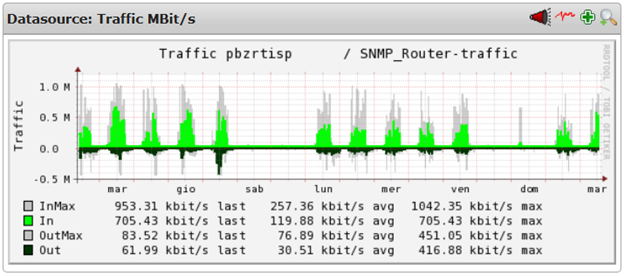
Daily Network Traffic Graph
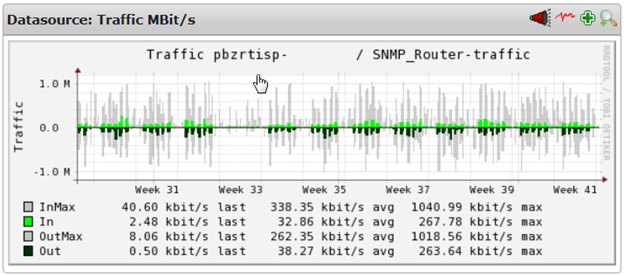
Monthly Network Traffic Graph

Juergen Vigna
NetEye Solution Architect at Würth IT Italy
I have over 20 years of experience in the IT branch. After first experiences in the field of software development for public transport companies, I finally decided to join the young and growing team of Würth Phoenix (now Würth IT Italy). Initially, I was responsible for the internal Linux/Unix infrastructure and the management of CVS software. Afterwards, my main challenge was to establish the meanwhile well-known IT System Management Solution WÜRTHPHOENIX NetEye. As a Product Manager I started building NetEye from scratch, analyzing existing open source models, extending and finally joining them into one single powerful solution. After that, my job turned into a passion: Constant developments, customer installations and support became a matter of personal. Today I use my knowledge as a NetEye Senior Consultant as well as NetEye Solution Architect at Würth Phoenix.
Author

Latest posts by Juergen Vigna
22. 05. 2025
NetEye, Unified Monitoring
Automatic Integration of NagVis Map into Icinga Web 2/NetEye Monitoring