01. 09. 2026
Log-SIEM

During our consulting activities we frequently find ourselves having to collect data from SNMP devices that do not support SNMPv3 for data encryption.
This type of traffic is readable on the network and can create security problems and noncompliance with company certifications, for example ISO27K. For this reason, you might have devices segregated on a management network that’s difficult to access from the regular network.
Another snag may be the presence of more modern orchestration systems (telco environment) that don’t manage devices with SNMP but rather via REST API (network segregation/DMZ could be a problem).
This last use case is the one that gave me the idea for this small tool: an snmp-api gateway that allows SNMP data to be read via API calls to a web server that can be placed at the closest point to the affected devices.
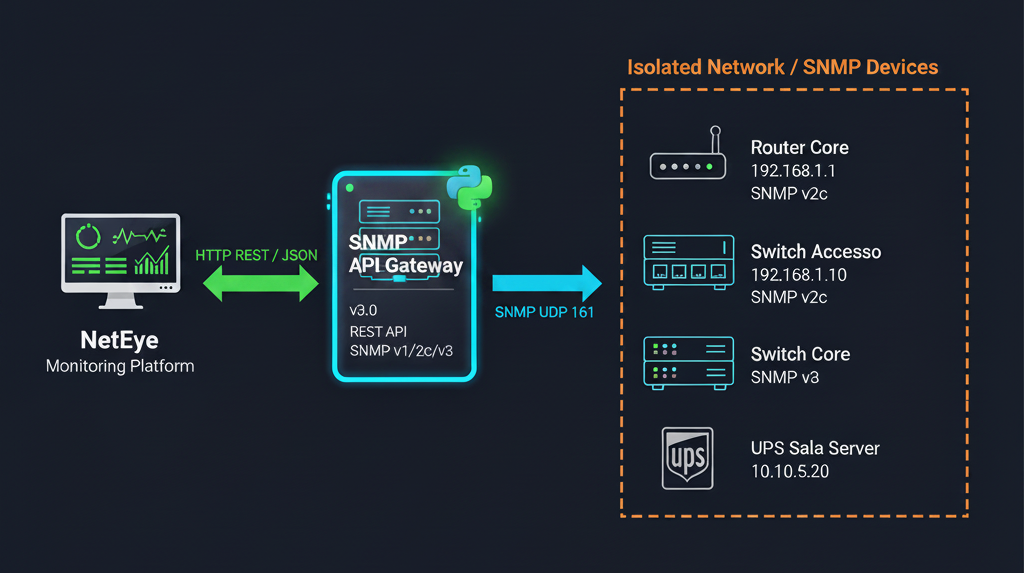
Components Used
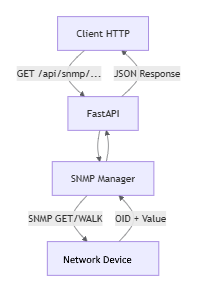
fastapi
This is the web framework that exposes the SNMP logic as a REST API. It handles all incoming HTTP/HTTPS requests and returns structured JSON responses.
What it does:
- Defines and serves all REST endpoints (/api/snmp/get, /api/devices, /api/mib/resolve, etc.)
- Automatically validates query parameters (type checking, required fields, defaults)
- Generates interactive API documentation automatically at /docs (Swagger UI)
- Handles routing, error responses (HTTP 400, 404, 502), and application lifespan events (startup/shutdown)
- Works together with uvicorn as the underlying ASGI web server
It is the entry point for any external tool (NetEye, curl, scripts) that wants to query SNMP data. Without it, snmp_manager.py would be a standalone Python library with no network interface.
pysnmp
It is the main engine. It implements the entire SNMP protocol stack in pure Python.
What it does:
- Builds and sends UDP SNMP packets (GET, GETNEXT, WALK, SET)
- Handles all 3 versions: v1, v2c, v3 (USM authentication, encryption)
- Receives and decodes responses from network devices
- Manages timeouts, retries, and protocol errors
It is the “engine” that snmp_manager.py uses to communicate with routers, switches, and UPS devices. Without it, there is no SNMP communication at all.
pysnmp-mibs
It is a collection of standard MIBs, pre-compiled in Python format and distributed alongside pysnmp.
What it contains:
- The core standard MIBs: SNMPv2-MIB, IF-MIB, IP-MIB, HOST-RESOURCES-MIB, etc.
- Allows the use of symbolic names like SNMPv2-MIB::sysDescr.0 instead of the raw OID 1.3.6.1.2.1.1.1.0
Without this package, the OID ↔ symbolic name resolver would not work for standard MIBs. It’s used by mib_loader.py to build the MIB View at startup.
pysmi
It is the MIB compiler. It translates .mib files (written in ASN.1 language) into Python modules that pysnmp can load and use.
What it does:
- Reads a vendor-specific .mib file (e.g. APC-UPS-MIB.mib, CISCO-PROCESS-MIB.mib)
- Converts it into a .py file saved in mibs_compiled/
- From that point on, pysnmp can resolve symbolic names from that MIB (e.g. APC-UPS-MIB::upsAdvBatteryCapacity.0)
It’s used by mib_loader.py at startup to automatically compile any custom MIB files placed in the mibs/ folder.
How It Works
Run the server with python main.py an try some API
With numeric OID
curl “http://localhost:8000/api/snmp/get?host=192.168.1.1&oid=1.3.6.1.2.1.1.1.0”
With symbolic MIB name
curl “http://localhost:8000/api/snmp/get-by-name?host=192.168.1.1&name=SNMPv2-MIB::sysDescr.0”
Here’s the answer for both cases
{
    "host": "192.168.1.1",
    "data": {
        "1.3.6.1.2.1.1.1.0": {
            "value": "Linux router 5.15.0 #1 SMP x86_64",
            "info": {
                "label": "SNMPv2-MIB::sysDescr.0",
                "mib": "SNMPv2-MIB",
                "object": "sysDescr",
                "suffix": "0"
            }
        }
    }
}
Ok, but I have a lot of devices, with different MIBs and different authentication levels, how do I do it ?
Step 1 – Import custom MIB
Copy your .mib files into mibs/ folder application. Rerun the application. Your MIB will be compiled for the future use.
If a MIB depends on other MIBs, the compiler will attempt an automatic download from
mibs.pysnmp.com. In isolated environments, copy all dependent MIBs to the
mibs/ folder before startup.
Step 2 – Device configuration
The devices.yaml file defines the network devices that can be queried via the API. Each device has a unique name, SNMP connection parameters and a list of associated MIBs.
devices:

  # ── SNMP v2c (legacy) ──────────────────────────────────────────────
  - name: "Router Core"
    host: "192.168.1.1"
    port: 161
    version: "2c"
    community: "public"
    mibs:
      - "SNMPv2-MIB"
      - "IF-MIB"
      - "IP-MIB"

  # ── SNMP v1 (legacy) ───────────────────────────────────────────────
  - name: "Printer Floor 2"
    host: "192.168.1.50"
    version: "1"
    community: "public"
    mibs:
      - "SNMPv2-MIB"


  # ── SNMP v3 — authPriv  ────────────────────────
  - name: "UPS Server Room"
    host: "10.10.5.20"
    version: "3"
    v3_username: "snmpadmin"
    v3_security_level: "authPriv"
    v3_auth_protocol: "SHA256"          # SHA256 preferred
    v3_auth_password: "AuthPass456!"
    v3_priv_protocol: "AES"             # DES | AES | AES192 | AES256
    v3_priv_password: "PrivPass789!"
    mibs:
      - "SNMPv2-MIB"
      - "HOST-RESOURCES-MIB"
      - "APC-UPS-MIB"
You can then query your preconfigured devices:
    # Uptime
    curl "http://localhost:8000/api/devices/Router%20Core/get-by-name?name=SNMPv2-MIB::sysUpTime.0"

    # System name
    curl "http://localhost:8000/api/devices/Router%20Core/get-by-name?name=SNMPv2-MIB::sysName.0"

    # SNMPWALK on interfaces (IF-MIB::ifTable)
    curl "http://localhost:8000/api/devices/Router%20Core/walk?oid=1.3.6.1.2.1.2.2"

    # Remaining autonomy (minutes)
    curl "http://localhost:8000/api/devices/UPS%20Server%20Room/get-by-name?name=APC-UPS-MIB::upsAdvBatteryRunTimeRemaining.0"
Final Notes
That’s it. The idea was born from the needs of various customers and my personal experience faced in my many years of IT management and monitoring. The topic isn’t new but was approached in a modern way with AI tools, providing the necessary information for prompts and refining the requirements with new ideas that emerged during the first tests.
It’s therefore to be considered a small PoC that solves a small problem. A first step in integrating old and new technologies.
Write to us whether you have any doubts or are just curious.
These Solutions are Engineered by Humans
Did you find this article interesting? Does it match your skill set? Our customers often present us with problems that need customized solutions. In fact, we’re currently hiring for roles like this here at Würth IT Italy.

Paolo Seghetti
Author

Latest posts by Paolo Seghetti
30. 06. 2026
Azure, Cloud, Microsoft, NetEye, NetEye Extension Packs, Unified Monitoring
New NEP Coming Soon: Monitor Your Office 365 Tenant Subscriptions with Confidence
30. 03. 2026
NetEye, Unified Monitoring
SNMP and Non-connected Interfaces
28. 12. 2025
Automation, Business Service Monitoring, Icinga Web 2, NetEye, Service Management
Automating Notifications in NetEye
30. 09. 2025
NetEye, Unified Monitoring
Business Process Automation on NetEye