29. 09. 2026
AI, NetEye, Unified Monitoring


In this article, I am going to explain how to implement a monitoring on your system, using an agentless solution (without Nagios’ nrpe agents), and I will underline some advantages of this useful solution. The target machine will be Linux or Unix Operating Systems.
The need can arise from the fact that some of the Operating Systems do not provide the Nagios’ agent or the customer does not intend to install software of third parties, as the system is considered too critical or the customer wants to avoid discussions with the assistance offered by the system’s vendor.
The basic idea is very similar to the one utilized by Nagios’ agent. Having recourse to the features available in the SNMP protocol (Net-SNMP package) installed by default on the main Operating Systems “Unix-like”, it is possible to define a script and run it with a specific OID via the SNMP protocol.
In this article, I will use Oracle Solaris 11 as the target Operating System. However, with some simple configuration changes it is possible to adapt the configuration also to other systems.
The configuration is quite simple. Here are the main steps:
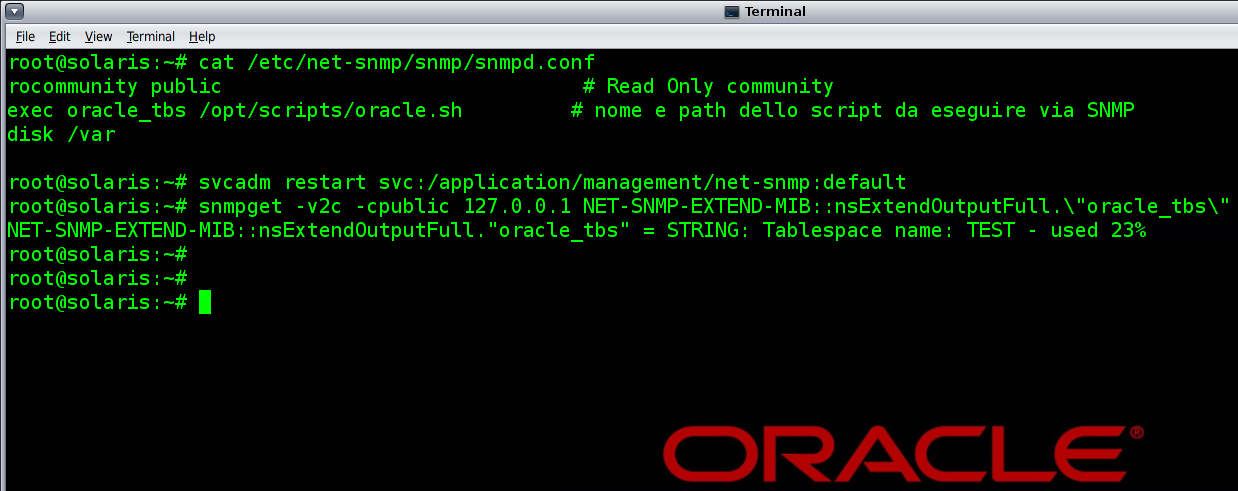
- Edit the file etc/net-snmp/snmp/snmpd.conf with the following settings:
- rocommunity public # Read Only community
- exec oracle_tbs /opt/scripts/oracle.sh # name and path of the script to be executed via SNMP
- Create a file that will be called and executed by SNMP i.e.: /opt/scripts/oracle.sh
- Restart the SNMP service in order to apply the new settings.
The following is a screenshot that shows some of the steps:
There are no limits to the potentialities of these checks, except for the ability to write its own scripts.
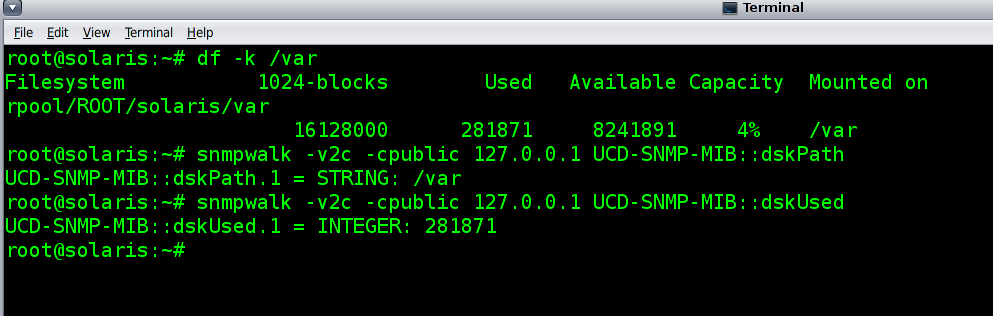
This package will allow you to increase your checks and with some simple keywords you will be able to expand the features available and make recourse to further controls provided by the package. For instance, you can verify a partition of your target system, simply by adding the following configuration in the snmpd.conf file. For example, for the partition var you must add:
disk /var
The integration with NetEye is very easy as well, thanks to the plugin check_snmp, that is already installed on our system.
All you need now is to try this opportunity!

Matteo Baruchello
Consultant at Würth Phoenix
Hi, I'm Matteo and since 2005 I am working as IT system consultant with different systems (Oracle, Solaris, Linux, Cisco, NetApp, etc.) and various programming languages too. I have also obtained some certifications, as RHCE, OCA and CCNA. In the last years, my main focus is on monitoring tools like Zenoss, Zabbix, ntop and of course Nagios. Thanks to my working experience I acquired the ability to manage complex services, to analyse and solve both organizational and technological problems. In 2016 I joined the Wuerth-Phoenix Group as System Integration consultant. My free time is dedicated to photography and also to windsurfing and playing guitar.
Author
