29. 09. 2026
AI, NetEye, Unified Monitoring

27. 06. 2019
Stefano Bruno
NetEye, Unified Monitoring
A Simple Way to Deploy Linux Agents Using the Icinga 2 API
The Agent’s distribution is probably one of those more time-consuming tasks. This can be for various reasons: different operating systems, network segregation, administrative credentials that are difficult to obtain, or even more simply, a large number of Agents to install.
We know that the Agent installation on Windows servers is made easier by this PowerShell script made available by the community: https://github.com/Icinga/icinga2-powershell-module.
In addition, it’s possible to generate an authentication token at the Host Templates level. This clearly facilitates the deployment methods.
For Linux Operating Systems, the situation is more complicated: it is not possible to generate a token at the host template level, so each host type object will have a different authentication token. This will increase significantly the installation times.
Fortunately, the APIs that Icinga makes available will help us.
When creating a Linux host, it becomes possible to download a bash script by accessing the “Agent” tab on the host screen. There is a dedicated script for every single host.
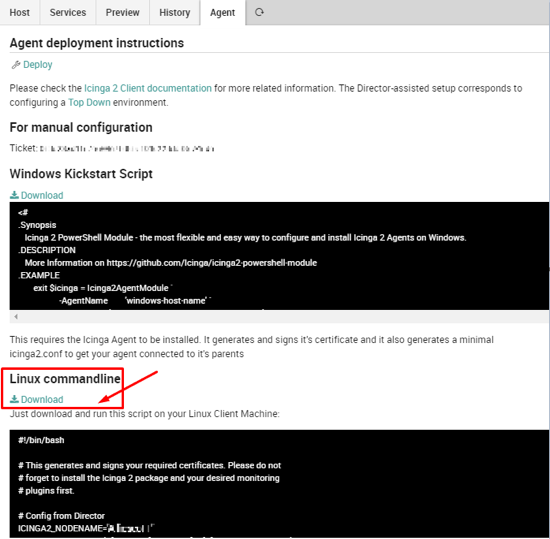
The two parameters to be customized are the following:
ICINGA2_NODENAME=’linux_agent.domain’ (FQDN of the remote server)
ICINGA2_CA_TICKET=’aq1sw2de3fr4gt5hy6ju7ki8lo9′ (the ticket released by NetEye master)
- The value for the first field is easily to find (for example, it could correspond to the hostname -f command executed on the remote server)
- For the second parameter value, we must use the API via the curl command on the remote host agent. Here we can follow the instructions in the Icinga Documentation portal at the following link: https://icinga.com/docs/icinga2/latest/doc/12-icinga2-api/#generate-ticket
The curl command will return a JSON response like this:
 {
     "results": [
         {
             "code": 200.0,
             "status": "Generated PKI ticket 'aq1sw2de3fr4gt5hy6ju7ki8lo9aq1sw2de3fr4'  for common name 'linux_agent.domain'.",
             "ticket": "aq1sw2de3fr4gt5hy6ju7ki8lo9aq1sw2de3fr4"
         }
     ]
 }
We only have to parse the content in order to get just the authentication token.
It isn’t necessary for the host object to already be present on Director, we can create it later. If you have a large number of hosts to set up, I recommend that you use a configuration management tool (puppet, rundeck, etc…) that can execute commands on all remote servers.

Stefano Bruno
Consultant at Würth Phoenix
Dear all, I'm Stefano and I was born in Milano.
Since I was a little boy I've always been fascinated by the IT world. My first approach was with a 286 laptop with a 16 color graphic adapter (the early '90s).
Before joining Würth Phoenix as SI consultant, I worked first as IT Consultant, and then for several years as Infrastructure Project Manager, with a strong knowledge in the global IT scenarios: Datacenter consolidation/migration, VMware, monitoring systems, disaster recovery, backup system.
My various ITIL and TOGAF certification allowed me to be able to cooperate in the writing of many ITSM Processes.
I like to play guitar, soccer and cycling, but... my very passion are my 3 baby and my lovely wife that has always encouraged me and helped me to realize my dreams.
Author

Latest posts by Stefano Bruno
13. 07. 2020
NetEye, Service Management, SLM, Unified Monitoring
ITSM Ticketing Integration with NetEye