29. 09. 2026
AI, NetEye, Unified Monitoring


We were recently asked how to dynamically monitor folders with Icinga.
Several of our clients monitor folders whose names change from day to day. For example, suppose every day I want to see if there is a file named with the date of that particular day, or I’d like to see if there is a folder for the current day, etc. This need arises on the file servers that our customers normally manage with Windows Server.
We’ve found that one quick approach to solving this type of problem is to use Icinga DSL.
In the past, other colleagues of ours have used Icinga DSL for similar dynamic tasks. You can refer to this blog to find out more about Icinga DSL and how to use it:
https://www.neteye-blog.com/2020/05/icinga-dsl-how-to-enrich-siem-logs-with-icinga-custom-vars/
We chose to use the command Invoke-IcingaCheckDirectory, which is used to check the directory and the files in a path using Powershell. This topic has also already been discussed in another recent blog:
https://www.neteye-blog.com/2021/06/monitoring-windows-systems-through-icinga-powershell-plugins/
So one solution is to follow these steps:
1: Duplicate command: duplicate the command Invoke-IcingaCheckDirectory
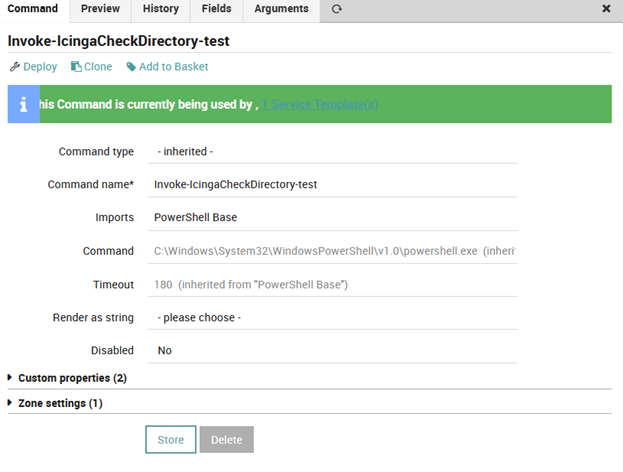
2. Change argument: click on the Arguments tab and change the path using for example this configuration shown in this screenshot:
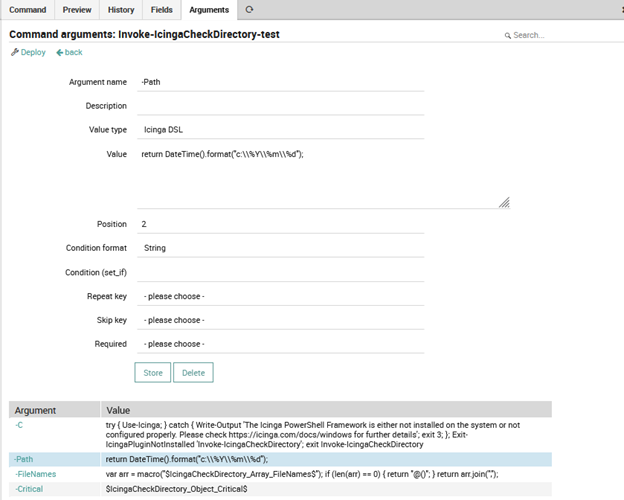
How can we test the correct syntax and output of this Icinga DSL command?
It’s simple: you can use the Icinga Console. Open an SSH session on NetEye and type this command:
[root@neteyedemo ~]# icinga2 console
Icinga 2 (version: r2.11.9-1)
Type $help to view available commands.
<1> => DateTime().format("c:\\%Y\\%m\\%d")
"c:\\2021\\10\\20"
<2> =>
Inside Icinga Console it’s possible to run Icinga DSL commands and see their output. In this simple example, we’ll check the Windows Directory on the Windows Server and verify the path with year month and day.
You can extend this example to files and folders of different types, and in general to other commands.
That’s the power of Icinga 2 DSL.

Franco Federico
Hi, I’m Franco and I was born in Monza. For 20 years I worked for IBM in various roles. I started as a customer service representative (help desk operator), then I was promoted to Windows expert. In 2004 I changed again and was promoted to consultant, business analyst, then Java developer, and finally technical support and system integrator for Enterprise Content Management (FileNet). Several years ago I became fascinated by the Open Source world, the GNU\Linux operating system, and security in general. So for 4 years during my free time I studied security systems and computer networks in order to extend my knowledge. I came across several open source technologies including the Elastic stack (formerly ELK), and started to explore them and other similar ones like Grafana, Greylog, Snort, Grok, etc. I like to script in Python, too. Then I started to work in Würth Phoenix like consultant. Two years ago I moved with my family in Berlin to work for a startup in fintech(Nuri), but the startup went bankrupt due to insolvency. No problem, Berlin offered many other opportunities and I started working for Helios IT Service as an infrastructure monitoring expert with Icinga and Elastic, but after another year I preferred to return to Italy for various reasons that we can go into in person 🙂 In my free time I continue to dedicate myself to my family(especially my daughter) and I like walking, reading, dancing and making pizza for friends and relatives.
Author

Latest posts by Franco Federico
10. 06. 2026
Unified Monitoring
Transform Metrics into Alerts
10. 03. 2026
Unified Monitoring
Elastic AutoOps in NetEye: Simplifying Elasticsearch Operations with Real-Time Intelligence
09. 09. 2025
NetEye
Backing up a MariaDB Galera Cluster