21. 05. 2026
APM, Kubernetes

27. 09. 2026
Alessandro Valentini
AI, Automation
Building a Small Tekton GUI for the Features We Actually Need
Tekton has been at the core of our CI/CD infrastructure for several years. On OpenShift, however, we’ve never interacted with Tekton only through its APIs or command-line tools: The OpenShift web console provides a convenient graphical interface to inspect pipelines, understand their structure, start them with custom parameters and workspaces, and follow their execution.
As we started investigating a future Kubernetes platform independent from OpenShift, this raised a relatively small but important question: What will happen to the user experience around our pipelines?
Tekton itself is portable. The OpenShift web console is not.
The Tekton Dashboard Gets Us Most of the Way
The obvious first candidate was the upstream Tekton Dashboard. It already provides many of the features we need, especially around running pipelines: Inspecting PipelineRuns and TaskRuns, reading logs, looking at the underlying resources, and following an execution.
For those tasks, it works well.
Our problem was mostly around everything that happens before a run starts, since some of our pipelines are also started manually by developers. In OpenShift, users can see the pipeline, fill in its parameters, configure the required workspaces and select the appropriate PersistentVolumeClaims (PVCs) without having to understand or create a PipelineRun manually.
There was also a smaller issue that had been bothering us for quite some time: Most of our manually-initiated pipelines use the same kind of workspace PVC. OpenShift lets users configure it each time, but we had no convenient way to provide our usual configuration as the default. It’s a small piece of friction, but also exactly the kind that becomes annoying when repeated often enough. Since we were building our own interface, we finally had a place where we could encode that default while still allowing users to change the PVC size when necessary.
Building the Interface Around Our Workflow
We therefore decided to experiment with a small web application focused on the way we actually interact with pipelines.
The idea was not to reimplement Tekton itself. Kubernetes and Tekton remain the source of truth, while the application provides a more convenient entry point for the operations our users perform regularly. The current PoC can browse Pipelines and PipelineRuns across a configured set of namespaces and filter them to make larger environments easier to navigate.
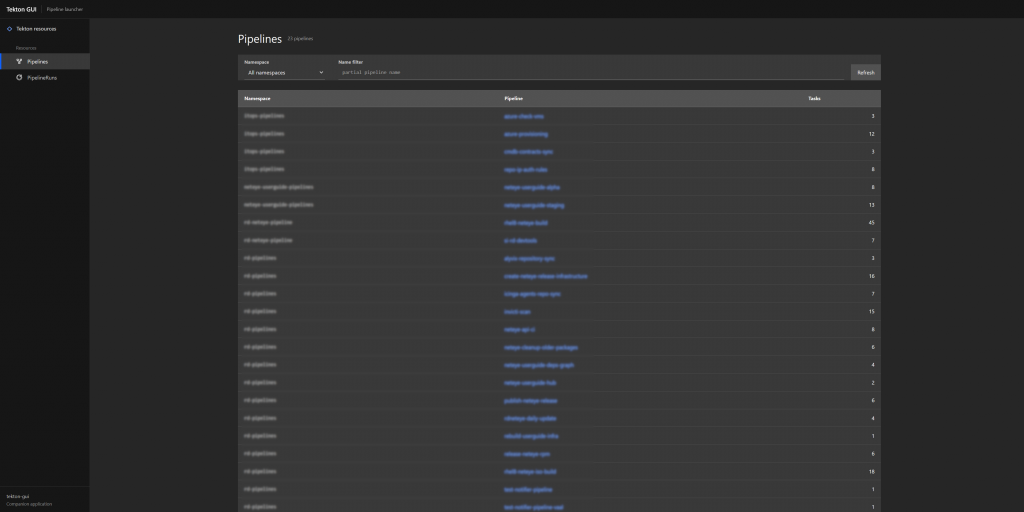
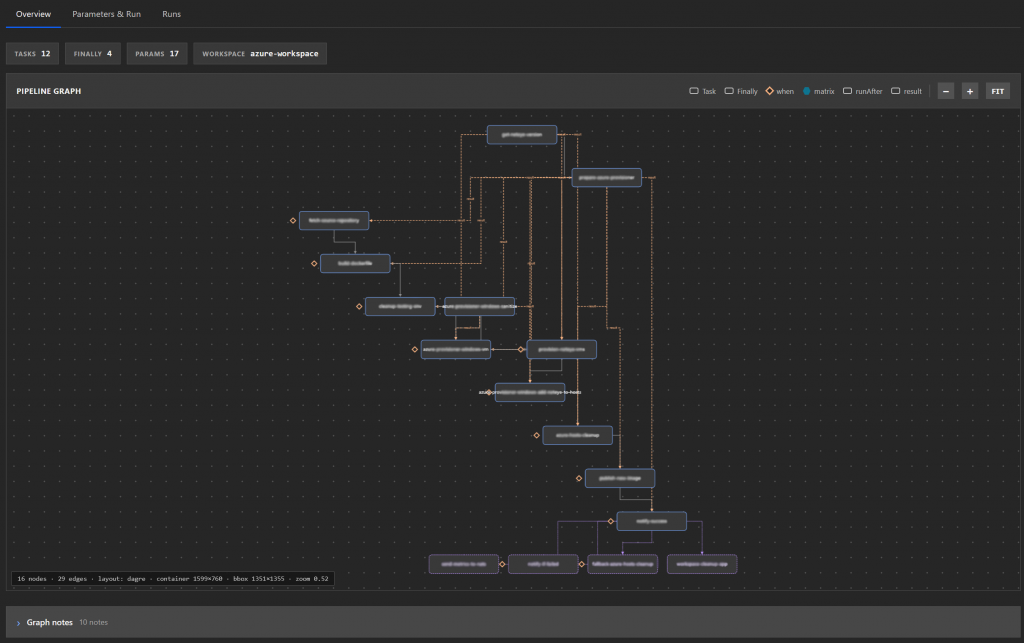
For each Pipeline, our webapp displays its parameters and a graphical representation of the task dependencies. A new PipelineRun can then be started directly from the interface, with editable parameters and workspace configuration.
For our usual workspace pattern, the storage class remains centrally managed, while users can adjust the requested PVC size.
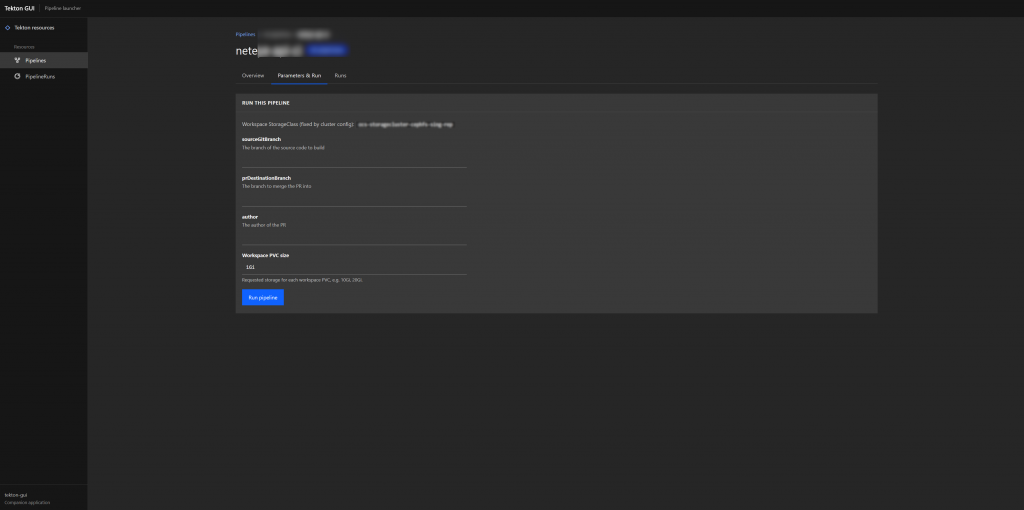
Existing PipelineRuns can also be used as the starting point for another execution. Their parameters are loaded back into the form, where they can be modified before rerunning the Pipeline. Metadata that matters to our workflows, such as the rd/author label, is preserved when creating the new run. Being able to rerun a pipeline while changing its parameters is actually a requirement that predates Tekton for us. It was already a missing convenience in our previous Jenkins-based workflow, so this was a good opportunity to finally address it properly rather than carry the limitation forward again.
The application also provides direct links to the corresponding execution in Tekton Dashboard. That reflects our current division of responsibilities: The Tekton GUI is the entry point for finding, understanding and starting pipelines, while Tekton Dashboard continues to handle the execution details and logs that it already presents well. This boundary is pragmatic rather than strict. The result of the PoC has been good enough that we would not rule out bringing some of those existing capabilities into the Tekton GUI in the future, should having a single interface turn out to be more convenient.
The application is stateless and runs inside Kubernetes using a dedicated ServiceAccount and RBAC permissions. There is no additional database and no new state to synchronize: Most of the current functionality is implemented directly against resources that already exist in the Kubernetes API. That simplicity was also important when deciding what to include in the first version.
One Innovation Day, with a Little Help from AI
The project started during one of our Innovation Days: Once a month, our team reserves a full day for activities outside normal project work. That could be experimenting with technologies, investigating ideas that might improve our platform, or simply learning something new.
The Tekton GUI was a good candidate. The problem was real, but not urgent enough to justify starting a conventional development project around it. There was one obvious constraint: One day is not much time for designing and implementing a web application that does real work.
This is where AI-assisted development made a considerable difference. We already understood both ends of the problem quite well. We knew how Tekton worked, how our Pipelines and PipelineRuns were structured, which Kubernetes resources we needed to interact with and what was missing from our current user experience. That allowed us to give the AI relatively precise requirements and, just as importantly, to recognize quickly when an implementation or assumption was wrong.
After roughly four to six hours of development, we already had a functional PoC covering most of the original requirements, and with the left over time, we didn’t even have to stop at the first working version. Within the same Innovation Day we could actually use it, and thus identify bugs, fix them, and iterate on parts of the interface that didn’t behave or look the way we wanted. The result was therefore not just a quickly generated mockup, but an already refined PoC that was good enough to demonstrate to the rest of the team.
This is probably where AI had the largest impact. Platform Engineering teams rarely suffer from a lack of ideas for small internal tools. What usually makes them difficult to justify is the surrounding implementation effort: frontend components, API integration, validation, error handling, deployment manifests and all the glue needed to turn a small idea into something usable. AI compressed a significant part of that overhead.
It didn’t decide which problem we had or what the correct workflow should be. Those were the parts where our existing knowledge of Tekton and our own CI/CD environment mattered most. In this case, AI worked particularly well because we knew where we were starting from and where we wanted to end up.
That still meant reviewing the generated code, correcting assumptions, and understanding what the application was doing. Especially since our AI agents were allowed to create resources inside a Kubernetes cluster. But being able to move from an idea to a useful and already iterated PoC within a single Innovation Day changed the cost of trying out the idea considerably.
And yes, seeing that happen in a few hours was also pretty cool.
Current Limits and Next Steps
The PoC is already usable enough to demonstrate the core idea, but it’s obviously not a finished product.
Some requirements were intentionally postponed because they didn’t fit the common technical path used in the first implementation. OIDC authentication is one example. In the future it will be necessary before the application can become a proper production service, but it required additional analysis that would have consumed a significant part of a short PoC. Log downloads was another. Unlike most of the implemented features, which are mostly based on Kubernetes and Tekton API calls, accessing the logs we want to expose requires an additional integration with the system where they are stored.
Other gaps became more visible during the team demo. For example, the pipeline graph still needs work, both in terms of presentation and in correctly representing some Pipelines as Code cases. For now, known graph limitations can be exposed directly in the interface rather than kept hidden.
These are exactly the kinds of findings we expected from a PoC. The important result is that the experiment gave us a concrete interface to discuss instead of a list of theoretical requirements. We now have a better idea of which missing features are genuinely important, which ones can remain delegated to the Tekton Dashboard, and which parts are worth improving before putting the application in front of users for normal day-to-day work.
For now, the interesting result is simple: a small problem we had been tolerating for quite some time became a functional and fairly polished proof of concept in a little over half a working day. The combination of dedicated time for experimentation, a problem we understood well and AI-assisted development made an idea cheap enough to actually try.
What comes next after the PoC may well be interesting material for a second part to this blog post.
These Solutions are Engineered by Humans
Did you find this article interesting? Are you an “under the hood” kind of person? We’re really big on automation and we’re always looking for people in a similar vein to fill roles like this one as well as other roles here at Würth IT Italy.

Alessandro Valentini
DevOps Engineer at Würth IT Italy
Platform Engineer at Würth IT Italy
Author

Latest posts by Alessandro Valentini
30. 06. 2026
Automation, DevOps, Kubernetes
K8s Secrets: Why We Migrated from SealedSecrets to ExternalSecrets
05. 08. 2025
DevOps, Kubernetes
Use S3 Storage with OpenShift Data Foundation
04. 03. 2025
Automation, DevOps, Service Management
Group-aware Reboot with Ansible