


30. 12. 2025
Automation, Development, Log Management, Log-SIEM, NetEye

06. 03. 2026
Damiano Chini
Log-SIEM, NetEye
One Elastic Fleet Policy, Multiple Behaviors: Selective Agent Configuration with Agent Providers
In many Elastic deployments, the natural approach every time you encounter a server with different needs is to create a new Fleet policy. Each group seems to require its own small set of tweaks or additional integrations. But the more policies you create, the harder it becomes to maintain and scale your configuration.
In reality though, most hosts share a big part of their configuration, and they all need the same basic integrations and monitoring behaviors. What actually differs are small, host-specific variations: an extra input here, a slightly different setting for this other subset of machines there.
So how do you keep the simplicity of a single Fleet policy while still having the flexibility to apply host-level customizations?
This is where Elastic Agent Providers come in. Providers let you add dynamic behavior to a single Fleet policy, so you can activate certain inputs only on specific hosts or under specific conditions. Instead of multiplying Fleet policies, you keep one policy with multiple “behaviors”.
In this post, starting from a real use case, we’ll explore how a single Elastic Fleet policy can support different host configurations using Agent Providers. The result is cleaner management, fewer policies to maintain, and more flexibility in how your agents behave.
The Practical Use Case
NetEye comes with some preconfigured Fleet Policies in Elastic. One of these is the NetEye Operative Nodes policy, applied to PCS Nodes. But these nodes are not necessarily identical. With the introduction of Kibana multi-instance in NetEye, some Operative Nodes can be configured as “Kibana nodes”, meaning a Kibana instance runs on them, while others don’t run Kibana at all.
Yet, we wanted to collect logs and metrics from the Kibana instances running on those Operative Nodes.
The problem is that if we add the Kibana integration to the NetEye Operative Nodes policy, Elastic Agents would go into an unhealthy state on nodes where Kibana is not running. The integration would try to collect logs and metrics from a service that simply isn’t there. We don’t want something to be flagged as unhealthy when everything is actually working fine.
An alternative would be to create separate Fleet policies for the nodes running Kibana. But if another service is later introduced in NetEye that only runs on a subset of nodes, we’d need to split the policies even further, eventually ending up with one Fleet Policy per node. That defeats the whole purpose of having Fleet Policies.
The Solution
After looking into various alternatives, we found that inputs can be conditionally enabled in Fleet via Elastic Agent Providers.
Elastic Agent Providers are a way to dynamically configure an Agent based on the conditions of the host it runs on. Different types of Providers exist, and they let you define key/value pairs that can be referenced in the Fleet configuration.
In our case, we used the “Env” provider, which lets you reference environment variables of the Elastic Agent process to conditionally configure inputs.
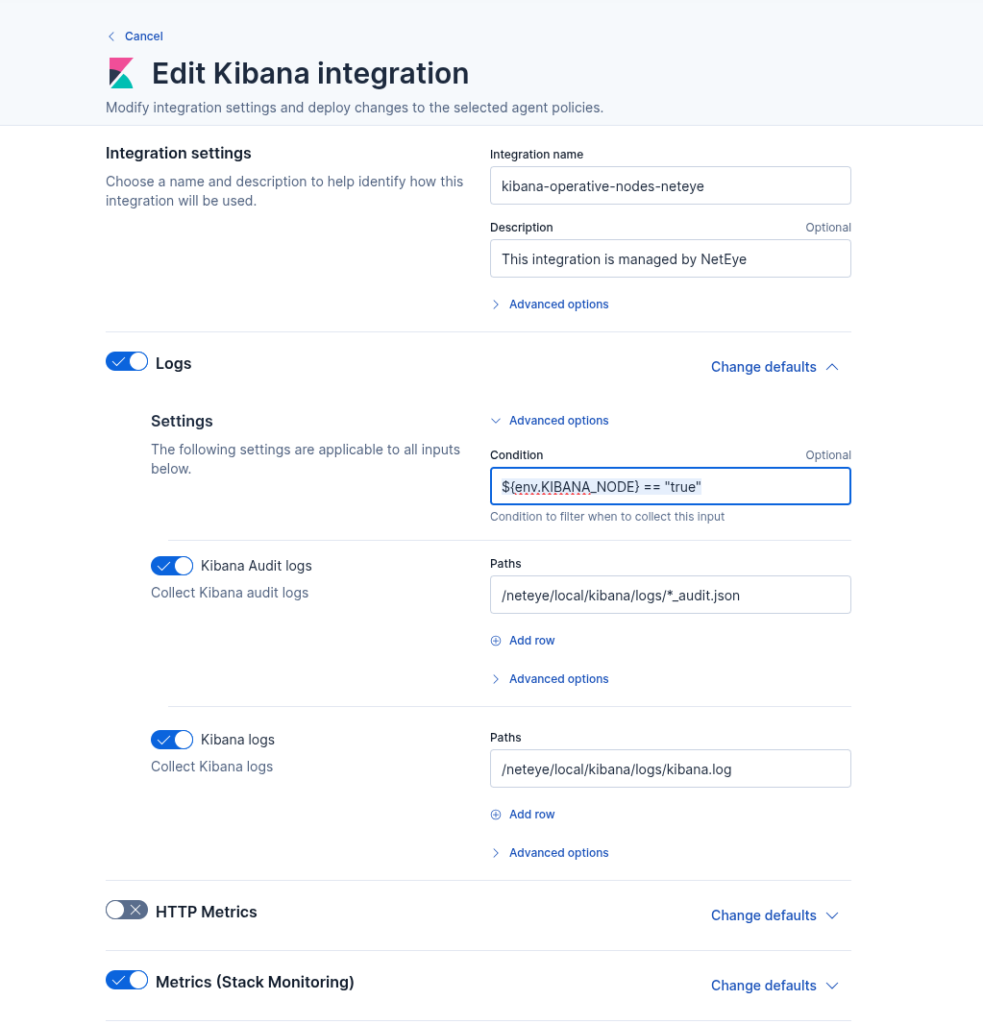
What we did was simple: we set the environment variable KIBANA_NODE to true in the Elastic Agent service, and then enabled the Kibana logs and metrics inputs only when ${env.KIBANA_NODE} == "true" via the Fleet UI, as you can see below.
Conclusion
The key takeaway is: before creating a new Fleet policy, ask yourself if you really need one, or if you can avoid it somehow. In most cases, the difference between hosts is just a few inputs that should or shouldn’t be active. Elastic Agent Providers let you handle that within a single policy, using conditions based on environment variables or other host level properties. And fewer policies means less configuration to manage, saving you time and reducing the chance of errors as your environment grows.
These Solutions are Engineered by Humans
Did you find this article interesting? Does it match your skill set? Programming is at the heart of how we develop customized solutions. In fact, we’re currently hiring for roles just like this and others here at Würth IT Italy.

Damiano Chini
Author

Latest posts by Damiano Chini
30. 12. 2025
Automation, Development, Log Management, Log-SIEM, NetEye
Optimizing Rolling Restarts in Elasticsearch Clusters
24. 12. 2025
APM, Log-SIEM, Machine Learning, NetEye, Real User Experience
Root Cause Analysis with Elastic ML and Alyvix