
A K3s Cluster Based on Raspberry Pi’s – The Hardware Adventure
When I got back from my last trip to Japan, I quickly bumped into a small but annoying problem: I had finally reached my free storage limit on Google Photos.
Instead of just buying more space for a few euros a year, I saw it as the perfect excuse to try something I’ve been considering for a while now: replacing Google Photos with Immich, an open-source alternative that comes surprisingly close to the original.
So there I was, facing a choice: pay for more cloud storage, or dive into a new project that would probably consume most of my evenings for the next few months: trying to build and provide a fully self-hosted photo management service for my family. Since I rather like giving myself unnecessary challenges, the decision didn’t take terribly long. Immich is the way.
Immich offers several deployment options, including a Helm chart for Kubernetes. I’ve been looking for a project as an excuse to delve deeper into Kubernetes for a while, and this seemed like the perfect opportunity.
Everything was coming together perfectly: the use case, the technology, and the desire to learn, so I had no alternative.
At this point, a smart person would just provision a Kubernetes cluster on a cloud provider and get on with their life. But I have a weakness for DIY solutions, and the idea of hosting everything on my own hardware was just too tempting. So I chose the more complicated route: building a bare-metal K3s cluster based on Raspberry Pi’s.
Why Raspberry Pi’s?
With RPi’s there are endless hardware options for a home lab.
I spent days down the rabbit hole on r/homelab and r/selfhosted, reading about NUC’s, old recycled servers, brand-new mini-servers, and custom builds made from spare parts. After a while (and a lot of headaches), I had to pause and write a short list of real requirements for this project:
- Low power consumption
- Small physical footprint
- Easy to handle and maintain
- Not too expensive
With that checklist in hand, I came across a great website, rpi4cluster.com, that sealed the deal. I already had an RPi4 collecting dust in a drawer, so I reused it and bought two Raspberry Pi 5’s to complete the cluster.
The result promised the right balance of efficiency, size, and DIY friendliness for the kind of self-hosted setup I wanted.
Storage, Power Supply, and Networking
The first requirement for any photo service is, of course, having enough storage.
I decided to keep things simple and went with basic 2.5″ SATA SSD’s connected through USB-to-SATA adapters. I briefly considered using NVMe drives, but since the Raspberry Pi 4 doesn’t support them natively, it felt cleaner and more consistent to just buy three identical SATA SSD’s and avoid mixing standards.
For networking, I kept it equally straightforward: a small 5-port gigabit switch and a set of 0.5 m Ethernet cables – it’s more than enough for a first iteration.
At some point, I’ll probably upgrade to a switch with more ports and higher throughput, but for now, this setup keeps things simple and tidy.
The tricky part turned out to be power. Powering a Raspberry Pi sounds simple: “just use USB-C”, right?
Sure… but what voltage, what amperage, and how do you handle peak consumption?
The Raspberry Pi 5 can draw up to 25W under load, so in true DIY fashion, I started looking for 12V PSU’s, DC-DC converters to drop from 12V to 5V, the right AWG cabling capable of handling at least 5A (5V x 5A = 25W), and loose USB-C connectors I could solder myself.
After way too much research, it became clear that this approach would never be reliable or practical. I needed something that just worked.
Fortunately, Raspberry Pi’s support USB Power Delivery (PD), which lets the device negotiate voltage with the power supply. That opened up a much better option: a multi-port 300W GaN charger capable of delivering stable PD output to all nodes.
Yes, it does introduce a single point of failure, something I’ll probably address in the future, but for now, it’s the cleanest, safest, and most efficient way to power the entire cluster.
Chassis Design
Once the hardware arrived, I started the software side with a full GitOps approach, taking inspiration from some work my colleagues shared for their home lab (https://github.com/Sbling-Technologies/datacenter-k8s, though I won’t be diving into that repo in this post).
After validating the cluster’s feasibility and stability, it was time to think about the physical home for my RPi’s.
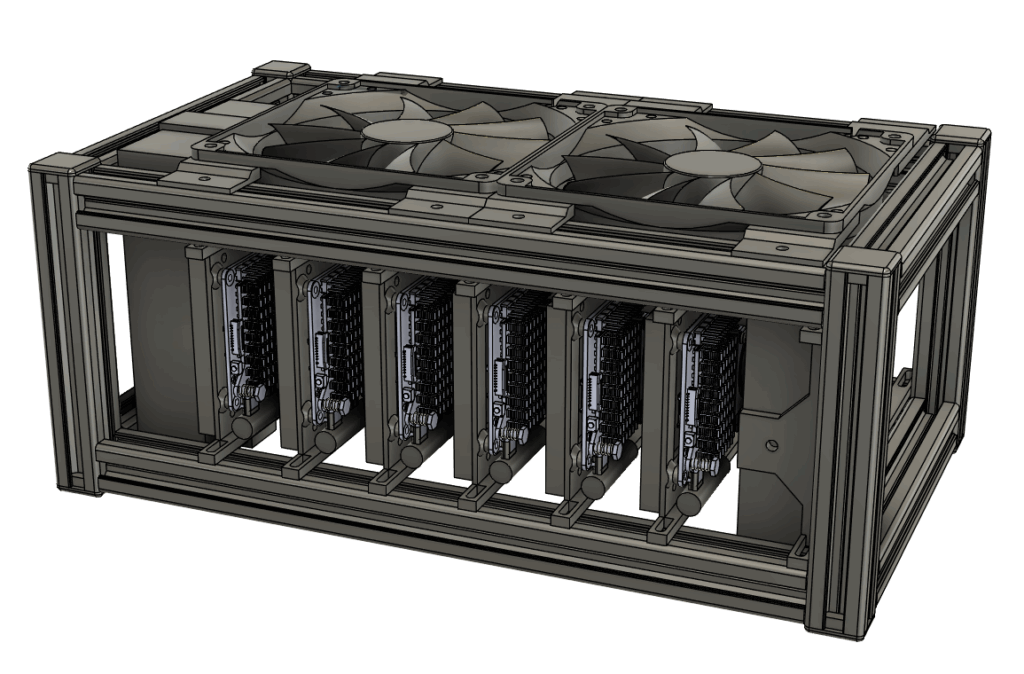
For the frame, I went back to something I already knew: V-slot aluminum profiles (20×20). I’d used these same profiles years ago to build a 3D-printer case, so the material was familiar, cheap, and extremely modular, in other words: perfect for a project that needed to be compact but also easy to expand.
My design goals were simple: keep it small, keep it tidy, and leave room to add more nodes later.
In fact, I ended up fitting an older Raspberry Pi B+ into an extra bay to run Pi-hole, just to make the most of the chassis real estate.
I combined the aluminum profiles with some custom 3D-printed parts to securely hold the boards, SSD’s, and power supply. The Pi’s and SSD’s are mounted on printed holders with M3 screws, and fixed to the frame by T-nuts.
I also added two quiet 12V fans I had lying around: not strictly necessary at room temperature, but handy for summer (you never know).
Final Result
The cluster has now been up and running and stable for a few months. At some point, I’ll probably write another post focused on the software side: monitoring, Immich configuration, the GitOps setup, and everything that keeps the system running smoothly.
Overall, this project was challenging from every angle, but it taught me a lot. Building a small Kubernetes cluster is something I’d recommend to anyone who wants to get into this world: there’s no better way to understand how things really work than getting your hands dirty, running into problems, and figuring out how to solve them.
If you want to build your own small K3s cluster, you can use the following repository as a reference: https://github.com/Sthirs/rpi-cluster

Mattia Codato
Author
