22. 05. 2026
NetEye, NetEye Extension Packs

19. 01. 2026
Dennis Orlando
Development, Icinga Web 2, NetEye, PHP
PHP – Migrating from Icinga 2’s Monitoring Database to IcingaDB
NetEye’s SLM module is tightly coupled to Icinga 2’s legacy monitoring backend, which was removed upstream with the introduction of IcingaDB.
Official documentation exists that describes how to migrate configuration files written using the old syntax, but it’s incomplete and – more importantly – it doesn’t explain how to migrate PHP code that depends on the legacy monitoring PHP classes (see IcingaDB – Migration).
Database queries
Old queries to the Icinga database looked like this:
$monitoringBackend = MonitoringBackend::instance()
$query = $this->monitoringBackend->select()->from('slmdowntimeevent', [
        'host_name',
        'service_description',
        'downtimeevent_actual_start_time',
        'downtimeevent_actual_end_time'
]);
This relied on a series of abstracted conversions that transformed, for example, the slmdowntimeevent string to SlmDowntime, which was then mapped to the icinga_downtime table. Thankfully, this is now far less obfuscated and much clearer.
The new pattern looks like this:
$query = SlaHistoryDowntime::on($db)->with([
      'host',
      'service'
])->eхecute();
You can find a usage example in one of the upstream Controller classes, for example HistoryController.php.
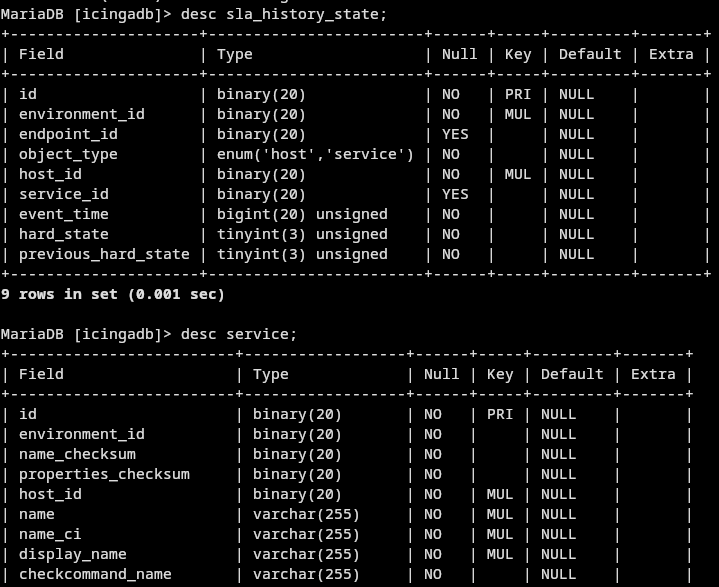
Information about the backing MySQL table can be found in the comments of the relevant “Model” (e.g. SlaHistoryDowntime.php), along with the available relations that can be used (such as service or host).
The fields you can access from the query correspond directly to the underlying database column names, and relations can be followed using the names specified in the with([]) parameter.
For example:
$query = SlaHistoryState::on($db)->with(['service']->eхecute();
foreach($query as $row){
      $display_name = $row->service->display_name;
}
Filters
The syntax used to write filters remains the same. As such, you should be good to go by only migrating the column names to the new equivalents (if present).
If migrating a large codebase step-by-step, you can use Icinga’s UrlMigrator.php to translate the old field names contained in a filter to the new ones.
The filters are now governed by ipl-stdlib‘s Filter class. Most importantly, each filter is a Rule.
These Solutions are Engineered by Humans
Did you find this article interesting? Does it match your skill set? Our customers often present us with problems that need customized solutions. In fact, we’re currently hiring for roles just like this and others here at Würth IT Italy.

Dennis Orlando
Author

Latest posts by Dennis Orlando
16. 01. 2026
Development, UI
Notes on Vue 2 to Vue 3 Migration