30. 09. 2026
Atlassian, Service Management

Automation is now part of everyday operations. It helps teams move faster, cut down on manual work, and keep processes consistent. But automation only works well if it can be trusted. When something breaks in the background and nobody notices, the consequences can spread quickly.
That’s why alert notifications matter. They add a layer of visibility to automated processes and help teams react as soon as something goes wrong.
What is a Jira alert?
In Jira Service Management or Jira Operations, an alert is a notification created when an incident or operational event needs attention. Its role is simple: make sure the right people know there is a problem and can act on it quickly.
Put simply, an alert tells a team that something important happened and needs to be checked.
What does a Jira alert include?
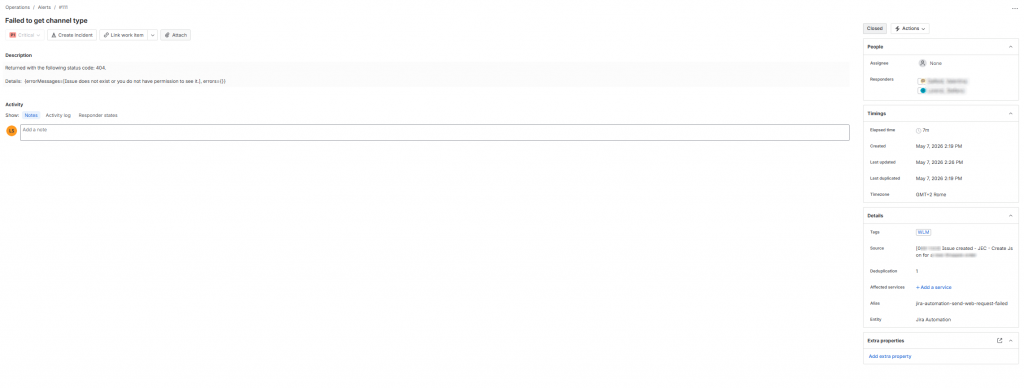
A Jira alert usually contains the key information needed to understand the issue and respond quickly.
Title or summary
A short explanation of the event.
Description
More detail about what happened and what may be affected.
Priority or severity
An indication of how urgent the issue is.
Source
Where the alert came from, such as a workflow, an integration, or a monitoring tool.
Timestamp
When the event occurred.
Status
Whether the alert is still open, has been acknowledged, or has already been resolved.
Assignee or responder
The person or team expected to handle it.
Related object
A link to the related issue, incident, service, or job.
Tags or metadata
Additional information that helps add context, such as the environment or the affected service.
A simple example could be an alert showing that an automation job failed, the severity is high, the source is an external integration, and the incident has been assigned to the operations team.
Why are alerts important?
Automated processes should not run without oversight. If no alert is generated when something fails, problems may stay hidden until users report them or the impact becomes more serious.
Alerts are useful because they make issues visible straight away. They also help teams respond faster, coordinate more effectively, and reduce the risk of wider disruption. In practical terms, they make automations more dependable.
How can alerts be integrated into automation?
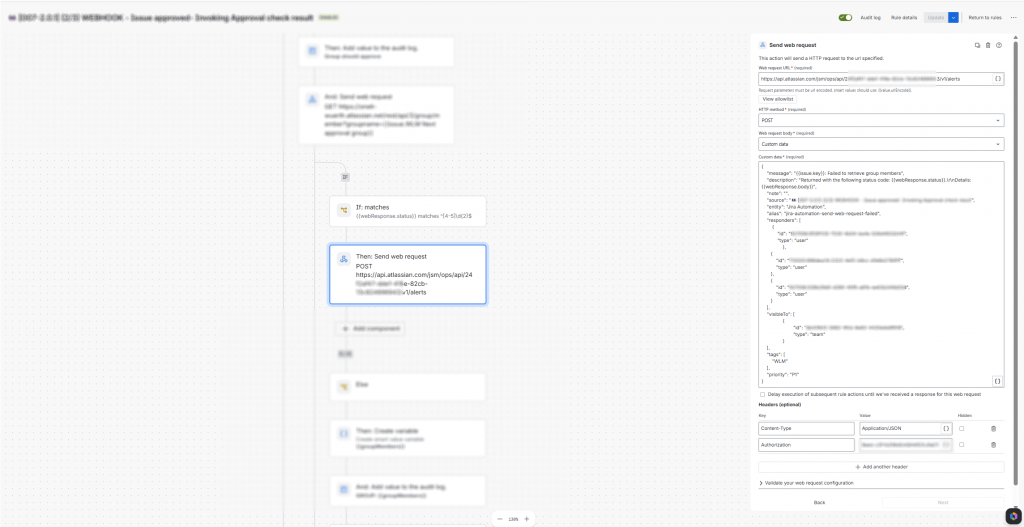
A practical way to integrate alerts is through Jira Automation, using the Send web request action.
The idea is simple: When a request sent to another endpoint doesn’t complete successfully and returns a 40x or 50x response code, Jira Automation can call a dedicated endpoint and pass the information needed to create an alert in Jira Operations.
This removes the need for any manual steps. The alert is generated as part of the process itself, not after someone notices that something went wrong.
A typical flow is very straightforward:
- A request is sent to another endpoint
- The endpoint returns a 40x or 50x response code
- Jira Automation uses Send web request to call the alert endpoint
- Jira Operations receives the request and creates the alert
- The appropriate team is notified
This kind of integration keeps the process simple and effective. It ensures that failures are captured immediately and passed on to the right team without delay.
Why this integration matters
Adding alert notifications to automation is a practical way to improve reliability. It gives teams better visibility, shortens reaction times, and makes responsibilities clearer when something goes wrong.
As automation becomes more widespread, this kind of integration helps ensure that efficiency does not come at the expense of control.
Final thoughts
Automation should make work easier, not less transparent. Integrating alert notifications into automated workflows helps teams stay informed, respond quickly, and keep operations under control.
Alerts are not just a useful addition. In many cases, they are what makes automation truly reliable.
It would also be valuable to see Atlassian introduce a native Jira Automation action for alert creation in the future, making this type of integration even more immediate and easier to manage.
These Solutions are Engineered by Humans
Did you find this article interesting? Does it match your skill set? Our customers often present us with problems that need customized solutions. In fact, we’re currently hiring for roles just like this and others here at Würth IT Italy.
https://www.wuerth-it.it/en/job/kick-off-your-career-in-our-it-consulting-team/

Stefano Lorenzi
I’m a tech enthusiast with a deep passion for IT in all its forms—always curious, always building, always improving.
I don’t just work on ideas—I turn them into reality. Give me a vision, and I’ll find a way to make it tangible, efficient, and impactful.
Author

Latest posts by Stefano Lorenzi
31. 03. 2026
Atlassian
Our Forge App for Inventorying IT Assets