30. 09. 2026
Atlassian, Service Management


Tired of wasting time on repetitive, mundane tasks?
Want to focus on more strategic activities while saving time and money?
Looking to automate emails to your team?
Well, automating your processes with Jira is the solution for you!
What is Automation in Jira?
Jira helps you automate repetitive tasks so you can focus on what really matters. Here are a few examples:
- Manage any phase of the workflow by moving tickets from one status to another
- Manage tickets by automatically assigning them to team members
- Set due dates
- Send notifications to team members when a ticket changes status or is nearing its due date
- Automatically create sub-tasks when a new ticket is created
- Set triggers (events) and specific actions that are executed automatically
- Set priority based on certain conditions
- Modify fields
- Automatically open and close tickets
- And more

Why Automate with Jira?
- Increases productivity: eliminate repetitive work and let your team solve bigger problems.
- Reduces errors: automation ensures process consistency and minimizes the risk of human error
- Improves visibility: with automation, you always have a clear view of the status of your projects
- Accelerates delivery times: automated processes are faster and more efficient, allowing you to accelerate delivery times
How to Get Started with Jira Automation?
- Identify processes to automate: first, analyze your workflows and identify those repetitive activities that consume excessive time
- Configure automation rules: use Jira’s rule builder to create your custom automations
- Test and optimize: once created, you need to test the automations and verify that they work correctly
Automation Examples
Here are two examples of automation applications:
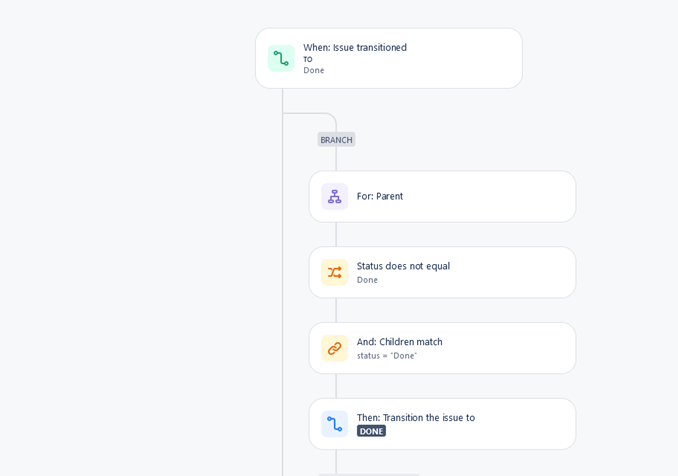
- Automatic closure of an issue: The first example of automation is applied to a workflow. This automation assumes the existence of a parent issue, such as an Epic, which contains one or more child issues. When all child issues are closed by setting the status to Done, the parent issue will also be closed automatically:
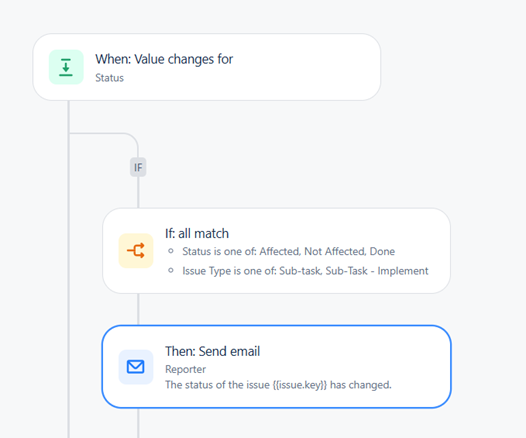
- Automated notifications: The second example involves sending an automatic notification to the reporter when the status of a ticket changes, for example when it’s moved to a new phase:
Conclusion
Automations in Jira are a powerful tool for improving team efficiency and productivity as they ensure greater accuracy and transparency and reduce the risk of errors.
They also save time, allowing the team to focus on more strategic activities and consequently improve productivity.
Adopting well-designed automations is key to optimizing workflows in Jira and thus increasing the overall efficiency of any organization.
For more details, see the official documentation: What is an automation?

Fabiana Pittalis
Author

Latest posts by Fabiana Pittalis
15. 12. 2025
Atlassian
Jira Forms vs JSM Forms: The Magic of Forms
29. 09. 2025
Atlassian
Who Does What? A Useful Guide to User Roles
26. 06. 2025
Atlassian
Confused by Atlassian Teams, Groups, and Managed Teams? Here’s the Difference