30. 09. 2026 Marco Berlanda AI, Development

AI suffers like you do, in a very long meeting

If you have spent any real time with an AI coding agent, you know the feeling. The first twenty minutes are great, the agent finds the right file, makes the right edit, explains itself clearly, this is amazing, what a time to be alive!

Just like when you are stuck in a 3 hours meeting, after 1.5 hours you don’t even remember when you got there, you you are, and when did you start working there.

Same goes for using LLMs, everything seems great until it starts showing: around the fortieth tool call, it quietly stops being good. It forgets a constraint you stated very clearly, or it re-reads a file it already read. It starts suggesting fixes for a problem you solved half an hour ago. There’s no obvious problem, it just seems it got dumber and dumber as you go. Weird right…

Most people read that as “ah Claude today seems more dull than usual” but the truth is, this is a very common and predictable scenario, which is bound to happen.

Claude’s context window fills up fast, and performance degrades as it fills. Period. That’s how it works.

I spent a while writing up how these agents actually work for my team, mostly so we would stop trading “folklore” or “pseudoscience”. What follows is the part that turned out to matter most. In this article, my examples use Claude Code, because that is what I run most, and because it’s the best documented, but the same can be basically applied to Codex and OpenCode too.

The commands and the limits cannot though, and I will get to that later.

The preconception is wrong

It is tempting to picture the context window as stacking, linear and predictable, like water in a bucket. Fine until full, then it overflows, and until that point everything inside is equally available. That picture is both comforting and wrong.

It behaves more like a whiteboard where, as you finish available space, you start writing on top of previously written text. The information is technically still there. The model just attends to it less reliably because it’s harder to reach and read.

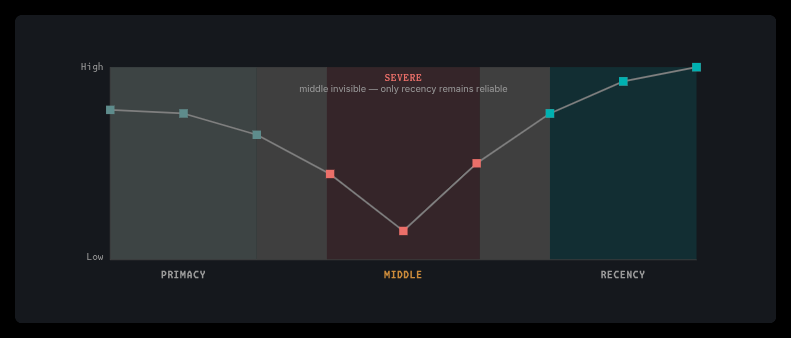
Attention is strongest at the edges (of the context):

  • The start holds the system prompt, your CLAUDE.md, your project rules. Visible to every later computation.
  • The end holds your current message and the most recent tool results. Closest to where the model is predicting.
  • The middle degrades first, and degrades further as the window fills.

This is measured, not vibes. The foundational paper is Liu et al., Lost in the Middle: How Language Models Use Long Contexts (2023). Chroma Research’s Context Rot (2025) found non-uniform degradation across 18 frontier models as input length grew, and added a detail I find very useful in practice: plausible but irrelevant content hurts more than obvious noise. A retrieved file that looks relevant but isn’t is worse than junk (so be careful)

https://agenticoding.ai/

Two consequences follow, and as you imagine they have dire consequences:

First, (once again) less is more. A focused 60K-token context beats a cluttered 300K one, even though both “fit”. Second, position matters, a lot. Where something sits in the context window, changes how reliably it gets used!

Which also means a bigger window is most definitely not the fix people hope it is. A 1M-token window gives you more room, not equal attention across that room. The same degradation at the middle exists at every size. You can actually say that this is “by design”. It’s a known trade-off that comes from using transformers (which is what evaluates tokens in a relationship-like way).

Context grows around you prompt

Here is the trap, and it took me embarrassingly long to see it clearly. I’m sorry to disappoint my fans 🙁

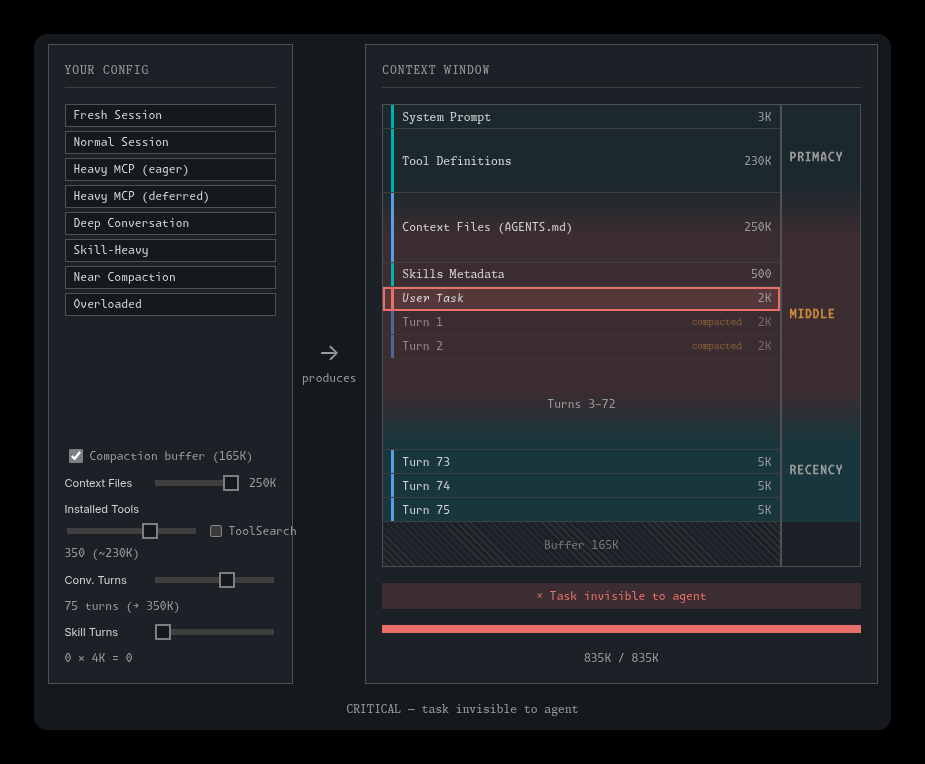
As you do, you state a constraint at the start of a session. Fifty tool calls later, your original instruction has tens of thousands of tokens sitting between it and the end of the window. It is no longer near the end, itt has drifted into the weak middle! And you didn’t move it, the models’ context grew around it!

This is precisely why the agent “forgot” something you said perfectly clearly, in writing, in the same conversation. And you think it got dumber and unreliable.

https://agenticoding.ai/

There is a corollary here that reads as nonsense until you think about ordering though: a 65%-full window bloated with tool definitions can be worse than an 80%-full window that is mostly conversation. Conversation sits below your task, in the strong recency zone. Tool schemas sit above it, pushing it down. (That one is a heuristic from the Context Engineering chapter of agenticoding.ai rather than a measured figure, but the mechanism is real.)

The practical fix is almost stupidly simple: restate critical constraints as you go. If a requirement matters five steps into a task, say it again at step five. It feels like nagging (well, it is to be honest) but you need it. You are moving the constraint back into the zone where it gets attended to. Not ideal, but it does work.

And when the agent ignores something you clearly said, suspect position before you conclude it can’t do the job! Sometimes doing a hand-off and starting a new sessions helps a lot.

What’s actually in there?

Before you type anything, this is what roughly is loaded. The token counts are purely just to illustrate, taken from documentation examples, and yours will clearly be very different:

WhatIllustrative cost
System prompt4,200
Project CLAUDE.md1,800
Auto memory index680
Skill descriptions (one-liners only)450
Personal global CLAUDE.md320
Environment info280
MCP tool names (schemas deferred)120

That is a small startup bill, THEN you start working, and the real consumers show up. Per the docs, file reads dominate context usage, so one auth file might be 2,400 tokens. An npm test run, 1,200. A grep, 600. Do that forty times and you can see where the window went. (spoiler: I don’t think the sun shines there)

The cheap and the expensive mechanisms sort out like this:

FeatureCost
CLAUDE.mdPaid on every single request
SkillsDescription upfront, body only when invoked
MCP serversNames upfront, schemas on demand
SubagentsIsolated from the main session
HooksZero, unless the hook deliberately returns content

That last row is the “sleeper” one: hooks are shell commands the harness runs on events, outside the model entirely, so they cost nothing in context! They are the cheapest extensibility mechanism you have and most people never touch them. Crazy!

When a session starts feeling sluggish or forgetful, /context shows you exactly what is consuming the window, including which memory files actually loaded. That last part is invaluable when an instruction isn’t taking effect, it can really shine light on why/what/when. Also, /doctor is the closest thing to a linter for your setup, flagging unused skills and servers against what they cost you.

Compaction IS lossy, so what can we do?

When you approach the limit, Claude Code does two things in order. First, it clears older tool outputs first (the bulky results you have already acted on). If that isn’t enough, it summarizes the conversation.(compaction)

Your requests and key code snippets are preserved. Detailed instructions from early in the conversation may be lost. That is the trade, and it is worth knowing before you rely on it.

What survives, thankfully, is the useful part:

MechanismAfter compaction
Project CLAUDE.md, auto memoryRe-injected from disk
The plan written in plan modeRe-injected from disk
Files read or editedRe-read, up to five, most recently modified first
Invoked skill bodiesRe-injected, capped at 5,000 tokens each and 25,000 total
Skill descriptions (the startup index)Do not reload. Only skills you actually invoked persist
Everything else in conversationSummarized away

There is one consequence here worth more than the rest of the table put together. Files get re-injected. Conversation gets summarized away. So anything that must survive a long session belongs in a file on disk, not in chat.

That is also why plan mode can save the day on non-trivial work. The plan is written to disk, so it comes back after compaction, unlike anything you simply “said”. Though the docs are honest about the other side of it: plan mode adds overhead, and if you could describe the diff in one sentence, skip it (unless it’s comfortable for your colleagues to review it and understand the PR better)

If you ever see the error Autocompact is thrashing: the context refilled to the limit, compaction succeeded and then a file or tool output immediately refilled the window, several times running. Read the oversized file in chunks, run /compact keep only the plan and the diff, move the large-file work to a subagent, or just clear.

Honestly, repeated mid-task compaction is best read as a scoping signal. It usually means your tasks are too big, not that your window is too small: so maybe switch to a model with a bigger context, or split your task into waves for example.

The cheapest gain you can get is /clear

It costs nothing. /compact costs a summarization request over your whole conversation. They are not the same lever, and people reach for the expensive one out of lazyness.

It’s interesting because a few things follow from that, and from how caching works:

Claude Code caches the prefix of each request, and cached tokens bill at roughly 10% of the standard input rate.

So cache hits are the biggest cost lever you have!

The mechanic that matters: it is prefix matching, so a change anywhere in the prefix recomputes everything after it. There is no per-file or per-segment caching, at least not yet.

Which makes /rewind (or Esc Esc on an empty prompt) better than /compact when you want to abandon a wrong path. Rewinding truncates back to a prefix that is already cached, so the next request hits the earlier cache entry. Compaction builds a new prefix from scratch (it also takes quite a while), while rewinding is cheaper and faster, and I use it far more than I expected to to be honest.

Just do not mistake it for version control. Every prompt creates a checkpoint, and file snapshots are kept for the 100 most recent, but changes made by Bash commands are not tracked, subagent edits are not restored, and symlinked paths are not restored. A migration that ran, a package that installed, a branch that got pushed: a file-level rewind will not touch any of it.

So please, please do commit whenever you reach a safe and sound place. It’s like working alone on an IDE that might crash, but 100x worse and more risky!

Also, another caching habit worth getting used to: do not switch model or effort mid-task without a reason, because each combination has its own cache and switching throws the whole thing away.

Verification and guardrails are key

This is the most emphasised practice in the official docs, and it is first for a reason. Give the agent a way to check its own work. A test suite, a build exit code, a linter, a fixture diff, a screenshot. Anything with a pass or a fail.

Ideally, the first thing to do before refactoring, adding a complex issue, etc, is to add as many tests as possible to “cristallize” the current working situation and make sure nothing the AI does breaks pre-existing features or parts of your code

Without a feedback signal, you are the only error detector in the loop, and you are reviewing generated code that maybe looks right, but is it? Which is a specific and nasty position to be in, because looking right is exactly what these models are good at. Can’t trust them, sorry.

There is a name for the failure mode, and it is a good one: the trust-then-verify gap. Accepting “done” without checking. The rule that goes with it is blunt, and must be 100% enforced: if you can’t verify it, do no ship it!

So ask for evidence, always: “tests pass” is a just an unverifiable claim. The actual test output is waaaaay more reliable. They are there to “please” you, they will lie to you, don’t blindly trust them, ever.

This is a bit advanced, but you should use /goal to set an evaluator that re-checks after every turn across a session. Use a Stop hook when the check must be deterministic, which blocks turn completion until it passes (Claude Code overrides it after 8 consecutive blocks so it can’t deadlock). Put a fresh-context reviewer on anything risky that you wan to be double, triple checked.

One honest caveat about that last one though: a reviewer prompted to find gaps will usually report some, even when the work is sound. Chase every finding and you will over-engineer your way into a worse codebase, this is actually a real danger. A workaround is to tell your reviewer to flag only what affects correctness or the stated requirements.

CLAUDE.md Is the only thing you pay for every time

Almost everything else loads on demand. CLAUDE.md is sent with every request, which makes it the one place where bloat piles up silently, like a rock in your bag, when you climb a mountain.

The target is under 200 lines. This is the single most repeated piece of advice in the docs, and the reason is not aesthetic. Claude Code merges files from the project root, from subdirectories, from .claude/rules/, from your user config, and from enterprise policy. Every single merged file adds more content between the prefix and your actual task, and the total cost is invisible unless you audit every level!

The test I now apply to every line: would removing this cause the agent to make mistakes? If not, delete it. Project knowledge belongs in your README. CLAUDE.md is for what changes how the agent operates, not for what the project does.

A formulation I stole from agenticoding.ai because it is genuinely clarifying: CLAUDE.md holds what the agent should always know, meaning architecture, conventions and constraints, while skills hold what the agent should know how to do, meaning workflows loaded on demand. If something is only sometimes relevant, it should not be paying rent on every request.

Two details most people miss. HTML comments are stripped before injection, so they are free maintainer notes for your team. And AGENTS.md is not read by Claude Code at all, so if your repo has one for Copilot or Cursor or Zed, import it with @AGENTS.md and keep a single source of truth. (Very important, and otherwise it can get very tricky very fast)

Also, and this is not paranoia for once: context files are a super inviting injection surface for threat actors. “Rules file backdoor” attacks use invisible Unicode and similar evasion. Keep these files minimal, version-controlled, and code-reviewed like any other piece of code.

Three almost free things

Once you accept and understand that context is the most scarce resource, cheap mechanisms suddenly stop looking like advanced features and start to look like the obvious and default thing to do:

Subagents

Think of one as the agentic equivalent of a function call: the dispatch prompt is the parameter, the synthesis is the return value. A subagent gets its own context window and returns only its final text. In the docs’ own example, a subagent read 6,100 tokens of files and returned 420. The parent pays for the conclusion instead of the search. This is one of the biggest wins there is!

It makes exploration the obvious thing to delegate, since “find where X is implemented” burns most of its tokens on dead ends you will never need to see. Honestly, by now Claude code does it almost by default.

Hooks

Zero context, deterministic, and they run outside the model. Anything you find yourself asking for repeatedly should probably be a hook instead of a sentence in CLAUDE.md. “Always run the formatter after editing” works far better as a PostToolUse hook than as a line the model might not attend to, because a hook is enforcement and a CLAUDE.md line is advisory.

Exploiting this, we just started to work on a “AI helper” plugin, that can help you use AI more effectively, and avoid pitfalls:

More on this soon

The docs’ best example of leverage is a PreToolUse hook that greps a log file and cuts context from tens of thousands of tokens down to hundreds. Worth knowing too: PreToolUse hooks run before the permission prompt in every mode, so a hook deny blocks even under --dangerously-skip-permissions.

A CLI instead of an MCP server

Every MCP tool schema is serialized JSON with repeated type annotations and verbose descriptions. The Agent SDK docs put numbers on it: 50 tools can use 10 to 20K tokens, and tool-selection accuracy degrades past roughly 30 to 50 loaded tools, so watch out. Especially do not blindly add tons of “miracolous” plugins from Github. Please don’t.

Meanwhile gh, aws, gcloud and sentry-cli add no per-tool listing at all, because the agent already knows how to drive them through Bash. Reach for MCP when you need structured, authenticated access a CLI genuinely can’t give you, not as the default.

They do not behave the same 🙁

The principles above hold across Claude Code, Codex and OpenCode basically entirely. The defaults and the limits absolutely do not, and a couple of the differences are the kind you would rather not discover in production.

OpenCode allows every operation without asking. Its own documentation says so plainly. Claude Code is read-only until you approve. So if you move from one to the other you inherit a far more permissive setup and nobody tells you! The documented hardening is to set edit and bash to "ask". Rule precedence is inverted too: Claude Code takes the first match in deny-ask-allow order, OpenCode takes the last matching rule, which is why its docs tell you to put the wildcard first and the specific rules after. A ruleset copied across will not behave the same way. Worth knowing!

Codex has no undo. Not omitted, removed. You get /fork to branch, /side for a throwaway tangent, and plain git. OpenCode has /undo and /redo, backed by a shadow git repo, which also means it silently does nothing outside a git repo.

Compaction and limits diverge. Codex compacts at 90% of the window and you cannot disable it, only lower the ceiling. It also enforces a 32 KiB cap on the instruction file and truncates past it, where Claude Code has a 200-line target and OpenCode has no cap at all. Codex is unusually forgiving about switching models mid-session, because its cache key is the session rather than the model. And OpenCode’s environment block contains today’s date, so a session running past midnight invalidates its own cached prefix, which is a delightful thing to debug at one in the morning.

Another (maybe obvious) but rather interesting one all three share: none of them can undo the side effects of a shell command. Commit to git whichever you use.

What always works well

1. Clearing between unrelated tasks

The most boring habit on this list and the highest return. Long mixed sessions are the most common cause of bad output. It is free. There is no reason not to.

2. Treating “two failed corrections” as a hard stop

After two rounds of “no, not like that”, clear and write a better initial prompt. Correcting over and over pollutes the context with wrong approaches, and the model keeps attending to them. Five rounds of correction is not persistence, it is a context problem you are actively making worse.

3. Writing state to disk at phase boundaries

For anything larger than a single change: let the agent interview you, write the answers to SPEC.md, then start a fresh session to implement. The spec survives compaction. Your conversation does not. The best specs name files and interfaces, state what is out of scope, and end with an end-to-end verification step.

4. Being specific enough to avoid a search

Vague prompts tend to often trigger broad scanning: “fix the bug” reads twenty files. “The null check in parseConfig at line 40 fails on empty input” reads one. The difference is thousands of tokens you get to spend on the actual work instead.

So, was it worth writing down?

I think so, but not for my initial idea to be honest.

I thought I was writing a list of tips. What I ended up with is one fact and many of its consequences. The only fixed point is that performance degrades as the window fills. Everything else is a way of spending that budget deliberately and more accurately instead of accidentally.

Which kinda reframes what these tools are, doesn’t it? They are not oracles you consult, and they are not junior developers you delegate to. They are systems with a resource you control and a failure mode you can predict. Once you see the context window as a budget rather than a bucket, the habits stop feeling like ritual and start feeling like engineering: keep the window small and relevant, put anything important on disk, always give the agent a way to check itself, and ask for the evidence rather than the claim.

In a way, it definitely is an amplifier, it can make you great, or it can lead you to the biggest f**kup of your whole career. Don’t drink and vibe code, safety first!

None of that is that shocking. There is no super secret prompt in here that unlocks a hidden mode or finds Waldo. But if you used LLMs for complex tasks, like ever, you know exactly how, tricky, delicate, and wasteful this whole process can become.

After all nobody wants to have their work deflagrate 80% in the plan, because the model lost it (and you wasted time and 400$ of tokens) wouldn’t you agree?

Thanks for reading!

These Solutions are Engineered by Humans

Did you find this article interesting? Does it match your skill set? Programming is at the heart of how we develop customized solutions. In fact, we’re currently hiring for roles just like this and others here at Würth IT Italy.

Marco Berlanda

Marco Berlanda

UX Front-end engineer by day, UX wizard by night, and an Interaction design ninja all the time. Always on the hunt for those ‘wow, didn’t see that coming!’ solutions to problems.

Author

Marco Berlanda

UX Front-end engineer by day, UX wizard by night, and an Interaction design ninja all the time. Always on the hunt for those ‘wow, didn’t see that coming!’ solutions to problems.

Leave a Reply

Your email address will not be published. Required fields are marked *

Archive