
20. 02. 2017
Tobias Goller
NetEye
Open Source assicura flessibilità nell’integrazione delle notifiche di monitoraggio tramite SMS
Icons by Dod Cosmin / CC BY 3.0 and Icons8 / CC BY-ND 3.0
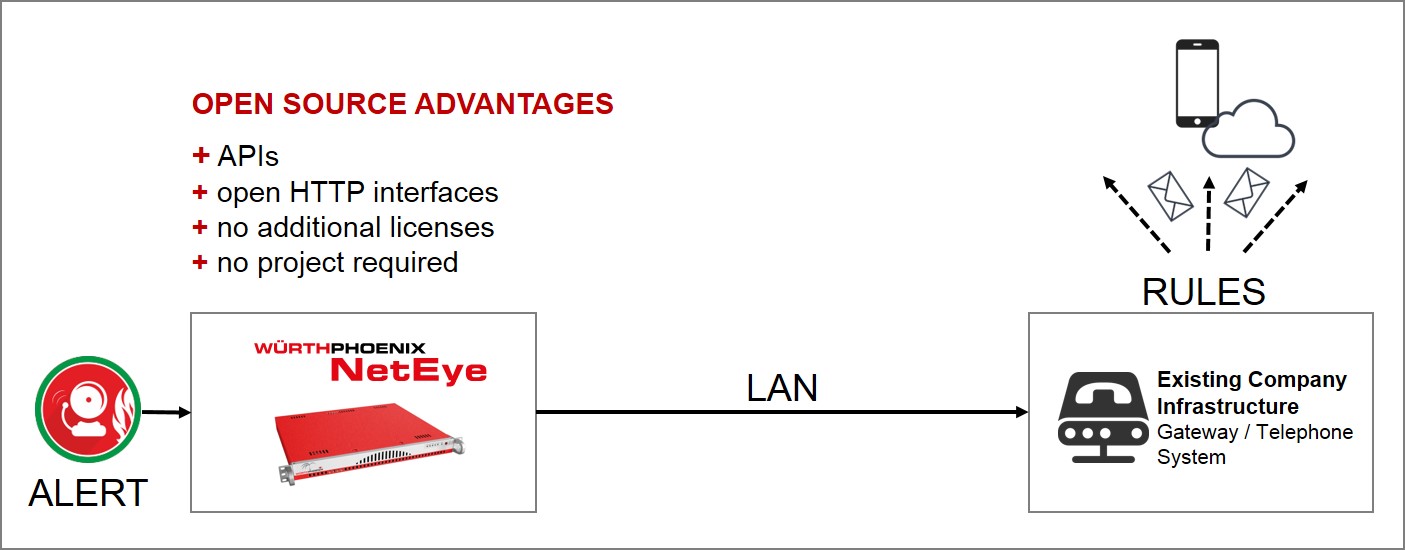
Esistono due grandi vantaggi nell’utilizzo di NetEye, il nostro sistema open source di IT System management, relativi alle notifiche di monitoraggio via SMS:
- Maggiore flessibilità nell’integrazione
- Possibilità di inviare notifiche anche nel caso in cui il sistema non risponda.
Come saprete, le soluzioni open source permettono la comunicazione con vari sistemi di notifica, come ad esempio l’SMS gateway, lo stesso vale quindi per NetEye. I gateway possono essere connessi sia alla rete che direttamente all’appliance di monitoraggio. In questo contesto, la caratteristica open source di NetEye concede due vantaggi:
Maggiore flessibilità nell’integrazione
NetEye permette di integrare in modo semplice diversi tipi di SMS gateway, utilizzando API o interfacce HTTP. In ogni caso, investire tempo nella creazione di interfacce ad hoc per permettere l’integrazione tra il sistema di monitoraggio ed il modulo SMS gateway è sempre un successo, in quanto permette di soddisfare al meglio le richieste specifiche del cliente. Inoltre questa integrazione può essere sviluppata senza troppe difficoltà, anche nel caso in cui si abbiano solo conoscenze base di scripting.
Durante le attività di configurazione si possono inoltre ottimizzare le impostazioni dei gateway esistenti, al fine di migliorare le notifiche via SMS. In sintesi, vi invito ad investire tempo durante l’integrazione, perché è l’unico modo per creare una struttura di notifica mirata ed uniforme per l’intero monitoraggio. Le regole sugli SMS gateway esistenti non devono essere ridefinite ma solo integrate, così la struttura costruita a priori può essere mantenuta e sarete in grado di utilizzare il know how già acquisito.
I messaggi di notifica possono essere impostati individualmente tramite l’interfaccia di configurazione standard di NetEye.
Possibilità di inviare notifiche anche nel caso in cui il sistema non risponda
Oltre all’integrazione dei gateway già usati, si può connettere un ulteriore SMS gateway direttamente al server NetEye, al fine di ricevere notifiche anche nel caso in cui il sistema stesso non risponda. Vi consiglio di fare ciò anche nel caso in cui avete già correttamente creato le interfacce.



Tobias Goller
NetEye Solution Architect at Würth IT Italy
I started my professional career as a system administrator.
Over the years, my area of responsibility changed from administrative work to the architectural planning of systems.
During my activities at Würth IT Italy, the focus of my area of responsibility changed to the installation and consulting of the IT system management solution WÜRTHPHOENIX NetEye.
In the meantime, I take care of the implementation and planning of customer projects in the area of our unified monitoring solution.
Author

Latest posts by Tobias Goller
16. 02. 2026
Unified Monitoring
OpenShift Monitoring in NetEye
13. 10. 2025
Log-SIEM, Unified Monitoring
Elastic Defend: Experiences
18. 07. 2025
Automation, Cloud
Running SOS Berlin JobScheduler in Containers: A Step Toward Cloud-Native Scheduling
16. 04. 2025
NetEye, Unified Monitoring
Application Performance Monitoring in NetEye with Elastic APM and OpenTelemetry