


31. 03. 2026
NetEye

Preface
In the landscape of self-hosted digital asset management (DAM) solutions, more and more companies are choosing platforms that allow complete control of their corporate data. Among these, Immich is rapidly emerging as the best self-hosted replacement for Google Photos, thanks to its advanced AI capabilities, high performance, and modern architecture.
A Comparison of the Leading Self-Hosted DAM’s
- Immich: specializes in photo/video management with integrated AI
- Nextcloud: is a comprehensive cloud platform with collaborative modules and file management
- Piwigo: is a mature, customizable DAM optimized for large photo archives
| Feature | Immich | Nextcloud | Piwigo |
|---|---|---|---|
| Primary Purpose | Modern AI‑powered photo & video DAM, Google Photos–like experience | Full cloud collaboration suite with file sync and optional photo module | Stable, customizable photo gallery system with themes and plugins |
| AI / Facial Recognition | Advanced (99.8% accuracy) + video facial recognition | Limited (25%–75% depending on plugin) | Minimal; manual tagging or basic plugins only |
| Video Support | Full support + GPU‑accelerated video analysis | Limited in photo modules | Plugin‑based only (not native) |
| Performance with Large Libraries | Very high (microservice architecture optimized for media) | Good, but not optimized for heavy media workloads | Excellent — handles 500,000+ photos easily |
| User Experience | Modern, fast, Google Photos–like timeline | More complex, geared toward team productivity and cloud workflows | More traditional UI but highly customizable via themes |
Requirements
Hardware Requirements
- Minimum: 6 GB RAM, 2 CPUs
- Recommended: 8 GB RAM and 4 CPUs to fully utilize AI
Software Requirements
- Ubuntu 22.04 or 24.04
- Docker Engine + Docker Compose
Installation Step-by-Step
1. Installing Ubuntu as Operating System
- Create a virtual machine with the above hardware requirements and install Ubuntu OS
- Update the system
# apt update && apt upgrade -y
2. Docker installation
- This command will use curl to grab the Docker install script and pass it directly to the terminal.
# curl -sSL https://get.docker.com | sh - Restart system
3. Preparing the Immich environment
- Create a directory where we will store the Compose and environment files for Immich
# mkdir -p /opt/stacks/immich
# cd /opt/stacks/immich
- Download official file (compose.yaml – .env)
# cd /opt/stacks/immich
# curl -Lo compose.yaml https://github.com/immich-app/immich/releases/latest/download/docker-compose.yml
# curl -Lo .env https://github.com/immich-app/immich/releases/latest/download/example.env - .env file configuration
UPLOAD_LOCATION=./library
DB_DATA_LOCATION=./postgres
IMMICH_VERSION=release
DB_PASSWORD=xxxxxx
DB_USERNAME=postgres
DB_DATABASE_NAME=immich - Start up Immich Docker container (download Immich and its various components)
# docker compose up -d
- Follow the first time settings on the following link
http://immich.domain.com:2283
Create Admin Account
Theme settings
Storage Template
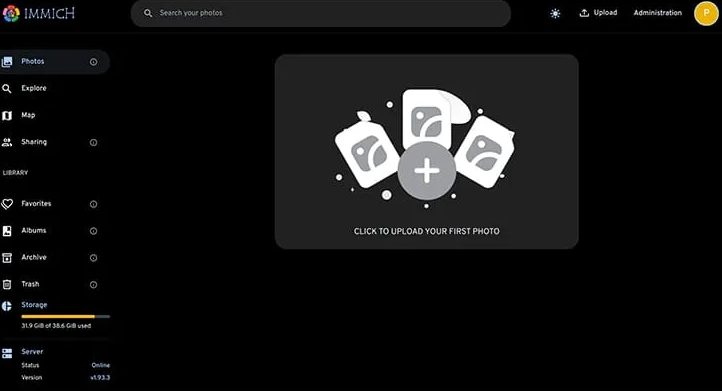
- Update the version of Immich to the latest stable release
# docker compose pull && docker compose up -d
4. Installing and Using NGINX as a Reverse Proxy for Immich
To make Immich securely, scalably, and professionally accessible within an enterprise context, it’s highly recommended to deploy NGINX in front of Immich Docker containers. This approach allows for HTTPS, clean URLs, compression, and caching, as well as offering greater control over the platform’s security.
According to best practices outlined in the latest Immich technical guides, using Nginx is considered the standard for a production installation.
Create SSL certificates and run the following commands:
# sudo apt install nginx -y
# sudo systemctl enable nginx
# sudo systemctl start nginx
# sudo ufw allow 'Nginx Full'
# vi /etc/nginx/sites-available/immich
server {
listen 443 ssl;
server_name immich.domain.com;

ssl_certificate     /etc/nginx/certs/fullchain.pem;
ssl_certificate_key /etc/nginx/certs/privkey.pem;

client_max_body_size 50000M;
proxy_request_buffering off;
client_body_buffer_size 1024k;

proxy_set_header Host              $host;
proxy_set_header X-Real-IP         $remote_addr;
proxy_set_header X-Forwarded-For   $proxy_add_x_forwarded_for;
proxy_set_header X-Forwarded-Proto $scheme;

proxy_http_version 1.1;
proxy_redirect     off;

proxy_read_timeout 600s;
proxy_send_timeout 600s;
send_timeout       600s;

location = /auth/onboarding {
rewrite ^ /photos permanent;
}

location / {
    proxy_pass http://immich.domain.com:2283;
    proxy_set_header Host $host;
    proxy_set_header X-Real-IP $remote_addr;
    proxy_set_header X-Forwarded-For $proxy_add_x_forwarded_for;
    proxy_set_header X-Forwarded-Proto https;
    proxy_set_header   Upgrade    $http_upgrade;
    proxy_set_header   Connection "upgrade";
}
}
# sudo ln -s /etc/nginx/sites-available/immich /etc/nginx/sites-enabled/
# sudo nginx -t
# sudo systemctl reload nginx
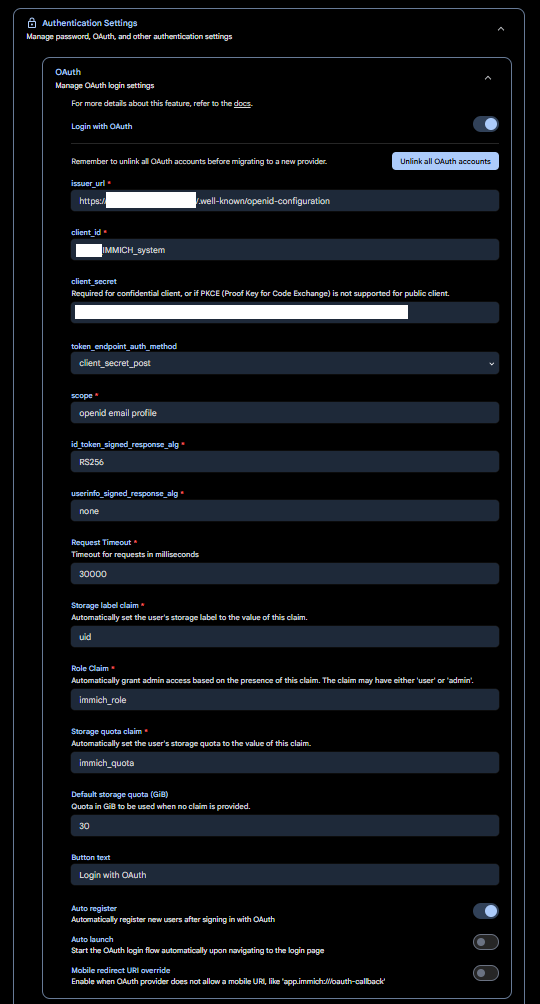
5. Single Sign-On (SSO) configuration
Single Sign-On (SSO) is a system that allows users to authenticate once to access multiple corporate applications and services without re-entering their credentials each time.
In a professional context, SSO has become an essential requirement to ensure security, productivity, and regulatory compliance.
On the Immich homepage, click at the top right on
‘Administration’
‘Authentication Settings’
‘OAuth’
and fill in with your data
6. Use of immich
With all the infrastructure now operational—Immich installed, NGINX configured, and integration with PingIdentity for SSO and centralized user management—DAM environment is finally ready to be used to its full potential.
From now on, we can:
- create custom albums
- organize photos by events, categories, or teams
- upload new images directly from the web interface or mobile apps
- manage internal collaborations by sharing albums with other users
- leverage smart search, timeline, and metadata management features
Immich is designed specifically to make these steps simple, fast, and intuitive, offering a modern and professional experience for managing multimedia content.

Antonio Cerullo
Site Reliability Engineer at Wuerth IT Italy
Author

Latest posts by Antonio Cerullo
24. 01. 2025
Knowledge Management, Service Management
Dynamics 365 Finance & Operations (On-Premises) Certificate Rotation