29. 09. 2026
Atlassian, NetEye, Unified Monitoring

30. 09. 2026
Stefano Lorenzi
Atlassian
SELF INVENTORY FOR SHARED DEVICES: BRINGING SHARED IT ASSETS UNDER CONTROL
Why shared devices need dedicated governance
Not every IT asset is assigned to an individual employee. Monitors, docking stations, meeting-room equipment, printers and other devices are often shared across an office or location.
Although these assets have no individual owner, they still represent a significant operational and financial value. Without regular verification, they can become invisible to IT management, Finance and the Controller Office, leading to inaccurate records, delayed replacements and ineffective budget planning.
To address this need identified within Würth AWKG, we extended our Atlassian-based self-inventory application to cover shared IT devices.
Extending self inventory to technical office owners
The original solution was designed for employees to verify the assets assigned to them. The new use case extends this process to technical office owners, who are responsible for checking the shared assets located in their assigned areas.
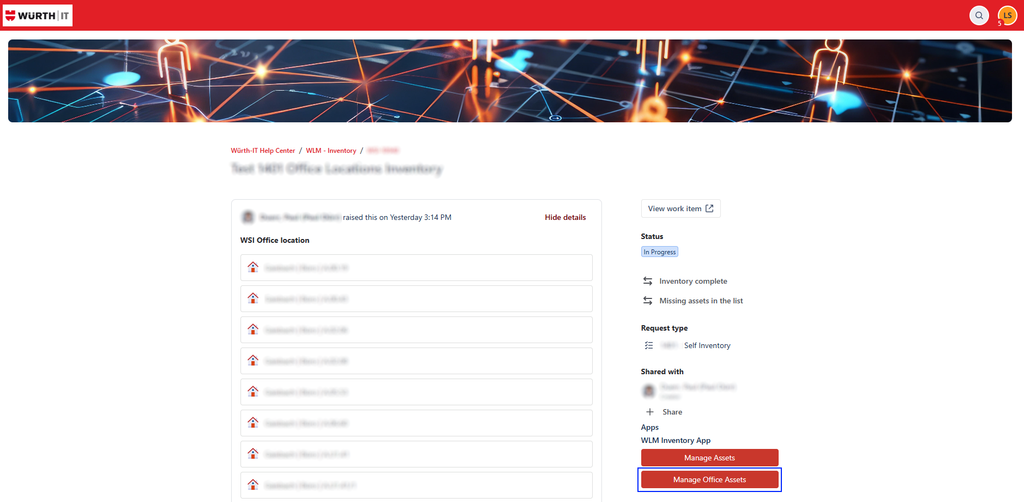
The inventory can be divided into multiple tickets, using office location as the main filter. This approach makes it possible to assign clear responsibilities, distribute the workload and track progress across different offices.
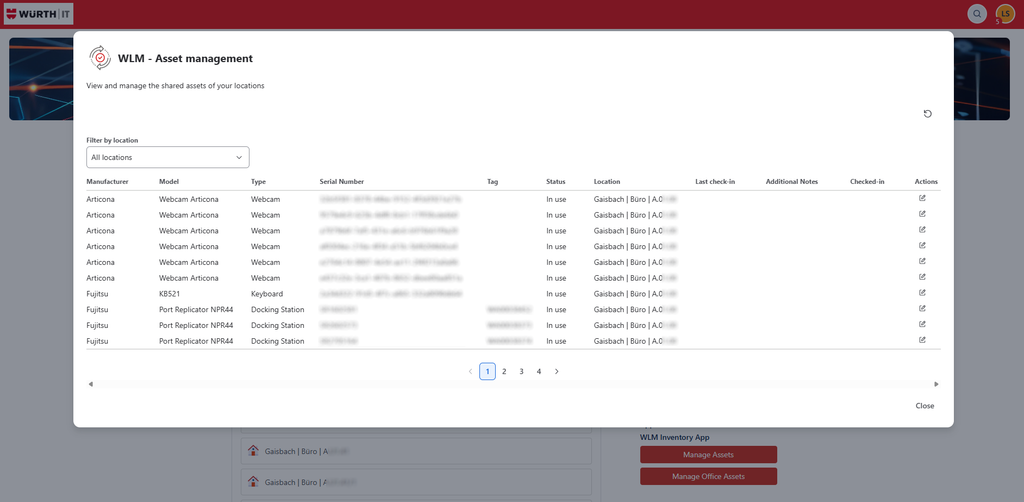
For each asset, the process records:
- physical presence;
- current condition;
- verification date;
- person who performed the check;
- any discrepancy requiring further investigation.
A simple, traceable verification process
The process consists of four main steps:
- Create the inventory ticket – The ticket is linked to one or more offices and defines the scope of the check.
- Perform the physical verification – The technical owner compares the assets found on site with the inventory list and assesses their apparent condition.
- Record the results – The date and responsible person are stored for each verified asset, creating a reliable audit trail.
- Close the ticket – The verification is completed using one of two standard outcomes:
- Inventory complete: all expected assets have been verified;
- Missing asset in the list: an asset is found on site but is not included in the inventory list.
Standardized outcomes provide a clear distinction between completed checks and cases requiring corrective action.
Handling discrepancies through the CMDB
If an issue is identified for one or more assets, the responsible technical team investigates the discrepancy. Examples include missing devices, damaged equipment, incorrect office assignments, duplicate records or assets that have not yet been registered.
Following the investigation, the team manually updates the CMDB with the latest known status of the asset. This keeps three sources of information aligned:
- the physical asset in the office;
- the inventory ticket documenting the check;
- the CMDB record representing the official asset status.
Business benefits
The solution provides measurable benefits for both IT and Finance:
- Improved asset visibility: shared devices are included in the same governance process as individually assigned assets.
- Higher CMDB data quality: regular checks reduce the gap between the physical environment and the official records.
- Clear accountability: every verification is linked to a date, location and responsible person.
- Better planning: accurate asset data supports replacement, maintenance and relocation decisions.
- Greater financial transparency: Finance and the Controller Office gain a more complete view of the company’s IT asset value and related costs.
Conclusion
Shared IT devices may not have an individual owner, but they remain part of the company’s technology investment. By extending self inventory to technical office owners, Würth AWKG has introduced a structured and traceable process for monitoring these assets.
The combination of office-based tickets, standardized outcomes and CMDB updates improves asset visibility and supports better decisions on maintenance, replacement and IT budget planning.
Better visibility of shared devices means better control of IT costs, risks and investments.

Stefano Lorenzi
I’m a tech enthusiast with a deep passion for IT in all its forms—always curious, always building, always improving.
I don’t just work on ideas—I turn them into reality. Give me a vision, and I’ll find a way to make it tangible, efficient, and impactful.
Author

Latest posts by Stefano Lorenzi
31. 03. 2026
Atlassian
Our Forge App for Inventorying IT Assets