30. 09. 2026
Atlassian, Service Management

16. 10. 2024
Alessandra Castiglioni
Atlassian
Unlocking Jira’s Power: Mastering Issue Security and Permissions
Imagine you’re working on a project that involves sensitive company information. How can you ensure that only the right people can see and edit this data? Jira has the answer!

In today’s fast-paced digital landscape, security remains a top priority for project management tools. In Jira, leveraging Issue Security Schemes alongside Permission Schemes ensures that sensitive information remains protected, while streamlining administrative tasks.
Here’s an overview of how these two vital components work in tandem to optimize your Jira projects.
Understanding Permission Schemes
For company-managed projects, Permission Schemes are essential for granting users, groups, and project roles the necessary permissions to collaborate effectively. Jira admins can create and associate these schemes with multiple projects, greatly reducing the need to configure permissions individually. This not only reduces administrative workload, but also maintains consistency across various projects.
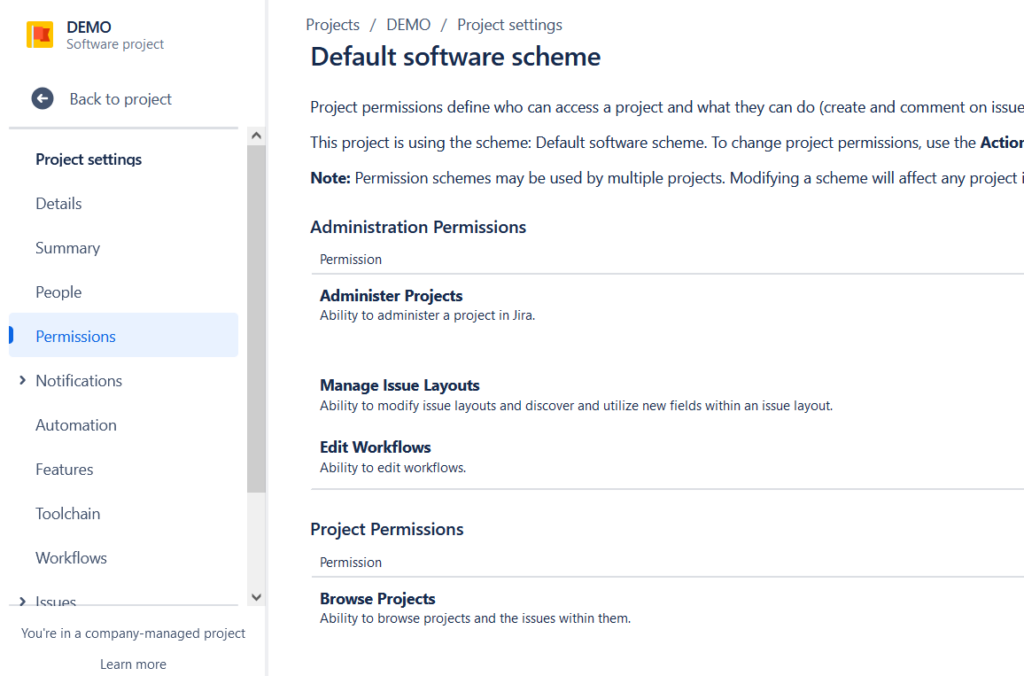
Example: Consider a Jira admin who configures distinct permission schemes for marketing and software development teams. This structured approach allows project roles to be adapted to specific needs without compromising overall security.
What are Issue Security Schemes?
While Permission Schemes control project access, Issue Security Schemes provide an added layer of security by defining who can view specific issues.
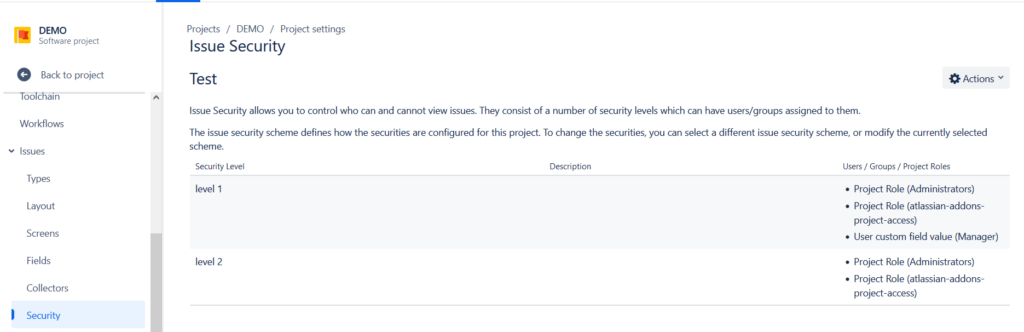
Think of Issue Security Schemes as digital locks on your Jira issues. They allow you to create different levels of security, each with its own set of rules about who can access which information. For example, you might have a “Public” level for issues that everyone can see, a “Confidential” level for sensitive business data, and a “Highly Confidential” level for top-secret projects.
Benefits of Issue Security Schemes
- Granular Control: Define user access at the issue level, ensuring only selected individuals can view certain issues
- Customizable Visibility: Tailor visibility according to project needs, whether for a select team or for specific roles
- Data Protection: Safeguard sensitive information like customer data, financial details, and strategic plans
- Compliance: Ensure your projects adhere to data privacy regulations like the GDPR
- Team Collaboration: Create focused teams with specific access levels to improve collaboration and efficiency
- Flexibility: Customize security levels to fit your unique project requirements
Best Practices for Effective Use of Issue Security Schemes:
- Clear Naming: Use clear and concise names for security levels to avoid confusion
- Regular Review: Periodically review and update your security schemes to ensure they remain effective.
- Consider Workflow Transitions: Ensure that workflow transitions align with security levels to prevent unauthorized access
- Automation: Use automation to modify issue security schemes based on changes in issues
- Combine with Permission Schemes: Use permission schemes to control overall project access, while issue security schemes regulate access to specific issues
Interplay Between Permission and Issue Security Schemes
The interaction between Permission Schemes and Issue Security Schemes is crucial for maintaining effective project governance. For instance, users must possess the Browse Projects and Set Issue Security permissions to view or set security levels on issues. A thoughtful setup ensures that projects not only remain secure but that multiple users can actively participate in managing them.
Troubleshooting Common Issues
If users can’t view issues as expected, check the following:
- Confirm Permissions: Ensure they have the required project role assigned
- Check Security Levels: Validate they are included in the relevant security levels
- Assess Visibility Settings: Verify that the Issue Security field is included in the appropriate project screens
Conclusion
Harnessing the full potential of Jira involves strategically using Permission Schemes to control access and Issue Security Schemes to manage issue visibility. They are a powerful tool for safeguarding your Jira data and ensuring that the right people have access to the right information. By mastering these configurations and following best practices, organizations can create a secure and efficient project management environment that adapts to varying needs while ensuring that sensitive data is protected. As a Jira admin, your role in setting these structures can significantly impact efficiency and security across your organization.
Want to learn more? Check out Atlassian’s documentation for detailed instructions on configuring Issue Security Schemes.

Alessandra Castiglioni
Author

Latest posts by Alessandra Castiglioni
21. 03. 2026
Atlassian
Atlassian SSO Explained: How Authentication Really Works (Without the Confusion)
23. 06. 2025
Atlassian
Is Your Jira and Confluence World About to Change? Understanding the Shift from Connect to Forge