30. 09. 2026
Atlassian

20. 12. 2024
Giuseppe Di Garbo
Atlassian, NetEye, Service Management
Managing Alerts with JSM: Focus on Incident Management (Part 2)
In the first part of this series, we explored how Jira Service Management (JSM) helps streamline Incident Management, aligning with ITIL v4 best practices. Incident Management aims to restore normal service operation as quickly as possible after a disruption, ensuring minimal impact on business operations. Events – changes in the system’s state – can trigger alerts that require immediate attention.
This post delves into how to integrate NetEye alerts with JSM, empowering teams to respond effectively while adhering to ITIL principles.
Integrating NetEye with JSM
NetEye integrates seamlessly with JSM through Icinga 2, enabling alerts from NetEye to be sent to JSM teams. For detailed setup instructions, refer to Atlassian’s documentation: Integrate with Icinga 2.
Steps to Configure Integration
On JSM:
- Create a Team: Assemble team members based on expertise areas
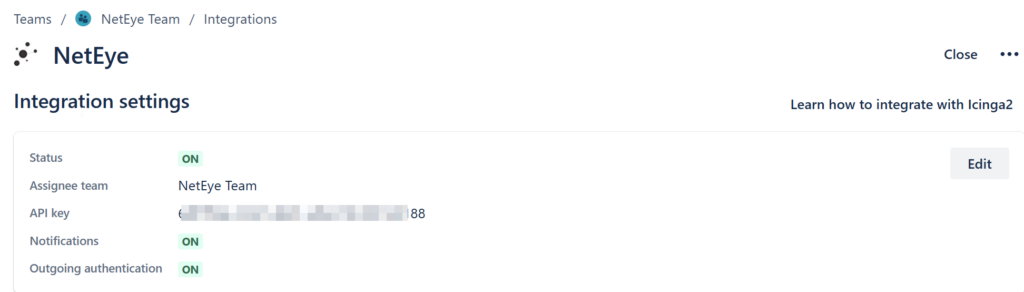
- Activate Icinga2 Integration: Navigate to the Operations section of the team, select Integrations, and add an Icinga2 integration. Follow the guide here.
- Take note of the API Key: Use this key to configure NetEye
- Remember to enable the Integration:
Note: Repeat for other teams as needed.
On NetEye:
- Install Notification Plugin: Deploy
nep-notification-opsgenie(details) - Create a Notification User: Use the script
/neteye/local/jec/scripts/configure-jec-instance.shwith the API key from JSM - Assign Notification User: Link the Notification User to hosts or services requiring alert forwarding
Notification User creation example:
sh /neteye/local/jec/scripts/configure-jec-instance.sh jsm-neteyeteam-user XXXXXXXX-XXXX-XXXX-XXXX-XXXXXXXXXXXX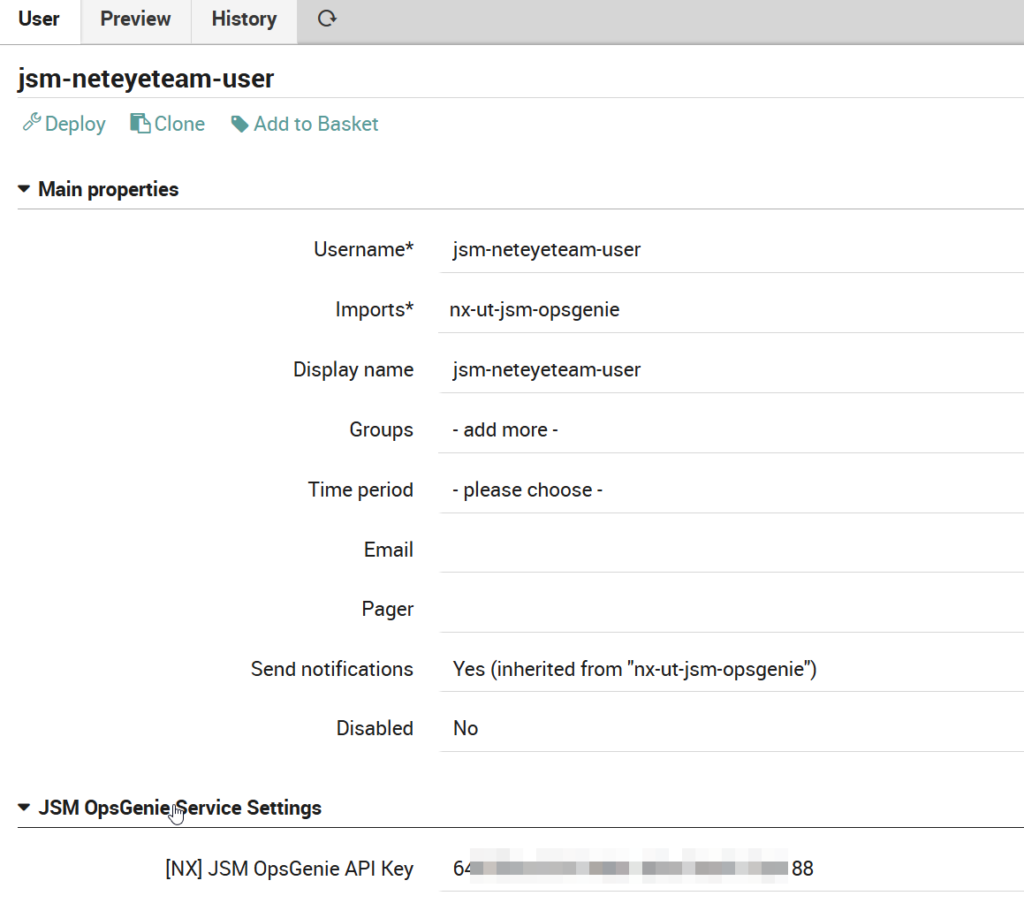
Note: You need a unique Notification User for each JSM team.
Once configured, NetEye alerts are routed to JSM teams.

Important: Each team will only see alerts relevant to them, although JSM users can belong to multiple teams.
Bidirectional Integration with JSM and Icinga 2
JSM’s integration with Icinga 2 supports bidirectional communication. By setting up Outgoing Rules, you can configure JSM to send updates back to NetEye, such as acknowledgments, comments, or other actions, enabling tighter integration between monitoring and incident management.


Note: Bidirectional integrations aren’t supported in Free and Standard plans.
Advantages of Managing NetEye Alerts in JSM
Managing NetEye alerts in JSM brings significant benefits, optimizing how alerts are assigned, handled, and personalized. Teams can be structured to match areas of expertise, ensuring that every alert reaches the right group. With advanced on-call management, robust escalation policies, and extensive notification customization options, JSM streamlines incident response and enhances collaboration.
Key Benefits of JSM for Alert Management
- On-Call Management: From the Operations section, each team can access advanced tools such as routing rules, escalation policies, and schedules. These ensure that the right person is notified at the right time, minimizing response delays.
- Integration with Multiple Tools: JSM allows teams to integrate with numerous monitoring, logging, ticketing, and chat platforms (e.g., Dynatrace, ServiceNow, Microsoft Teams). This enables the centralization of alerts from various sources for a unified management experience.
- Effortless Escalation: Teams can easily escalate alerts into incidents using the Create Incident feature, ensuring a seamless handoff when more attention is required.
- Sync Rules: Define rules to keep related work synchronized across alerts and issues, improving traceability and efficiency in incident handling.
- Advanced Functionalities:
- Heartbeats: Monitor the health of integrations and ensure systems are active.
- Automations: Automate repetitive tasks, reducing manual intervention.
- Policies: Define custom rules to tailor alert handling per team requirements.
- Maintenance: Suppress alerts temporarily during planned maintenance periods to avoid unnecessary noise.
- Personalized Notifications: Team members can configure notifications based on their preferences, choosing channels such as email, SMS, voice, or Jira push notifications. Note that some options, like SMS and voice, are available only for Premium or Enterprise subscriptions.
- Role-Based Permissions: Assign specific roles and permissions for managing alerts, routing rules, escalations, and other functionalities, ensuring clear accountability within teams.
By leveraging these features, teams can achieve a highly efficient, personalized, and centralized approach to managing alerts, enhancing overall incident management and collaboration.
Conclusion
Managing alerts in JSM offers a structured, efficient, and centralized approach to Incident Management. By integrating NetEye, teams can streamline alert handling, ensuring timely notifications, seamless escalations, and precise assignments to the right teams. Features like on-call management, multi-tool integrations, personalized notifications, and role-based permissions make JSM a powerful solution for modern incident resolution.
A new feature will soon enhance this experience: Alert Grouping using Atlassian Intelligence. This capability will allow teams to intelligently group related alerts for even more efficient handling and faster resolution. Learn more here.
Stay tuned!
These Solutions are Engineered by Humans
Did you find this article interesting? Does it match your skill set? Our customers often present us with problems that need customized solutions. In fact, we’re currently hiring for roles just like this and others here at Würth Phoenix.

Giuseppe Di Garbo
Consultant at Würth IT Italy
Hi everybody. I’m Giuseppe and I was born in Milan in 1979. Since the early years of university, I was attracted by the Open Source world and operating system GNU\Linux. After graduation I had the opportunity to participate in a project of a startup for the realization of an Internet Service Provider. Before joining Würth Phoenix (now Würth IT Italy) as SI consultant, I gained great experience as an IT consultant on projects related to business continuity and implementation of open source software compliant to ITIL processes of incident, change and service catalog management. My free time is completely dedicated to my wife and, as soon as possible, run away from Milan and his caotic time and trekking discover our beautiful mountain near Lecco for relax and lookup the (clean) sky.
Author

Latest posts by Giuseppe Di Garbo
30. 09. 2026
Atlassian
Workforce Management in Jira Service Management: From Ticket Assignment to Capacity Management
23. 06. 2026
Atlassian
Customer Feedback in Jira Service Management: CSAT and Native Surveys Explained
19. 12. 2025
Atlassian, Service Management
Jira Service Management Customer Detail Fields: A Practical Use Case
29. 09. 2025
Atlassian, Service Management
Streamlining Service Request Management with ITIL4 and Jira Service Management