


02. 04. 2026
NetEye, Unified Monitoring

25. 09. 2018
Alessandro Romboli
NetEye, Unified Monitoring
Microsoft Remote Desktop Services Performance – Part 2
Remote Desktop Services (RDS) Performance
In a complex distributed RDS environment, it’s difficult to measure RDS performance: the end user typically notices responsiveness in a different way compared to measuring a single Windows Performance Counter!
Overall performance tends to degrade over time: and frequent maintenance is required to keep an RDS Farm efficient.
Of course, the first step is to keep the whole RDS Farm monitored, especially the load on the Session Host servers, where users run their applications.
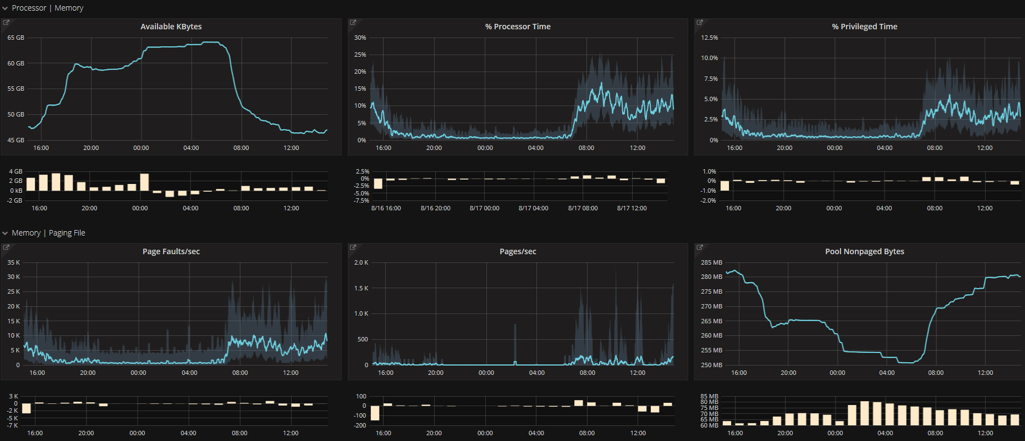
A Grafana Dashboard provided by NetEye can give a quick, comprehensive view of what’s going on.
Printer Load
One of the main load generators on Terminal Servers is the printing task.
Of course, we cannot avoid printing, but by using an external network Print Server, we can move a significant source of load off of the Session Host servers.
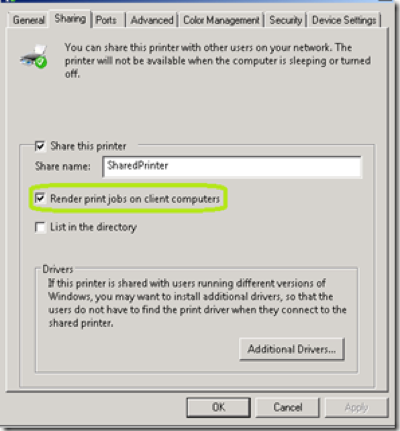
Disabling the default flag “render print jobs on client computers” in the Shared Printer properties will further reduce the load on RDS by moving it to the Print Server:
Limit the number of User Sessions
It’s important to limit the number of User Sessions: resources are limited and should be prioritized for people who really need them.
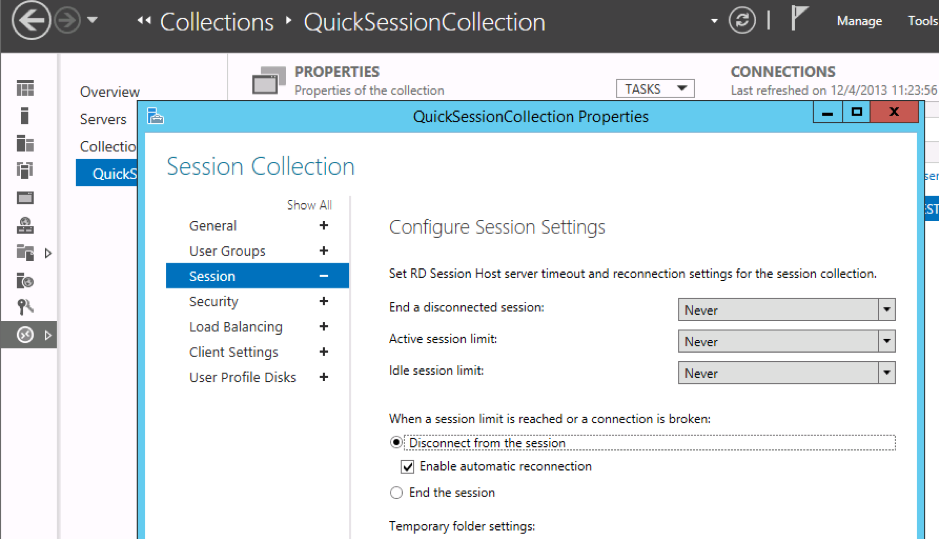
Configuring the “End a disconnected session” and possibly the “Idle session limit” parameters for Collection will free up unused resources:
The “pinned items on the start screen” problem
It’s important to keep User profiles on RDS small and clean as it will provide a fast user experience.
Unfortunately, a strange behavior in Windows Server tends to fill User profiles with references to pinned items on the start screen. These references are hosted in the User’s registry and grow at each user logon to the RDS Farm.
All these references slow down the user login process day by day and, after a long time, can introduce a delay of as much as 30 seconds or more!
Purging either manually or by a Group Policy is necessary to keep the user profiles clean.
Applications which leave bad data into User’s Profiles
Some third-party applications can also leave bad data into the user’s profiles causing slow responsiveness on RDS.
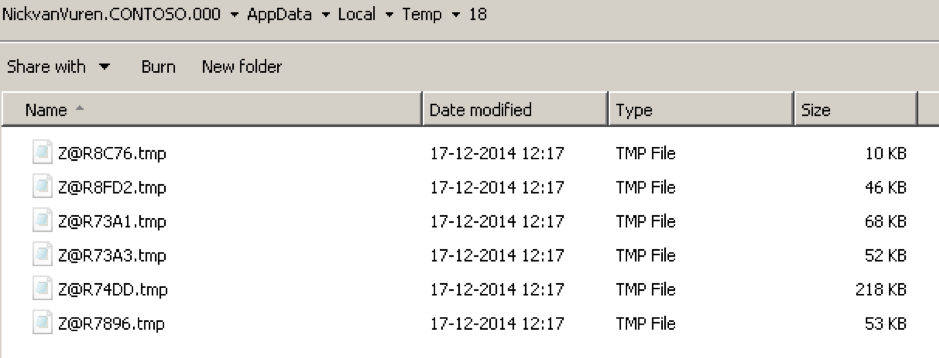
One famous case is Adobe Reader, which during some printing tasks leaves a number of Z@R****.tmp files in Appdata\Local\Temp\\ that are locked and cannot be deleted until the server is rebooted. This prevents profiles from being deleted properly upon logoff.
What to do?
There isn’t an easy way to keep a Remote Desktop Farm clean and efficient.
It’s important to have a good monitoring system like NetEye to discover long term bad trends.
Then, depending on the applications installed on the Session Host servers, you should periodically analyze the trends and the Windows Event Logs.

Alessandro Romboli
Site Reliability Engineer at Würth IT Italy
My name is Alessandro and I joined Würth Phoenix (now Würth IT Italy) early in 2013. I have over 20 years of experience in the IT sector: For a long time I've worked for a big Italian bank in a very complex environment, managing the software provisioning for all the branch offices. Then I've worked as a system administrator for an international IT provider supporting several big companies in their infrastructures, providing high availability solutions and disaster recovery implementations. I've joined the VMware virtual infrastructure in early stage, since version 2: it was one of the first productive Server Farms in Italy. I always like to study and compare different technologies: I work with Linux, MAC OSX, Windows and VMWare. Since I joined Würth Phoenix, I could also expand my experience on Firewalls, Storage Area Networks, Local Area Networks, designing and implementing complete solutions for our customers. Primarily, I'm a system administrator and solution designer, certified as VMware VCP6 DCV, Microsoft MCP for Windows Server, Hyper-V and System Center Virtual Machine Manager, SQL Server, SharePoint. Besides computers, I also like photography, sport and trekking in the mountains.
Author

Latest posts by Alessandro Romboli
03. 12. 2025
Microsoft
Single Sign-On for Power BI Report Server
08. 09. 2025
Service Management
VMware ESXi Transparent Page Sharing
12. 06. 2025
Microsoft
Terminal Server User Profiles with FSLogix
05. 02. 2025
Knowledge Management, Service Management
Dynamics 365 Finance & Operations (On -Premises) Connectivity: New Authentication Model