


25. 03. 2026
Atlassian, NetEye, Uncategorized, Unified Monitoring

01. 07. 2020
Damiano Chini
NetEye
NetEye Agent: a New Daemon for Supervising the NetEye Installation
Beginning in NetEye 4.12 we introduced the neteye upgrade command, which enables NetEye users to automatically and safely perform a number of tasks needed to complete a NetEye upgrade, both in single instance environments as well as in cluster environments (have a look here for more information about the neteye upgrade command).
In order to determine which tasks need to be executed, the neteye upgrade command needs as a pre-requisite a source of trust which can determine the current status of the NetEye installation. In particular, the command needs to know the current version of NetEye that’s running and whether or not a NetEye upgrade is currently in progress. Since it’s trivial to determine the status of a NetEye single instance, below we will concentrate on the problem of determining the installation status of a NetEye cluster (although the logic explained below still holds for NetEye single instances).
The factors that determine the status of the NetEye installation on a cluster environment are:
- The NetEye version installed on the different nodes of the cluster
- Whether the installed NetEye version was finalized (i.e. if the installation of the version completed successfully) on the different nodes of the cluster
Given this example:
- Node 1 has NetEye 4.12 installed and finalized
- Node 2 has NetEye 4.12 installed and finalized
- Node 3 has NetEye 4.12 installed, but not yet finalized

We can say that an upgrade from version 4.11 to 4.12 is in progress in the NetEye cluster
Information on both of these factors must be retrieved from the filesystem of the nodes.
One solution to extract the status of the cluster installation is to perform custom ssh calls to the nodes of the cluster, together with a script which combines the information coming from the different nodes. But we realized that this approach would have been neither reusable nor easily maintainable.
For this reason we decided to introduce and develop the new NetEye Agent. This agent is a Rust daemon installed and running on all the nodes of the NetEye cluster, which exposes two APIs returning information about the status of the NetEye installation.
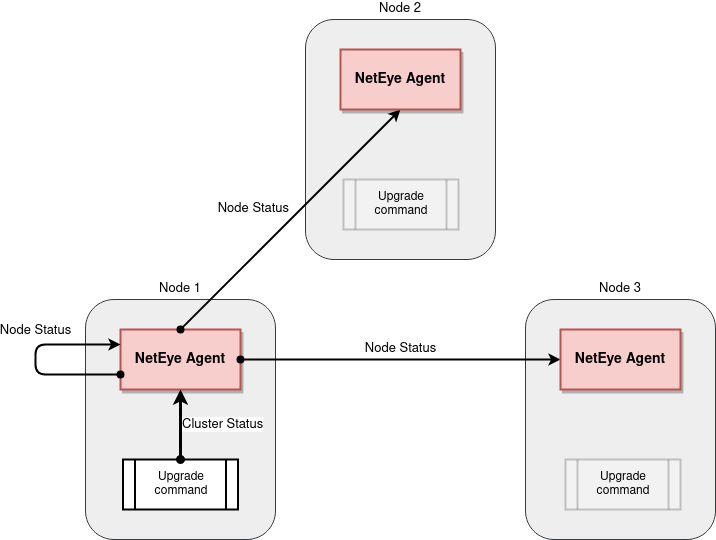
The NetEye Agent manages to return information about the NetEye cluster installation status by exposing two different APIs:
- Node Status: an internal API, for which the NetEye Agent locally reads the filesystem and returns the status of the NetEye installation on the node on which the agent is running.
- Cluster Status: an API callable on any node of the cluster, which returns the overall status of the NetEye cluster installation. Behind the scenes, this API makes a call to the Node Status API of each node of the cluster and aggregates the information retrieved.
At the moment, the NetEye Agent is performing these simple but important actions, yet already provides a solid structure (also due to the use of the Rust language) upon which we will be able to add much more functionality in the future, permitting us to more easily handle operations within NetEye.

Damiano Chini
Author

Latest posts by Damiano Chini
30. 12. 2025
Automation, Development, Log Management, Log-SIEM, NetEye
Optimizing Rolling Restarts in Elasticsearch Clusters