


27. 03. 2026
Automation, Development, DevOps, NetEye

15. 12. 2025
Juergen Vigna
Icinga Web 2, NetEye, Unified Monitoring
Monitoring Your NetApp S3 Object Storage
Introduction to NetApp and S3
NetApp offers a unified data storage system. NetApp’s ONTAP operating system supports a combination of file, block, and object protocols. We can use common storage (disk array), such as NetApp AFF or FAS, and operate it as file, object, and block storage. On an existing ONTAP cluster, we can enable ONTAP S3 and utilize S3 features without any additional costs.
Object Storage
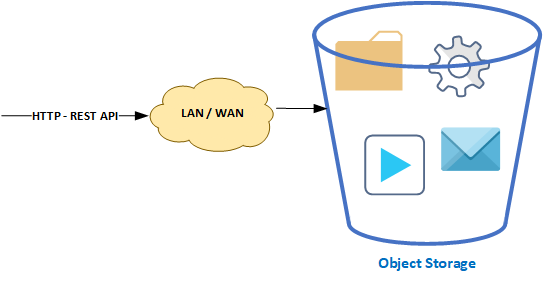
In NetApp, data is stored as objects, where each object contains the actual data, metadata, and a unique identifier. With high and simple scalability, it’s ideal for storing enormous amounts of unstructured data. It’s also accessed through an API, which can be used by both users and applications. Some key points:
- Network technology: Ethernet
- Communication protocol: TCP/IP
- Data protocols: HTTP, REST API
Object storage is a system for storing and managing data that treats information as objects instead of traditional files or blocks. Each object contains, besides its own data (files), a unique identifier (key) and metadata describing its content and properties. Objects are organized into buckets.
There is no set format for the content of stored data. We can store various data types (such as documents, videos, and backups) efficiently and securely. It’s suitable for large volumes of unstructured data. The main attributes of object storage are high scalability and security, as well as maximum durability and availability with the possibility of geographical replication.
To access object storage, an API is used, typically accessible via the HTTP protocol. Different vendors may have different API implementations that may not be compatible with other systems. Many providers support the de facto standard Amazon S3 REST API. We then speak of S3-compatible object storage.
S3 object storage has been supported since ONTAP 9.8. As with other protocols (FC, iSCSI, NFS, SMB, NVMe_oF), a license is required for S3, but it’s provided at no cost. ONTAP from version 9.12.1 supports S3 multiprotocol support, where data can be accessed via the S3 protocol and NFS and SMB protocols.
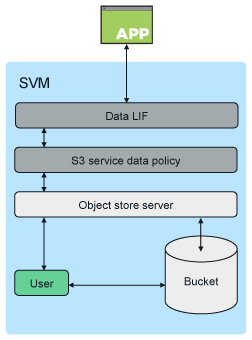
ONTAP uses Storage VM (SVM) that enables the S3 access protocol and creates an Object Store Server. Each SVM has its own namespace. When creating a data SVM, a root volume is created. The S3 Object Store Server manages data as S3 objects, unlike file or block storage provided by ONTAP NAS and SAN servers.
The basic architecture for a bucket in ONTAP is a FlexGroup Volume, which can span across different aggregates and cluster nodes. A common location for storing data is a Flexible Volume (FlexVol), which is located within an aggregate (Tier).
Monitoring NetApp S3 Buckets
As I said above, NetApp’s S3 Buckets can be monitored over the NetApp ONTAP REST API. I recently wrote a plugin check_netapp_api_s3_buckets.pl, which you can use to monitor your S3 Buckets. Using the –help parameter will give you all the info you need to use it.
# ./check_netapp_api_s3_buckets.pl --help
NAME
    check_netapp_api_s3_buckets - Check S3 Buckets Space Usage

SYNOPSIS
    check_netapp_api_s3_buckets.pl -H HOSTNAME -u USERNAME -p PASSWORD [-w PERCENT_WARNING] [-v|--verbose] [-c PERCENT_CRITICAL]
    [--perf|-f] [-r|--regex] [-i|--include <string>] [-e|--exclude <string>]

DESCRIPTION
    Checks the S3 Buckets Storage usage. You have the possibility to define include or/and exclude string/regexp on the
    Bucket-Name. Thresholds are only checked if you define them.

OPTIONS
    -H | --hostname FQDN
        The Hostname of the NetApp to monitor (Cluster or Node MGMT)

    -u | --username USERNAME
        The Login Username of the NetApp to monitor

    -p | --password PASSWORD
        The Login Password of the NetApp to monitor

    -w | --warning PERCENT_WARNING
        The Warning threshold

    -c | --critical PERCENT_CRITICAL
        The Critical threshold

    -f | --perf
        Flag for performance data output

    -e | --exclude
        Optional: The name of bucket that has to be excluded from the checks (multiple exclude item for multiple buckets)

    -i | --include
        Optional: The name of bucket that has to be included from the checks (multiple include item for multiple buckets)

    -r | --regex
        Optional: aggregate name is a regex

    -h | --help
    -?  to see this Documentation

EXIT CODE
    3 on Unknown Error 2 if Critical Threshold has been reached 1 if Warning Threshold has been reached 0 if everything is ok

AUTHORS
     Juergen Vigna <juergen.vigna@wuerth-phoenix.net>
Hopefully this plugin will help you gain more control over you S3 Buckets in the future.
These Solutions are Engineered by Humans
Did you find this article interesting? Does it match your skill set? Our customers often present us with problems that need customized solutions. In fact, we’re currently hiring for roles just like this and others here at Würth IT Italy.

Juergen Vigna
NetEye Solution Architect at Würth IT Italy
I have over 20 years of experience in the IT branch. After first experiences in the field of software development for public transport companies, I finally decided to join the young and growing team of Würth Phoenix (now Würth IT Italy). Initially, I was responsible for the internal Linux/Unix infrastructure and the management of CVS software. Afterwards, my main challenge was to establish the meanwhile well-known IT System Management Solution WÜRTHPHOENIX NetEye. As a Product Manager I started building NetEye from scratch, analyzing existing open source models, extending and finally joining them into one single powerful solution. After that, my job turned into a passion: Constant developments, customer installations and support became a matter of personal. Today I use my knowledge as a NetEye Senior Consultant as well as NetEye Solution Architect at Würth Phoenix.
Author

Latest posts by Juergen Vigna
22. 05. 2025
NetEye, Unified Monitoring
Automatic Integration of NagVis Map into Icinga Web 2/NetEye Monitoring
30. 08. 2024
Log-SIEM, NetEye, Unified Monitoring
Monitor your Elasticsearch Shards Count