


10. 03. 2026
Unified Monitoring

15. 12. 2025
Reinhold Trocker
Log Management, Log-SIEM
Strange Query Results in Kibana: Understanding the Behavior of event.original and Similar Fields
While working with Kibana, we recently encountered a puzzling situation: queries involving the field event.original returned unexpected results. Let’s break down what happened, why it occurs, and how to identify other fields with similar behavior.
The observed “strange behavior“
- no filter on
event.original: there are some documents with values inevent.originaland some without values in that field.
In fact, everything seems normal here:
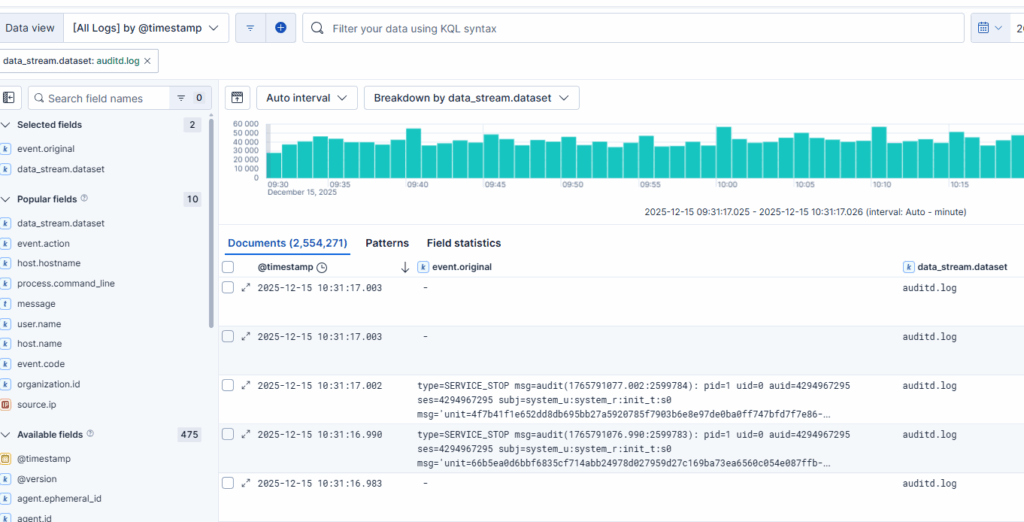
Now let’s assume you just want to see the documents where event.original is empty, You’d probably run a query like the following:
- filter
event.originaldoes not exist: you still get the same documents as before, though you wouldn’t expect to see the documents I’ve indicated in the result
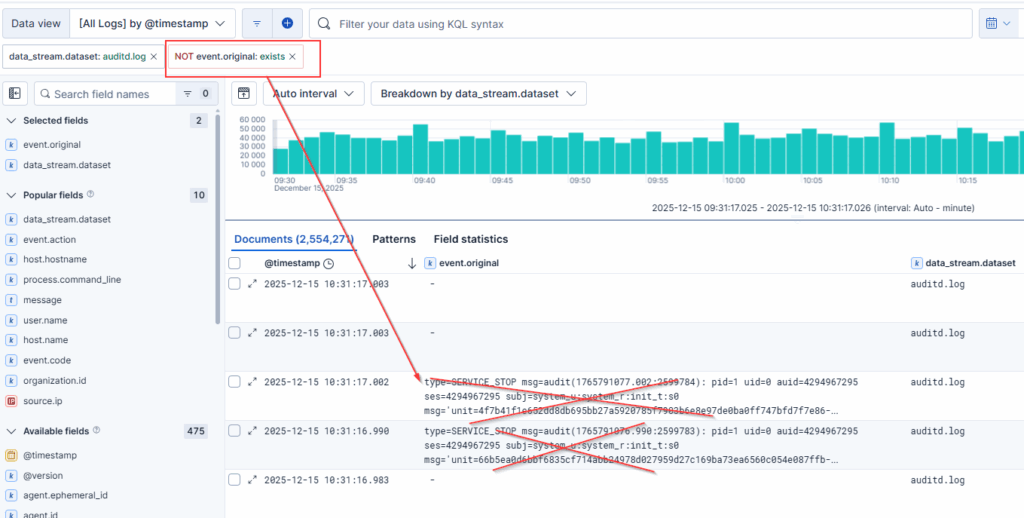
Now let’s assume you just want to see the documents where event.original is not empty. In this case you’d run a query like the following:
filter event.original does exist, but Kibana returned no results, even though the previous queries showed documents having this field set.
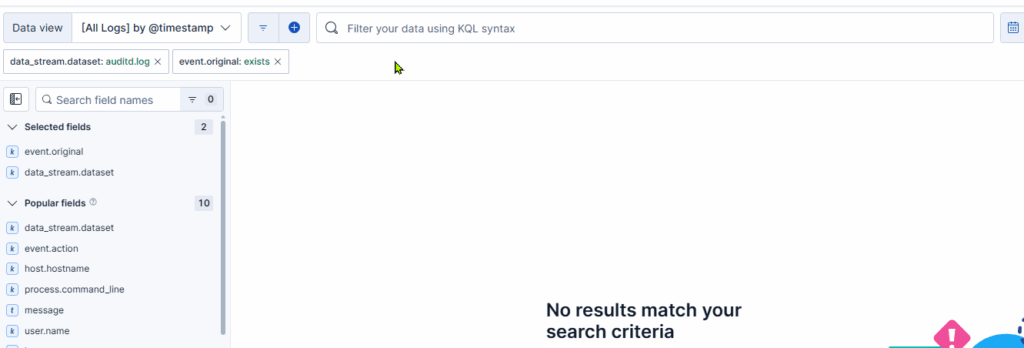
This contradiction raises the question: Why does Kibana behave this way?
The Root Cause
The key lies in how Elasticsearch handles indexed vs. non-indexed fields.
- Fields like
event.originalare often not indexed by default. They are stored in_sourcefor retrieval but cannot be used for filtering or aggregations because they lack an inverted index. - When you run a query such as
exists: event.originalorNOT exists: event.original, Elasticsearch evaluates it based on indexed fields. Sinceevent.originalis not indexed, the query logic fails, bringing misleading results. - Kibana’s UI doesn’t always make this distinction clear, which can cause confusion.
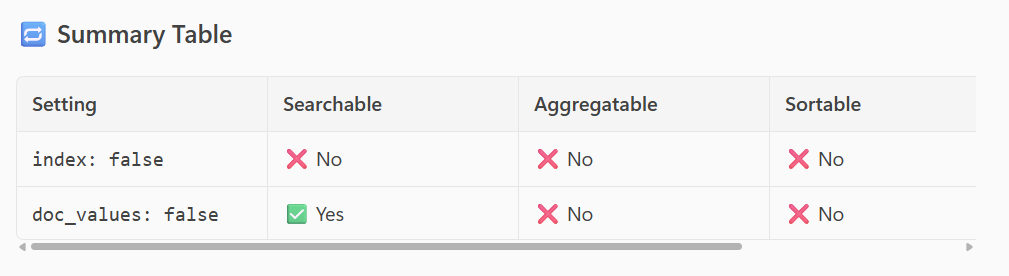
- Additionally, there is another setting called doc_values, which also may cause confusion.
See the following table to understand the settings:
Why Are Some Fields Not Indexed?
Non-indexed fields are typically:
- Large text blobs (e.g., raw logs, original event payloads)
- Fields intended for display or debugging rather than search
- Configured this way to save storage and improve performance
In ECS (Elastic Common Schema), event.original is explicitly documented as not indexed for these reasons.
How You Can Identify These Fields
To avoid surprises, you can:
- Check the field mappings in your index:
GET /<index>/_mappingLook for "index": false
- Use Kibana’s Index Management:
- Navigate to Stack Management → Index Patterns → Fields
- Fields marked as Searchable: No or Aggregatable: No are likely not indexed
- Consult ECS documentation for common non-indexed fields:
event.original- See the full list below found out with another method
Can we get a full list of such ECS fields?
Yes.
Follow these steps:
- Export the ECS8 component template to ecs8.json
- Search for “index”: false
You’ll find the fields below. If you want to automate, use this command:
# install xml2 and make sure that field @timestamp is called only timestamp since xml2 cannot handle fields with @ in the name
cat ecs8.xml | tr -d '@'| xml2 | grep index.false  | cut -f4- -d/ | sed s,/properties/,/,g | sed 's,/index=,: index=,'| tr / .
The output will look like this:
- file.x509.public_key_exponent
- event.original
- tls.server.x509.public_key_exponent
- tls.client.x509.public_key_exponent
- threat.indicator.x509.public_key_exponent
- threat.indicator.file.x509.public_key_exponent
- threat.enrichments.indicator.x509.public_key_exponent
- threat.enrichments.indicator.file.x509.public_key_exponent
You could change the mapping of those fields; it’s strongly recommended to keep the ECS standards.
If you want to have the contents of such a field searchable, we suggest copying the content of the field (using a pipeline) into a new custom field (example: event.Original) and map it as you want (keyword, text, …)
These Solutions are Engineered by Humans
Did you find this article interesting? Does it match your skill set? Our customers often present us with problems that need customized solutions. In fact, we’re currently hiring for roles just like this and others here at Würth IT Italy.

Reinhold Trocker
IT professional, IT security, (ISC)2 CISSP, technical consultant
Author

Latest posts by Reinhold Trocker
20. 06. 2025
Unified Monitoring
Elastic Integration with Huge Memory Usage? Keep That Host Accessible!
29. 01. 2025
Log Management, Log-SIEM
Understanding Headers in Elastic Agents: Normal Mode vs. Fleet Server Mode