
Managing Customers in Jira Service Management: Identity, Access, and Control
Introduction
Customer management in Jira Service Management looks simple at first. Users are invited, access is granted, and requests start flowing. That simplicity does not last. As soon as external users increase, access control becomes the real problem, not onboarding.
What matters is not how fast users can enter the system, but how clearly their identity is defined and how consistently their permissions are enforced.
Customers vs Agents
Customers and agents operate on completely different levels.
Customers are requesters. They access the Customer Portal or send emails, create tickets, and interact with support. They do not consume licenses and have limited visibility by design.
Agents, on the other hand, are licensed users working inside Jira Service Management. They manage requests, interact internally, apply workflows, and operate the service.
Treating customers as lightweight users leads to confusion. They are external identities with controlled access, not internal users with reduced permissions.
User administration in Atlassian Admin
All customer identities are managed centrally in Atlassian Admin.
Customers are created through invitations, imports, or automated processes. Once created, they exist as accounts regardless of how limited their access is. Without structure, this quickly leads to disorder: duplicate users, inconsistent access, and no clear ownership.
Groups solve this problem. Instead of assigning permissions directly, users are organized into groups that represent real access needs. These groups are then linked to the Service Desk Customers role in the space.
Access becomes predictable:
- add user to group → access granted
- remove user from group → access removed
No space-level changes are needed.
The basic invitation and user lifecycle
At the simplest level, customers are added via:
- Manual invitation (email-based)
- Automatic creation through incoming requests (email or Customer Portal)
- Bulk import or API
The default experience is straightforward: a user receives an invitation, sets up an Atlassian account if needed, and gains access to the Customer Portal.
What’s often underestimated is the lifecycle:
- Users accumulate quickly
- Ownership of requests persists even if access changes
- Deactivation and cleanup are rarely automated by default
Without a clear model, customer directories become a mix of active users, legacy accounts, and duplicates. That’s manageable in small setups, but becomes a liability at scale.
Global JSM configuration: Customer Access settings
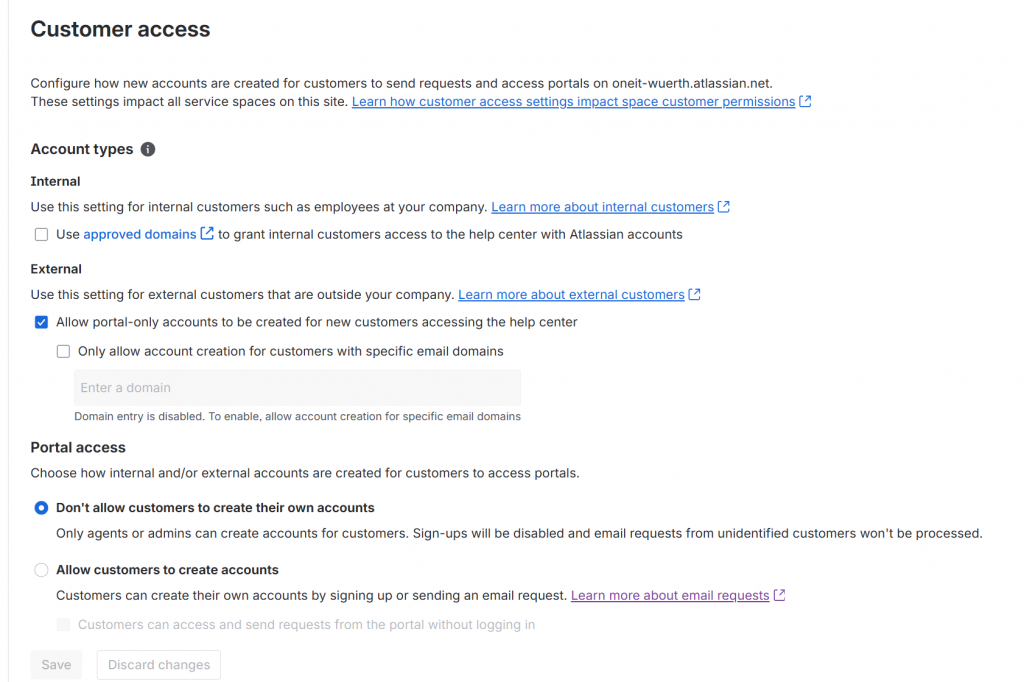
At global level, Customer Access settings (available from Settings → Jira apps → Jira Service Management) define how customers are created, authenticated, and allowed into your service environment. This is the foundation: every space configuration depends on what is allowed here.
The first key aspect is account type. You can allow:
- Internal customers, tied to your organization and domains
- External customers, typically portal-only users
- Or a mix of both
Domain configuration plays a central role. If a domain is approved, users are treated as internal and provisioned accordingly. You can also restrict external access to specific domains to avoid uncontrolled onboarding.
The second dimension is how accounts are created. You decide whether:
- Customers can sign up via Customer Portal or email
- Accounts can only be created by admins or agents
- The Customer Portal allows anonymous access, where users submit requests without logging in and accounts are created afterward
Each option shifts the balance between accessibility and control. Open signup and anonymous access reduce friction but increase exposure. Restricted creation keeps the environment clean and predictable.
These global settings act as a boundary. Space-level configurations like Channel Access can only operate within what is allowed here. If account creation is blocked globally, no space can truly be open. If access is allowed broadly, space can become publicly reachable.
In practice, this is where the service model is defined: controlled internal support, open external service desks, or a hybrid approach shaped by domain rules and identity policies.
Space-level settings: Channel Access and Customer Sharing
Once global rules are defined, each service space introduces its own layer of control.
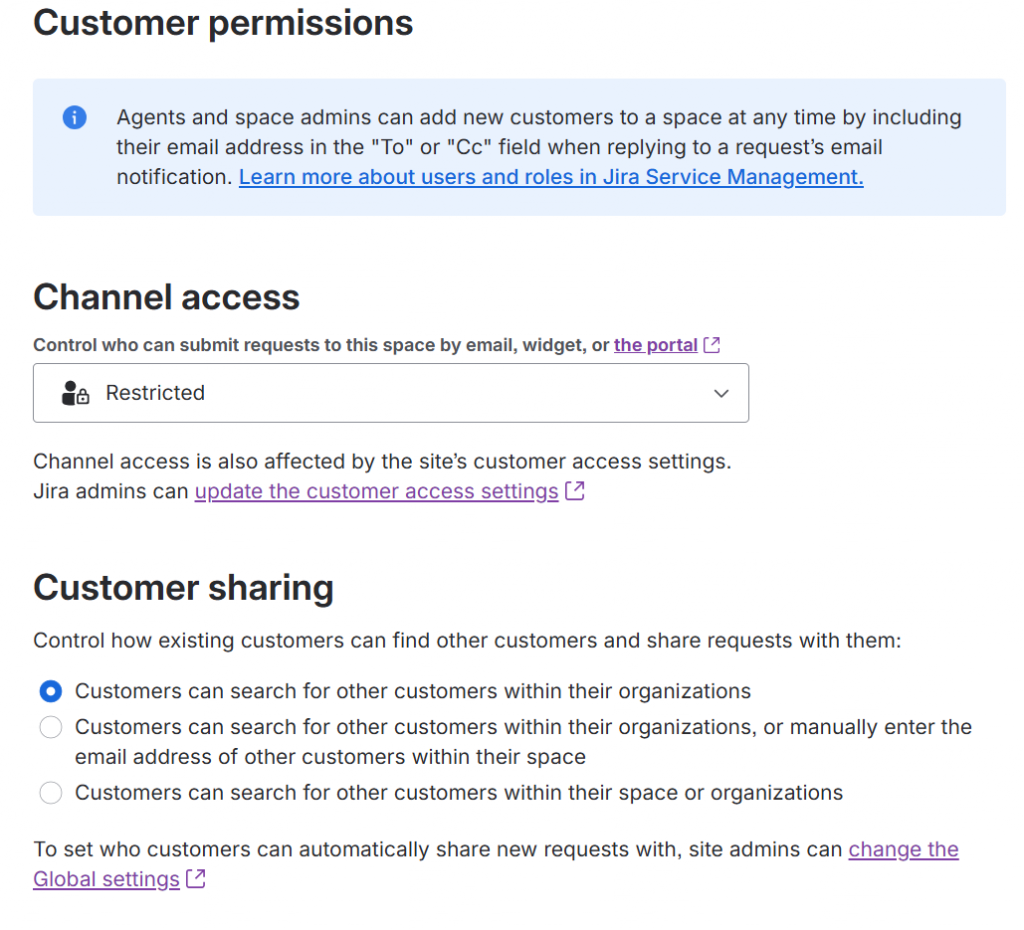
Channel Access: Open vs Restricted
This setting defines who can use the space’s channels (Customer Portal and email) to create requests.
- Open means anyone who can reach the Customer Portal or send an email can create a request. If they don’t have an account, one will be created automatically (depending on global settings).
- Restricted means only explicitly added customers (or users belonging to allowed organizations) can create requests.
The difference is not subtle.
Open access is designed for public-facing services: support desks, customer care, or any scenario where friction must be minimal. It prioritizes accessibility over control.
Restricted access is about governance. It ensures that only known users interact with the service. No automatic onboarding, no unexpected accounts, no surprises in the customer list.
In practice, Open is convenient at the beginning. Restricted is what keeps environments sustainable.
Customer Sharing: visibility of requests
Customer Sharing defines what customers can see beyond their own requests:
- Only their own requests
- Requests shared within their organization
- Requests shared explicitly
This setting directly impacts data visibility.
Allowing organization-wide visibility can be useful for internal teams or B2B scenarios where multiple users from the same company collaborate. In other contexts, it can expose sensitive information unintentionally.
The combination of Channel Access and Customer Sharing defines both who gets in and what they see once inside.
Best practices from the field
In practice, a few simple principles tend to work well across most implementations.
- Start controlled, then open only where needed. It’s much easier to relax restrictions than to clean up after an overly permissive setup.
- Separate internal and external customers clearly. Use domains, organizations, and access policies to avoid mixing identities with different trust levels.
- Avoid relying on default invitation flows. Integrate with identity providers when possible, especially for internal users.
- Regularly review the customer base. Remove inactive users, consolidate duplicates, and keep the directory aligned with reality.
- Use Restricted Channel Access by default. Open it only for services that genuinely require public exposure.
- Align Customer Sharing with data sensitivity. Visibility is often overlooked until it becomes a problem.
- Treat customers as part of your security model, not just as request creators.
Closing note
Customer management in Jira Service Management sits at the intersection of usability and control. Ignoring it leads to entropy; overengineering it leads to friction. The balance comes from understanding how each layer – global settings, space configuration, and identity management – interacts with the others, and shaping them intentionally.
References and official documentation
For deeper details and up-to-date configuration specifics, the Atlassian documentation remains the authoritative source:



Giuseppe Di Garbo
Author
