
SNMP monitoring is the standard method for obtaining information and metrics from network devices. Typically, we focus on extracting data from a single interface to monitor its status, traffic, or errors. But in many cases, we’re only interested in getting an overview of the interfaces, or to avoid overloading our somewhat outdated devices, we limit ourselves to requesting the general status of all interfaces.
Our checks work like this: they monitor the operational and administrative status of the interfaces and compare them; if one of the administratively active interfaces is in a down state, an alarm is triggered.
| Administrative config | Operational status | Check result |
| DOWN | DOWN | OK |
| UP | UP | OK |
| UP | DOWN | CRITICAL |
Yes, of course, the combination of “admin DOWN” and “status UP” is missing, but that’s why we use the ghostbusters!
The real life
Not all devices allow you to configure the administrative status of an interface. This is generally the case with network devices for security reasons: active interfaces are not left open unless they are in use, to prevent unauthorized connections.
However, some devices lack this feature either by design or due to firmware issues.
This is what happened to us with some NAS or firewall devices: not all available interfaces were connected, but there was no way to configure them as “administrative down.”
To avoid reports that do not match the actual status of our devices, we used regular expressions to include or exclude interfaces.
Including interfaces
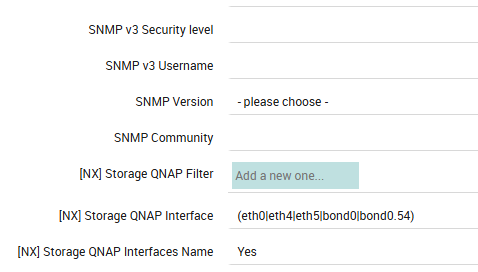
In the first case, the regular expression used on QNAP devices allowed us to include only the interfaces actually in use for each device as :
eth0, eth4,eth5,bond0, bond0.54
Excluding interfaces
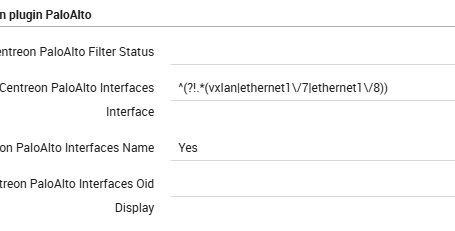
The second case was particularly curious: alongside the unused interfaces, a “ghost” interface—the VXLAN interface—appeared. According to the client’s configuration, this interface shouldn’t have been there, but due to a bug in the device’s SNMP process, it was reported. We therefore implemented a filter to exclude the unused interfaces (especially since there were so many in use!).
We have therefore excluded :
vxlan, ethernet1/7, ethernet1/8
Points to note
- As you can see, in both cases we have set the “interfaces name” option to YES: this allows us to define interfaces by name instead of by OID
- Be sure to escape special characters; otherwise, the check won’t work, or you may encounter errors from Director during deployment.
If you need to get familiar with regular expressions, I recommend the website regex101.com.
You can test different regular expressions—even for different languages—and get an explanation of how yours regex filter works.


Paolo Seghetti
Author

Latest posts by Paolo Seghetti
28. 12. 2025
Automation, Business Service Monitoring, Icinga Web 2, NetEye, Service Management
Automating Notifications in NetEye
30. 09. 2025
NetEye, Unified Monitoring
Business Process Automation on NetEye
30. 03. 2025
NetEye, Unified Monitoring
Cron Job Monitoring with Tornado