


17. 12. 2020
Cloud, Unified Monitoring

Scenario
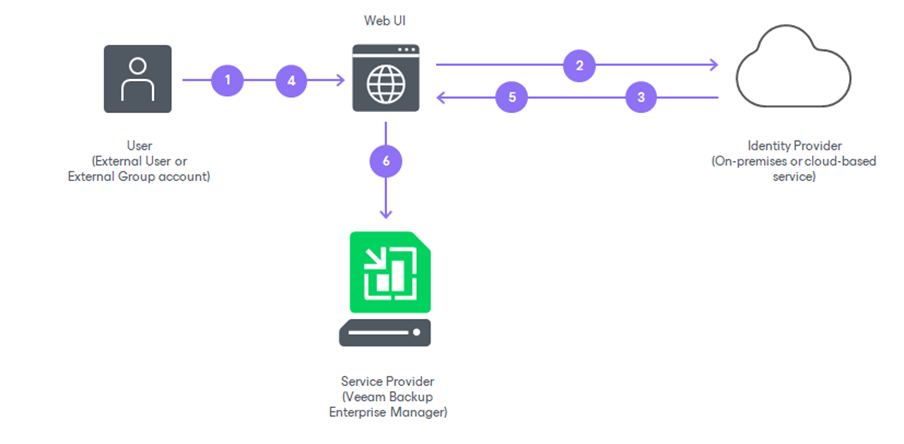
Veeam Backup is widely used as backup software, especially on virtual VMware vSphere infrastructure.
Together with the new version 13 of the product, the SAML Single Sign On (SSO) feature was introduced, which can be used to protect administrative access to the Veeam Backup console by delegating the admin authentication to an external Identity Provider, which can also perform Multi Factor Authentication (MFA).
In this blog, I’ll describe how to configure Veeam Backup admin user single sign on with an external ADFS service which will enforce MFA authentication.
This authentication flow will be valid for both the traditional Veeam Backup console as well as the new Web UI Veeam Backup console.
My example will show a Veeam Backup installed on an Active Directory domain-joined Windows server along with a pre-configured ADFS service.
Backup Server Certificate
First of all, the SAML integration requires a server certificate to cipher and sign all communications.
I suggest generating a server certificate from an internal Enterprise Certification Authority (if one exists), so a longer period of validity could be set. The certificate should have the Common Name equal to the Veeam Backup server’s fully qualified domain name.
If an internal Enterprise CA is not available, a public certificate could also be used, but it will expire more often and will require a reconfiguration every time it expires.
Retrieve the ADFS Federation Metadata XML
The second step requires saving the ADFS federation metadata .xml file.
By using a web browser, the metadata file can be retrieved by opening the following URL:
https://<ADFS_server>/federationmetadata/2007-06/federationmetadata.xmlConfigure SSO on Veeam Backup
Open the Veeam Backup console, then the menu “Users & Roles” at the upper left.
Select the “Identity Provider” tab:
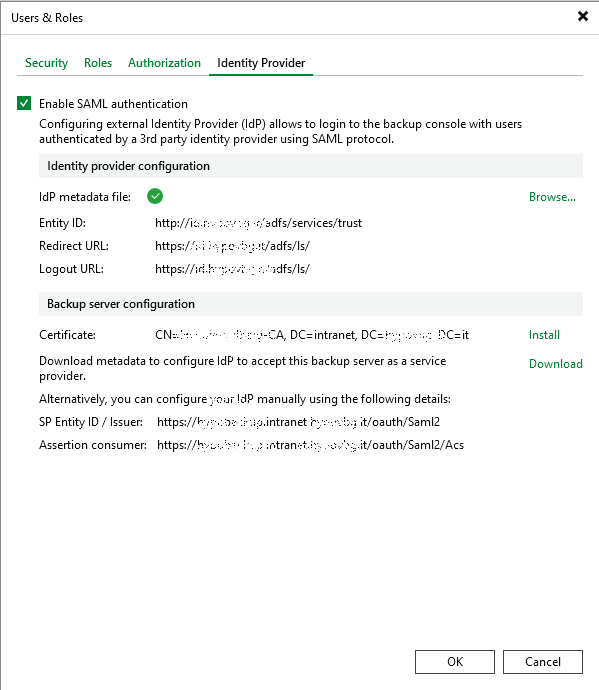
Enable the flag on SAML authentication, then browse for the IdP metadata file and load the XML metadata file exported from the ADFS service. This will auto-compile the upper part related to the IdP configuration.
Then install the certificate already created for the Veeam Backup server.
Finally, download the Veeam service provider metadata file: this will be used to configure ADFS.
Save and close.
Configuration on the ADFS Service Side
Open the ADFS service console.
Under “Relying Party Trusts”, right click and add a new trust: type is “Claims aware”.
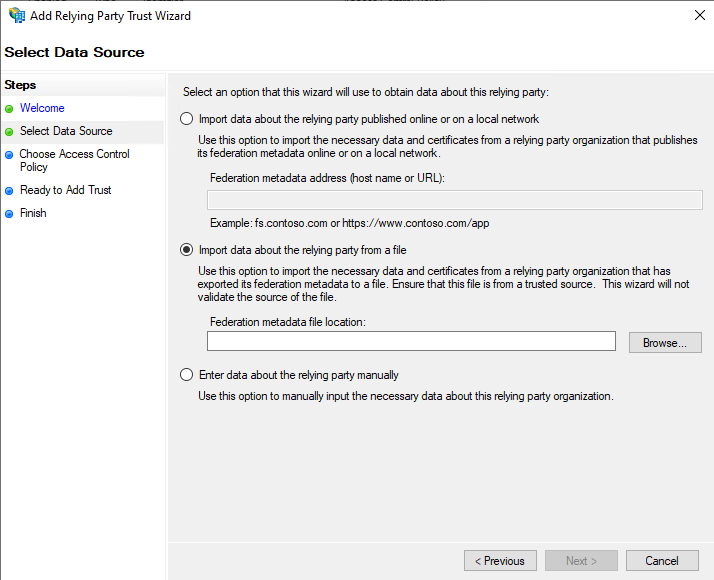
Import data from the XML file previously exported from the Veeam Backup console.
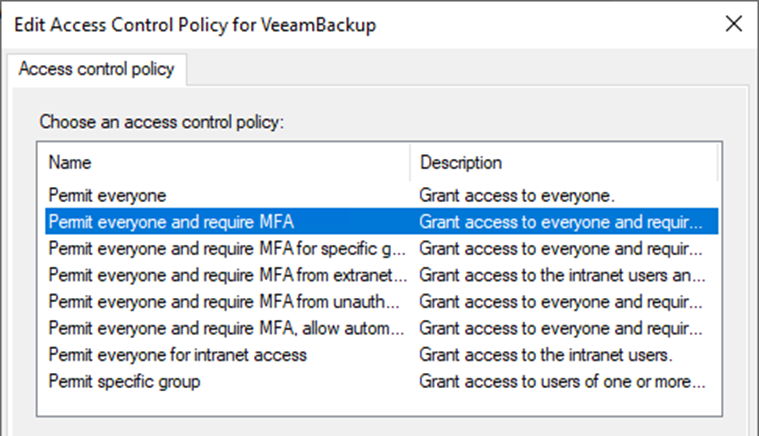
This will pre-configure all the parameters, apart from the choice about the Access control policy: it could be “Permit everyone”, but, if ADFS is already integrated with an MFA provider, it’s better to enforce “Permit everyone and require MFA”.
For this Relying party definition, a Claim issuance policy must then be defined. Just select and use the menu on the right to add one.
The rule to be added must be of the “Issuance Transform Rules” type:
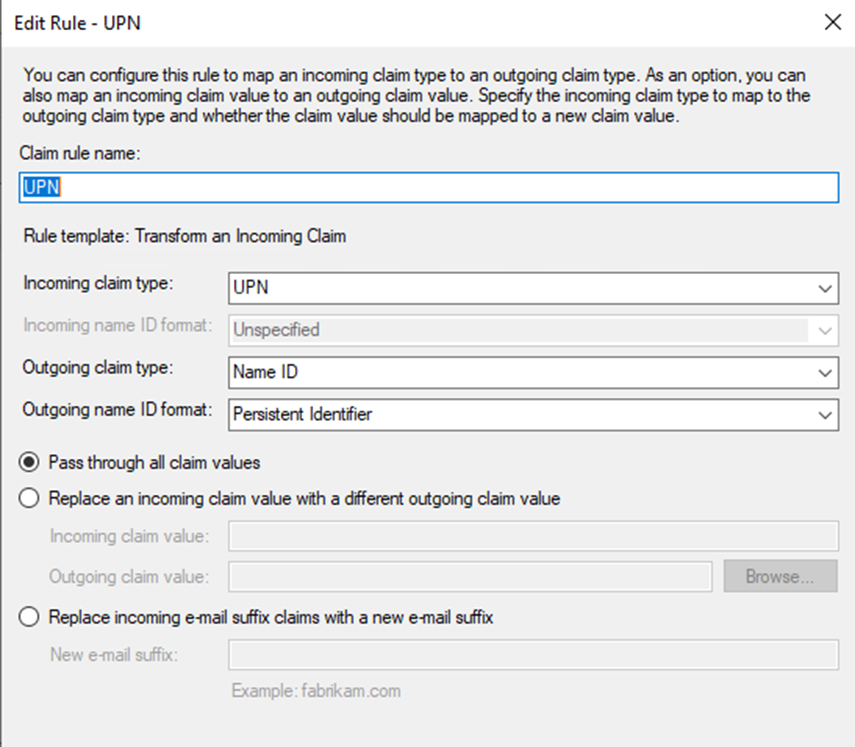
Final Step: Define the Admin Users on the Veeam side
Go back to the “Users & Roles” menu under the Veeam console.
Under the “Security” tab, admin SAML SSO users must be defined as “External user” and their “User Principal Names” must appear in Active Directory.
To improve Veeam security, the Domain Administrators group should be removed from the admin users.
Just leave one single “Internal user” as a backup emergency access to the Veeam console in case of SAML malfunction: it should be a user with a very long complex password.
These Solutions are Engineered by Humans
Did you find this article interesting? Does it match your skill set? Our customers often present us with problems that need customized solutions. In fact, we’re currently hiring for roles just like this and others here at Würth IT Italy.
Alessandro Romboli
Site Reliability Engineer at Würth IT Italy
My name is Alessandro and I joined Würth Phoenix (now Würth IT Italy) early in 2013. I have over 20 years of experience in the IT sector: For a long time I've worked for a big Italian bank in a very complex environment, managing the software provisioning for all the branch offices. Then I've worked as a system administrator for an international IT provider supporting several big companies in their infrastructures, providing high availability solutions and disaster recovery implementations. I've joined the VMware virtual infrastructure in early stage, since version 2: it was one of the first productive Server Farms in Italy. I always like to study and compare different technologies: I work with Linux, MAC OSX, Windows and VMWare. Since I joined Würth Phoenix, I could also expand my experience on Firewalls, Storage Area Networks, Local Area Networks, designing and implementing complete solutions for our customers. Primarily, I'm a system administrator and solution designer, certified as VMware VCP6 DCV, Microsoft MCP for Windows Server, Hyper-V and System Center Virtual Machine Manager, SQL Server, SharePoint. Besides computers, I also like photography, sport and trekking in the mountains.
Author

Latest posts by Alessandro Romboli
03. 12. 2025
Microsoft
Single Sign-On for Power BI Report Server
08. 09. 2025
Service Management
VMware ESXi Transparent Page Sharing
12. 06. 2025
Microsoft
Terminal Server User Profiles with FSLogix
05. 02. 2025
Knowledge Management, Service Management
Dynamics 365 Finance & Operations (On -Premises) Connectivity: New Authentication Model