
Scenario
NetEye 4 is a comprehensive monitoring platform which natively supports Business Processes.
A Business Process is an abstract view of a customer’s Business from the Application point of view. Usually, it’s a collection of Icinga2 checks aggregated by “AND, OR, At Least” logics in order to monitor if a Business Application is really available to the users, if all the necessary components are up.
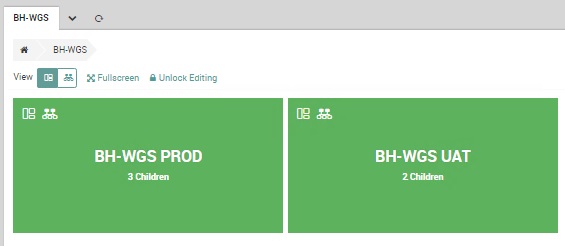
Business Processes are represented by colored boxes, changing color according to the service status: UP, DOWN, degraded.
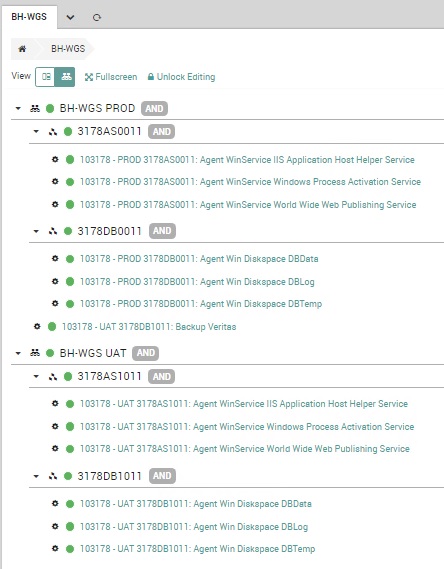
A Tree View is also available: there you can see the Icinga2 logic behind the topmost level:
It would be useful to keep track of some Business Process history or to activate notifications based on a Business Process status change: how to achieve this?
The answer is to use Icinga2 itself to monitor a Business Process.
How to monitor a Business Process
Some information must be collected from the Business Process to be monitored: these data are shown on the Business Process view after clicking “Unlock Editing” and then “Config”.
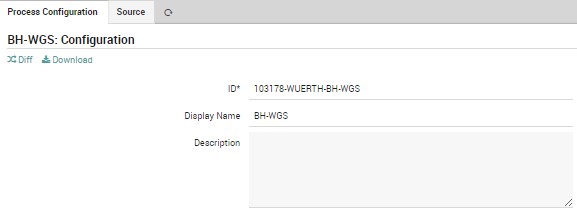
First of all, the Business Process ID:
Then, by clicking on the “Source” tab, the whole Business Process structure. (it’s better to copy all the content into a text editor for better reading)
1.	### Business Process Config File ###
2.	…………
3.	###################################
4.	3178AS0011 = 3178as0011.domain.local;Agent WinService IIS Application Host Helper Service & 3178as0011.domain.local;Agent WinService Windows Process Activation Service & 3178as0011.domain.local;Agent WinService World Wide Web Publishing Service
5.	display 0;3178AS0011;3178AS0011
6.	3178DB0011 = 3178db0011.domain.local;Agent Win Diskspace DBData & 3178db0011.domain.local;Agent Win Diskspace DBLog & 3178db0011.domain.local;Agent Win Diskspace DBTemp
7.	display 0;3178DB0011;3178DB0011
8.	BH-WGS PROD = 3178AS0011 & 3178DB0011 & 3178db1011.domain.local;Backup Veritas
9.	display 1;BH-WGS PROD;BH-WGS PROD
10.	3178AS1011 = 3178as1011.domain.local;Agent WinService IIS Application Host Helper Service & 3178as1011.domain.local;Agent WinService Windows Process Activation Service & 3178as1011.domain.local;Agent WinService World Wide Web Publishing Service
11.	display 0;3178AS1011;3178AS1011
12.	3178DB1011 = 3178db1011.domain.local;Agent Win Diskspace DBData & 3178db1011.domain.local;Agent Win Diskspace DBLog & 3178db1011.domain.local;Agent Win Diskspace DBTemp
13.	display 0;3178DB1011;3178DB1011
14.	BH-WGS UAT = 3178AS1011 & 3178DB1011
15.	display 2;BH-WGS UAT;BH-WGS UAT
Inside the configuration file, you have to look at the Business Process that must be monitored by checking the “display” lines and the names at the end of the line, after the semicolon.
In this sample, line 9 starts with display and ends with the Business Process name “BH-WGS PROD”, the one we want to keep monitored.
In the previous line, line 8 in this example, there is the configuration name, just before the equal sign.
The two names could be identical, but usually they are different and we are interested in the latest one.
In this example the configuration name is the same: “BH-WGS PROD”.
Create an Icinga2 service
First of all, an Icinga2 dummy host must be created: this host will hold the Business Process service check.
The host could be created using the “nx-ht-dummy” host template.
Inside the newly created host, we can create monitoring services by using the “generic-business-process” service template.
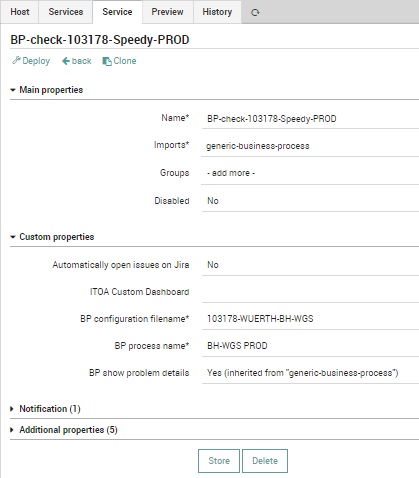
The service parameters are:
- Name: in case of multiple check of different Business Processes, it’s better to use a common prefix
- BP configuration filename: the Business Process ID saved earlier
- BP process name: the Business Process configuration name taken before from the “Source”
In case of multiple Business Processes to be monitored, this icinga2 service could be cloned and then changed the Name and the BP process name.
Icinga2 monitoring is very powerful: all these services could be then associated with a notification.
Alessandro Romboli
Site Reliability Engineer at Würth IT Italy
My name is Alessandro and I joined Würth Phoenix (now Würth IT Italy) early in 2013. I have over 20 years of experience in the IT sector: For a long time I've worked for a big Italian bank in a very complex environment, managing the software provisioning for all the branch offices. Then I've worked as a system administrator for an international IT provider supporting several big companies in their infrastructures, providing high availability solutions and disaster recovery implementations. I've joined the VMware virtual infrastructure in early stage, since version 2: it was one of the first productive Server Farms in Italy. I always like to study and compare different technologies: I work with Linux, MAC OSX, Windows and VMWare. Since I joined Würth Phoenix, I could also expand my experience on Firewalls, Storage Area Networks, Local Area Networks, designing and implementing complete solutions for our customers. Primarily, I'm a system administrator and solution designer, certified as VMware VCP6 DCV, Microsoft MCP for Windows Server, Hyper-V and System Center Virtual Machine Manager, SQL Server, SharePoint. Besides computers, I also like photography, sport and trekking in the mountains.
Author

Latest posts by Alessandro Romboli
17. 06. 2026
Microsoft
UEFI Secure Boot Nightmare
03. 12. 2025
Microsoft
Single Sign-On for Power BI Report Server
08. 09. 2025
Service Management
VMware ESXi Transparent Page Sharing
12. 06. 2025
Microsoft
Terminal Server User Profiles with FSLogix