01. 07. 2026
AI, Atlassian, Service Management

In organizations using Confluence Cloud as a knowledge‑base, documentation hub or collaboration platform, you often see pages or spaces created with restrictions (i.e., visible only to certain users/groups). In these situations an administrator may need to access content they don’t have permission to view. To address this, Atlassian provides the admin key feature.
But like any powerful tool it should be used judiciously, and should not become the “easy way out” for managing permissions. In this article we’ll look at what an admin key is, how it works, what the risks are, and especially how to avoid relying on it by implementing solid governance and permissions practices.
What Is the Admin Key?
The admin key is a feature available in Confluence Cloud Premium and Enterprise editions that enables organization admins (or site admins) to bypass view/edit restrictions on content (pages/spaces) even if they don’t otherwise have explicit permission.
In practice, if an admin encounters a page they cannot view because of restrictions, they can enable admin key (via a “View now” or equivalent banner) and gain temporary elevated access.
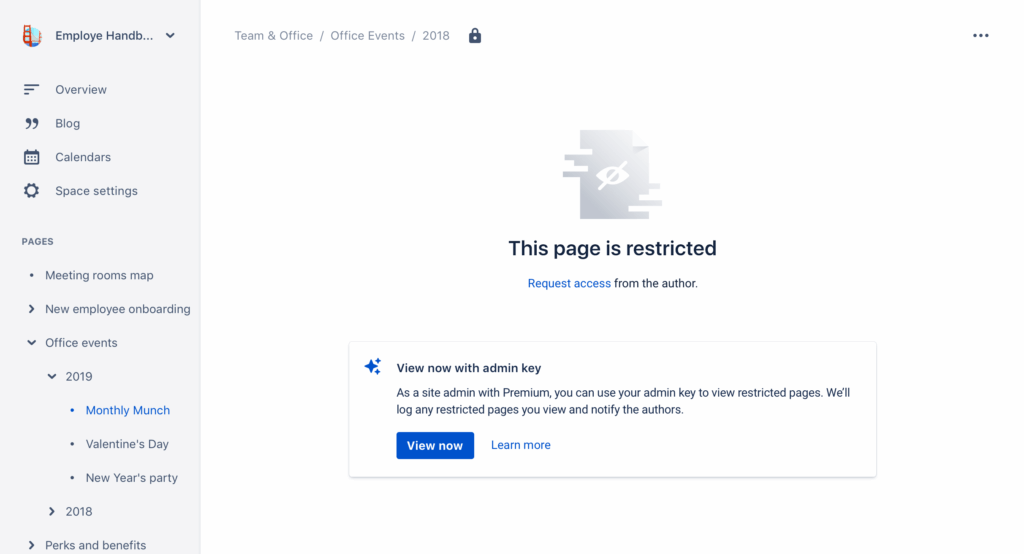
Use of the admin key is recorded in the audit log, and an email notification is sent to the content owner.
Why this matters
- It solves scenarios like when a user who owned a restricted page has left the company, their space is locked, and now no one else can access it; or you need to diagnose why someone can’t see content.
- It avoids the need to immediately adjust permissions or ask content owners to change restrictions just to allow an admin to investigate.
What Are the Risks / Things to Consider
- Security / unintended access: Bypassing restrictions means an admin may view or edit content that was intentionally restricted
- Governance weakness: Frequent use of the admin key signals that your permission model or content ownership model isn’t well designed, making your instance harder to govern
- Audit & traceability: Although actions via the admin key are logged, if use becomes common and unmanaged, the logs become less meaningful, and risk of inappropriate access increases
- Human‑error risks: An admin might bypass restrictions, make changes, forget to revert, or lose track of when/why they accessed content
- Reliance on the workaround, not process: If you treat the admin key as the “go‑to” fix rather than building correct permissions and governance, you inherit the cost of complexity and potential risk
How to Avoid Regularly Relying on the Admin Key
Using the admin key in Confluence Cloud can be a lifesaver in “emergency” situations – but if it becomes the norm, it’s a sign that your permission and governance structure needs a rethink. To reduce reliance on the admin key, consider the following approaches:
- Adopt a clear and consistent permissions model: Use groups or “roles” (instead of per-user configurations) to assign permissions to teams, departments or functions.
- Apply the “least privilege” principle: Give users only the permissions they absolutely need to do their job. This helps minimize accidental risks or unnecessary access.
- Document your permissions model and content ownership: Keep track of who is responsible for each space/page, who can modify what, and how restrictions are managed. Having documentation helps to know who to contact when something becomes inaccessible.
- Prepare procedures for “user off-boarding” cases: When someone leaves the company, verify whom the permissions for pages/spaces they created will be assigned to, to avoid content being left “locked” or unreachable.
- Conduct periodic reviews of permissions and access: Schedule regular audits (e.g., every few months) to check that configurations are still appropriate, and that there are no stale or overly broad permissions.
When to Use the Admin Key – And When Not to
The admin key remains useful in “one-off” scenarios, such as:
- Unlocking pages or spaces created by a user who no longer works at the company
- Diagnosing visibility problems (e.g., figuring out why someone isn’t seeing content they should have access to)
In these cases, it should be used only once – and, after solving the issue, it’s best practice to end the “admin key” session (by clicking “Stop using admin key”). That way you minimize the risk of accidental access or unwanted modifications.
If instead you find yourself using Admin Key frequently – that’s a warning sign: it’s time to revisit governance and clean up your permissions model.
In Summary
The admin key is a powerful and useful tool for administrators: It allows recovery and management of content even when direct permissions are missing. But if it becomes the only way to access content, it means the permissions model isn’t sustainable. To avoid a dangerous dependency on the admin key, what you need is governance, a clear permissions model, documentation, and regular reviews. Only then will your Confluence environment remain both collaborative and maintainable.
Next Steps: Audit Your Confluence Instance
If you’re using Confluence Cloud it’s worth taking a moment to review the current status of permissions, ownership and access-control on your instance. Ask yourself:
- When was the last time someone audited who owns each space and page? Are there pages “orphaned” because their creators left the company?
- Are you relying today on the admin key as a frequent shortcut to access content – or is it truly a “last-resort / emergency” tool?
- Do your groups and permission models reflect actual teams/roles (as opposed to individual users)? Are permissions granted on a “need-to-know” basis?
- Do you have a process in place – e.g. on user exit, team restructuring, onboarding – to review and re-assign space and page ownership, clean up permissions, and avoid future “locked out” content?
A quick permission and ownership audit helps you see weak spots before they become real problems. If you find anything messy, it may be time to reorganize permissions – reassign space-admins, refactor groups, clear or rationalize page restrictions – so that the admin key can remain a tool for exceptions, not the go-to fix.
Ultimately, this ensures that Confluence stays a secure, well-governed, and sustainable knowledge hub – not a patchwork of ad-hoc exceptions.
These Solutions are Engineered by Humans
Did you find this article interesting? Does it match your skill set? Our customers often present us with problems that need customized solutions. In fact, we’re currently hiring for roles just like this and others here at Würth IT Italy.

Alessandra Castiglioni
Author

Latest posts by Alessandra Castiglioni
23. 06. 2025
Atlassian
Is Your Jira and Confluence World About to Change? Understanding the Shift from Connect to Forge