
This article expands on the topic introduced in my earlier blog post Secure Access to Applications with Azure, which focused on securing access to an on-premises web application using Microsoft Entra Application Proxy.
Global Secure Access is Microsoft’s unified framework for securing access to private resources, Microsoft 365 services, and internet destinations through identity-aware controls. It brings Microsoft Entra Private Access and Microsoft Entra Internet Access together in a single administrative and policy model, managed through the Microsoft Entra admin center.
Together, these two components form Microsoft’s Security Service Edge (SSE) solution. SSE is a network security architecture class that delivers security controls as a cloud service, closer to the user, rather than requiring traffic to be backhauled through a central corporate perimeter. SSE is a subset of the broader SASE (Secure Access Service Edge) model; SASE additionally includes SD-WAN capabilities, which are outside the scope of this article.
Global Secure Access addresses the following goals:
- Replace many traditional VPN scenarios with identity-aware, segmented access to private resources
- Reduce the need to expose broad network access to remote users
- Apply granular, identity-centric access control to private, Microsoft 365, and internet resources
- Extend policy enforcement consistently across managed endpoints and supported network paths
Key Terms
- GSA: Global Secure Access – the umbrella product name in the Microsoft Entra admin center
- Global Secure Access Client: The endpoint software used to forward supported traffic through the service
- SSE: Security Service Edge – the service class that Global Secure Access belongs to
- Microsoft Entra Private Access: The ZTNA capability for private resource access
- Microsoft Entra Internet Access: The SWG capability for internet and SaaS traffic
- ZTNA: Zero Trust Network Access
- SWG: Secure Web Gateway
- CASB: Cloud Access Security Broker
- Conditional Access: The Microsoft Entra policy engine used to control access based on identity and device conditions
Basic Architecture of the Global Secure Access Solution
Global Secure Access uses Microsoft’s global network presence to connect managed users to private resources, Microsoft 365, and internet destinations through a unified, identity-aware service plane.
The Global Secure Access Client
The Global Secure Access Client is installed on managed endpoints and is responsible for forwarding supported traffic to the Global Secure Access service. It integrates at the operating system level and is typically deployed and managed through endpoint management tools such as Microsoft Intune or another MDM solution. Updates to the client are managed by Microsoft.
The client forwards traffic according to the enabled traffic forwarding profiles and the applicable policy configuration. Traffic handling depends on which profiles are enabled and what scenarios are supported – it’s not simply a function of the client being present on the device.
At a high level, the client establishes three separate channels to the SSE service, one for each traffic category:
- Private traffic – access to private resources via Microsoft Entra Private Access
- Microsoft 365 traffic – access to supported Microsoft 365 SaaS services
- Internet traffic – access to internet destinations and third-party SaaS via Microsoft Entra Internet Access
These channels are transparent to the user. Each category of traffic is processed independently by the service according to the policies and capabilities configured for the tenant.
The client authenticates the user to the Microsoft Entra ID tenant and uses this identity when communicating with the service. Access tokens issued by Microsoft Entra ID accompany traffic forwarded by the client, so the service always has the necessary claims to evaluate which policies apply to each individual request.
The Private Network Connector
The Microsoft Entra private network connector is used specifically for Microsoft Entra Private Access. It’s a lightweight, Microsoft-managed component installed on Windows Server systems that have line of sight to the private resources being published through the service.
The connector uses an outbound-only communication model. No inbound firewall rules are required because the connector initiates the connection to the Microsoft service over ports 443 and 80. Traffic in both directions flows over the session that the connector establishes.
Connectors should be deployed on multiple Windows Server instances for redundancy and continuous availability during updates. They are stateless: performance scales with the request rate, payload size, CPU capacity, and network throughput rather than with user or session count. Microsoft states that with standard web traffic, an average machine can handle around 2,000 requests per second. For more advanced deployments, connectors can be organized into logical groups; the Microsoft documentation covers this topic in detail.
Conditional Access and Global Secure Access
A defining architectural property of Global Secure Access is its deep integration with Microsoft Entra Conditional Access.
Global Secure Access extends Conditional Access to network traffic – not only to cloud application sign-in events. Microsoft refers to this as Universal Conditional Access through Global Secure Access.
Global Secure Access supports policy-driven handling of three traffic categories:
- Private traffic: Traffic to private applications and resources
- Internet traffic: Traffic to internet and SaaS destinations
- Microsoft traffic: Traffic to supported Microsoft 365 services
In practice, Conditional Access can require conditions such as:
- Multi-factor authentication
- Compliant device
- Acceptable sign-in risk level
- Compliant network, where supported
The link between identity and traffic handling is important to understand. When the Global Secure Access Client authenticates the user to the Entra tenant, it acquires access tokens for the service. These tokens carry claims about the user identity, group memberships, and device state. The service evaluates these claims at runtime to determine which policies and security profiles to apply to the traffic it receives. This is what makes the solution identity-centric rather than purely network-based, and what aligns it with Zero Trust principles.
Tenant restrictions, compliant network, and named locations
Traditional Named Locations in Microsoft Entra are defined by IP ranges or geographic regions and can be used as conditions in Conditional Access policies. They remain useful in some scenarios but have operational limits: administrators must maintain trusted source ranges manually, and static IP trust can be difficult to sustain in dynamic or distributed environments.
Global Secure Access improves this area with two distinct features:
- Compliant network
- Universal Tenant Restrictions
Compliant Network
Compliant network check in Global Secure Access allows administrators to require that access originates from the Global Secure Access service path for the correct tenant. This provides two practical benefits:
- It removes the need to maintain a curated list of trusted egress IP addresses
- It removes the need to hairpin traffic through VPN infrastructure in order to preserve a known source IP for IP-based Conditional Access policies
For example, a Conditional Access policy in de>contoso.com that requires compliant network can only be satisfied by users whose traffic passes through the Global Secure Access service for the de>contoso.com tenant. A user from de>fabrikam.com cannot satisfy that control even from a managed device, and a user on a non-compliant network path is blocked regardless of device state.
Important limitation: compliant network check is currently not supported for Private Access applications.
Tenant Restrictions and Universal Tenant Restrictions
Tenant Restrictions v2 control how managed users and devices interact with external Microsoft Entra tenants. There are two distinct protection layers:
1. Authentication plane protection
This layer blocks sign-in attempts that use unauthorized external identities from managed devices. A practical example: A malicious insider attempting to sign in to a personal or attacker-controlled tenant from a managed device would be blocked, preventing data from being exfiltrated through that external account.
2. Data plane protection
This layer addresses attacks that bypass authentication entirely. Examples include:
- Anonymously joining a Teams meeting hosted by a malicious tenant
- Accessing SharePoint files via anonymous sharing links in a malicious tenant
- Copying an access token from another device and replaying it on the managed device
Data plane protection forces authentication for all such attempts and blocks access if the resulting authentication does not meet policy.
Universal Tenant Restrictions extend this model by integrating Tenant Restrictions with Global Secure Access. The client tags all outbound traffic with tenant restriction policy at the operating system level, regardless of browser, application, or remote network path. The practical outcome is that managed users can only authenticate to and access resources in external tenants that are explicitly authorized by the organization’s tenant policy.
Global Secure Access: Private Access, Internet Access, and Microsoft Traffic
Global Secure Access provides a unified model for managing network access from managed endpoints through:
- The Global Secure Access Client on each managed endpoint
- Conditional Access policies in the tenant
- Traffic forwarding profiles that determine which traffic categories the client handles
- Security policies applied per category
- Private network connectors, required for Private Access scenarios
Each traffic category – Private Access, Internet Access, and Microsoft 365 traffic – solves a distinct problem and should be treated as a separate capability in architecture design.
Private Access through Global Secure Access
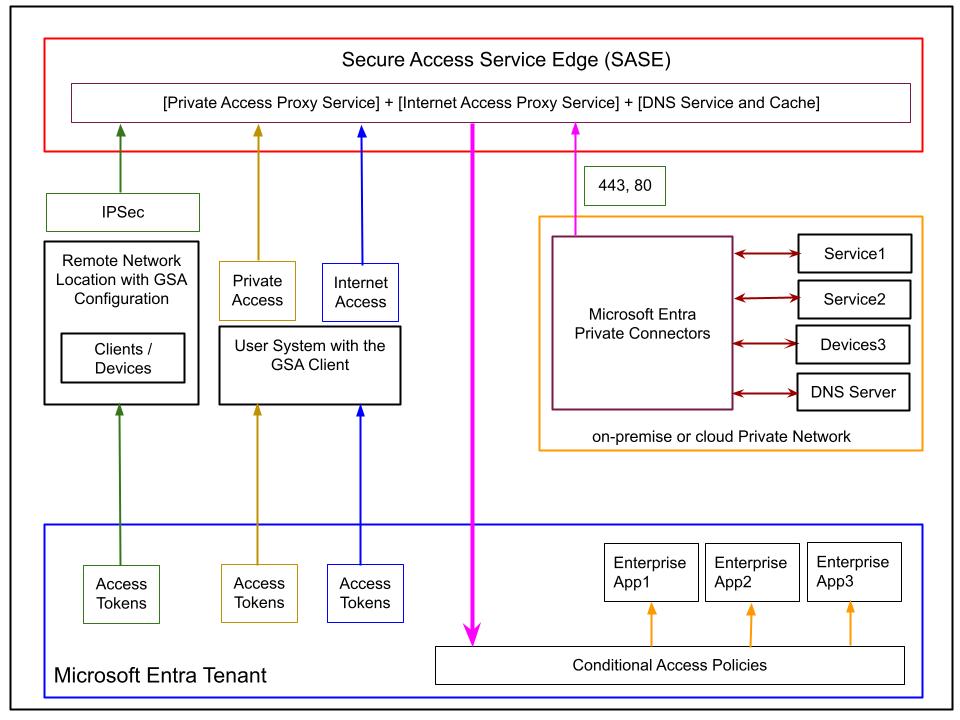
Microsoft Entra Private Access is Microsoft’s ZTNA capability for private resources. It’s designed for the scenario where a managed endpoint needs access to resources on a private network – whether on-premises or in a private cloud – without relying on traditional broad-access VPN connectivity.
The main design goals are:
- Eliminate classic VPN-style full-network access in favor of segmented, per-resource access
- Allow access based on user identity and device state, not network location
- Support non-HTTP protocols as well as web traffic
- Apply access policies at a granular per-application or per-segment level
Private Access Application Model
Private Access works with enterprise applications that act as containers defining the private resources to be published through the service. Microsoft documentation describes two main models:
- Quick Access: A single broad access segment that allows organizations to migrate quickly by publishing a wider set of resources under one application object. Useful when the overhead of defining individual segments is not yet justified.
- Global Secure Access applications: Individual enterprise application objects that each define a precise access segment. Each application is specified by a combination of:
- IP addresses or IP ranges / CIDR blocks
- Fully Qualified Domain Names (FQDNs)
- Protocols
- Port ranges
These definitions should be non-overlapping to ensure predictable policy evaluation. This model allows organizations to progressively move from broad access toward precise, least-privilege access segments – replacing the implicit broad access of a VPN with explicit, policy-controlled access to each resource.
Relationship to Application Proxy
Private Access is not the same thing as Microsoft Entra Application Proxy, and the two are not interchangeable.
- Application Proxy publishes web applications and provides application-layer capabilities such as header-based and integrated web SSO scenarios. It operates at Layer 7.
- Private Access is designed for broader private resource access and covers TCP- and UDP-based scenarios that go beyond HTTP and HTTPS. It operates at Layer 4 (Transport Layer), meaning it is aware of IP, port, and protocol but not of application-layer content
Because of this architectural difference:
- Private Access is not a universal replacement for every Application Proxy scenario (SSO capabilities differ)
- Internet Access is not a replacement for Application Proxy either – Internet Access is an SWG for internet-bound traffic, not a web application publishing tool
Protocol coverage
Because Private Access operates at Layer 4, it can cover a wide range of protocols beyond HTTP, including:
- RDP
- SSH
- SMB
- FTP
- Custom TCP applications
- Custom UDP applications
This is one of the main reasons why it’s a strong candidate for replacing many VPN-based access patterns, particularly for infrastructure access (RDP, SSH) and file share access (SMB).
Private Name Resolution
An important architectural challenge in Private Access is private DNS resolution. A remote user on a managed device needs to resolve private domain names maintained by the organization’s internal DNS server – but Private Access is not a VPN, so there’s no traditional full-network path between the endpoint and the private DNS server.
Microsoft Entra Private Access addresses this through a service-assisted name resolution model in which the client, the SSE service, the private network connector, and the private DNS server cooperate. The mechanism works at a high level as follows:
- For each Private Access application, a local DNS suffix (
.globalsecureaccess.local) is configured in the client - When the user on the managed endpoint attempts to resolve a private name, the client appends the suffix and forwards the query to the SSE DNS service
- The SSE DNS service checks its cache:
- If a cached result exists, it responds immediately to the client
- If no cached result exists, it strips the suffix and forwards the resolution request to the on-premises private network connector via the connector’s relay mechanism
- The connector resolves the name against the private DNS server it is configured to use
- The result is returned to the SSE DNS service, cached, and forwarded to the client
The important outcome is that the endpoint can resolve private names without requiring a full network tunnel to the corporate network. The Microsoft documentation is the authoritative reference for the exact current behavior and configuration requirements.
Internet Access through Global Secure Access
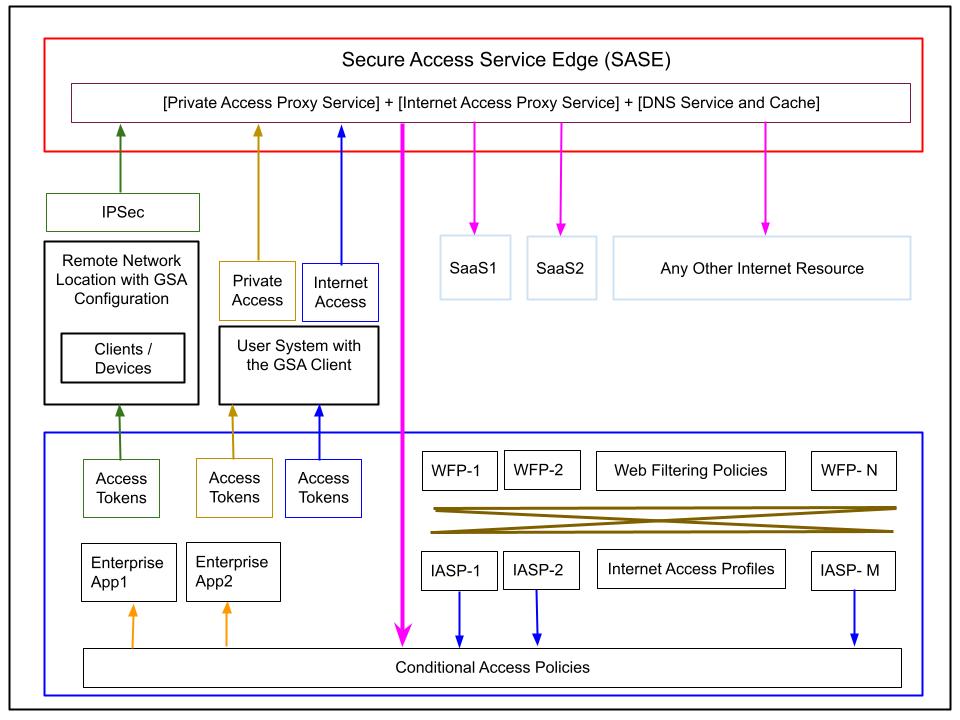
Microsoft Entra Internet Access is the identity-aware Secure Web Gateway component of Global Secure Access. It controls user access to internet destinations and SaaS services through centrally managed, identity-driven policies.
Web Filtering Policies
Web filtering policies define individual access rules. Each policy specifies:
- A set of web categories (e.g., Social Platforms, Gambling, Entertainment)
- Specific FQDNs
- An action: Allow or Block
Example policies:
| Name | Categories | FQDNs | Action |
|---|---|---|---|
| Allow Social | Social Platforms | — | Allow |
| Allow Work Sites | — | de>*.microsoft.com, de>*.mycorporate.* | Allow |
| Block Social and Gambling | Gambling, Entertainment, Social | — | Block |
Internet Access Security Profiles
Web filtering policies are grouped into security profiles (also called Internet Access Security Profiles). Each security profile collects a set of web filtering policies and assigns each a relative priority within the profile.
Each security profile is assigned an overall priority value (between 0 and 65,000). Lower priority values are evaluated first, so blocking rules with low priority values will filter traffic before any subsequent allow rules are evaluated.
Example security profiles:
Profile: Marketing Work – priority 500
- Priority 100: Allow Social
- Priority 200: Allow Work Sites
- Priority 300: Block Social and Gambling
Profile: General Work – priority 600
- Priority 200: Allow Work Sites
- Priority 300: Block Social and Gambling
This allows different user groups to have different internet access behavior. In the example above, marketing users are allowed access to social platforms, while general employees are not.
Linking Security Profiles to Users via Conditional Access
The connection between security profiles and user groups is implemented through Conditional Access policies. Each Conditional Access policy for Internet Access:
- Targets a specific user group
- Specifies
GSA-Internetas the traffic type - Assigns one Internet Access security profile
- Must have its action set to Allow
Example policies:
CAP: Internet – Marketing
- Group: Marketing
- Type: GSA-Internet
- Security Profile: Marketing Work
- Action: Allow
CAP: Internet – All Employees
- Group: Employees
- Type: GSA-Internet
- Security Profile: General Work
- Action: Allow
The Allow /Block action at the Conditional Access level is a traffic-forwarding switch:
- Allow means the traffic for that user group is forwarded from the client to the service
- Block means all internet traffic for that group is stopped before it reaches the service – regardless of any web filtering policies
The Allow/Block action in the individual web filtering policies applies to specific categories or FQDNs within the traffic that has already been forwarded.
Identity-centric Enforcement
The attentive reader might ask: How does the SSE service know which security profile to apply to a given client’s traffic?
The answer is in the access tokens. When the Global Secure Access Client authenticates on the tenant, it acquires access tokens with an expiration of approximately one hour. These tokens carry identity and group membership claims. When the client forwards internet traffic to the service, these tokens accompany the traffic. The service evaluates the claims to determine which Conditional Access policies apply, which security profile is assigned, and therefore which web filtering policies to enforce.
This is what makes Internet Access identity-centric rather than network-location-centric, and what satisfies the Zero Trust principle of continuous verification.
Remote Network Locations with Global Secure Access
Remote network connectivity provides an alternative to installing the Global Secure Access Client on every individual endpoint. It’s designed for branch office or campus scenarios where all network traffic from a site can be routed into Global Secure Access through a configured network device (for example, a router or firewall that supports the IPsec connectivity model required by the service).
In this model, the network device at the site acts as the entry point to the SSE service. Individual machines on the site do not require the client. The Global Secure Access policy configuration in the tenant remains the same; the operational difference is in how traffic reaches the service.
Important Limitation
At the time of writing:
- Private Access traffic can only be acquired with the Global Secure Access Client
- Remote networks cannot be assigned to the Private Access traffic forwarding profile
Remote network connectivity is therefore not a substitute for the client in Private Access scenarios. Its current scope is:
- Microsoft 365 traffic scenarios
- Internet traffic scenarios
In addition, remote network connectivity uses a bulk bandwidth licensing model rather than the per-user model that applies to the client. The specific conditions and thresholds should be verified against current Microsoft licensing documentation before adoption.
Licensing and Cost Considerations
Licensing for Global Secure Access should be verified carefully before implementation, as feature availability can change and entitlements vary by capability.
As a general baseline, Microsoft states that users need Microsoft Entra ID P1 or P2 to use Microsoft Entra Private Access and Microsoft Entra Internet Access. The following licenses include the relevant entitlements:
- Microsoft Entra ID P1
- Microsoft Entra ID P2
- Microsoft Entra Suite
Feature-specific licensing may vary. Remote network connectivity has its own conditions and minimum thresholds. Always verify current Microsoft licensing guidance before finalizing an architecture or deployment plan.
Current Limitations and Design Caveats
Before adopting Global Secure Access in production, these current limitations should be understood:
- Private Access is not a drop-in replacement for every Application Proxy scenario. SSO and application-layer capabilities available in Application Proxy are not present in Private Access.
- Compliant network check is currently not supported for Private Access applications. It applies to internet and Microsoft 365 traffic scenarios.
- Remote networks cannot currently acquire Private Access traffic. Private Access requires the Global Secure Access Client on the endpoint.
- Traffic handling depends on enabled forwarding profiles, not simply on client presence.
- Feature availability and licensing entitlements should always be validated against current Microsoft documentation before design sign-off.
Conclusion
Global Secure Access represents a significant step in Microsoft’s Zero Trust strategy. It brings together private resource access, internet access, and Microsoft 365 traffic control under a single identity-aware, cloud-delivered service model.
For architects, the key value is not only feature consolidation but the structural shift from broad, network-location-based trust to policy-driven, segmented, identity-centric access enforcement.
The three capabilities should be understood as distinct:
- Microsoft Entra Private Access – ZTNA for private resources, covering TCP/UDP protocols, a strong candidate to replace many VPN-based access patterns
- Microsoft Entra Internet Access – SWG for internet and SaaS traffic, applying identity-aware web filtering through Conditional Access
- Universal controls – Tenant restrictions, compliant network, and named locations – applied consistently across endpoints and supported network paths where the features are available
Used correctly, Global Secure Access can reduce dependency on legacy connectivity models, improve your security posture through continuous identity verification, and simplify access architecture by consolidating policy management in the Microsoft Entra admin center.
References
Secure Access to Applications with Azure – NetEye Blog
Microsoft Entra Global Secure Access
What is Global Secure Access?
Microsoft Entra Private Access
Global Secure Access admin center quickstart
Microsoft Entra Security Service Edge Overview – John Savill – YouTube
Deep Dive on Microsoft Entra Private Access – John Savill – YouTube
Deep Dive on Microsoft Entra Internet Access – John Savill – YouTube
These Solutions are Engineered by Humans
[N-DEVOPS] Did you read this article because you’re knowledgeable about networking? Do you have the skills necessary to manage networks? We’re currently hiring for roles like this as well as other roles here at Würth IT Italy.

Davide Spano
Author
