30. 06. 2026
Azure, Cloud, Microsoft, NetEye, NetEye Extension Packs, Unified Monitoring

18. 03. 2010
Andrea di Lernia
NetEye, Predictive Analysis, Unified Monitoring
Gli allarmi sul traffico di rete IP
Una interessante funzionalita’ di NetEye che abbiamo utilizzato per risolvere un problema concreto di un nostro cliente sono gli allarmi che vengono innescati sull’ analisi del traffico “live” di Nfsen.
Il problema che avevamo era legato all’ utilizzo massiccio di un protocollo che andava a degradare le performance di alcuni servizi, grazie alle nuove funzionalita’ di Ntop integrate in NetEye avevamo identificato la causa del degrado, quello che ci mancava era di avere l’ informazione in “tempo reale” di quando veniva utilizzato il protocollo in modo massivo.
La soluzione e’ stata l’ utilizzo degli allarmi di Nfsen che permettono di eseguire delle azioni (allarmi o attivazione di plugin) in base al raggiungimento di determinate condizioni sul traffico.
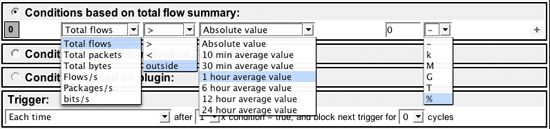
tramite l’ utilizzo dei filtri e la definizione delle condizioni che vedete elencate nelle immagini e’ possibile ottenere una ottima granularita’ dell’ informazione.
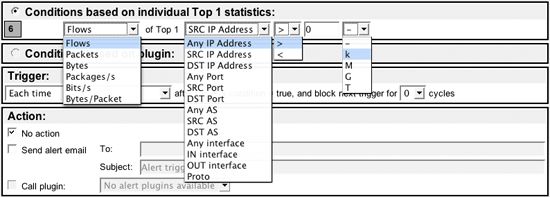
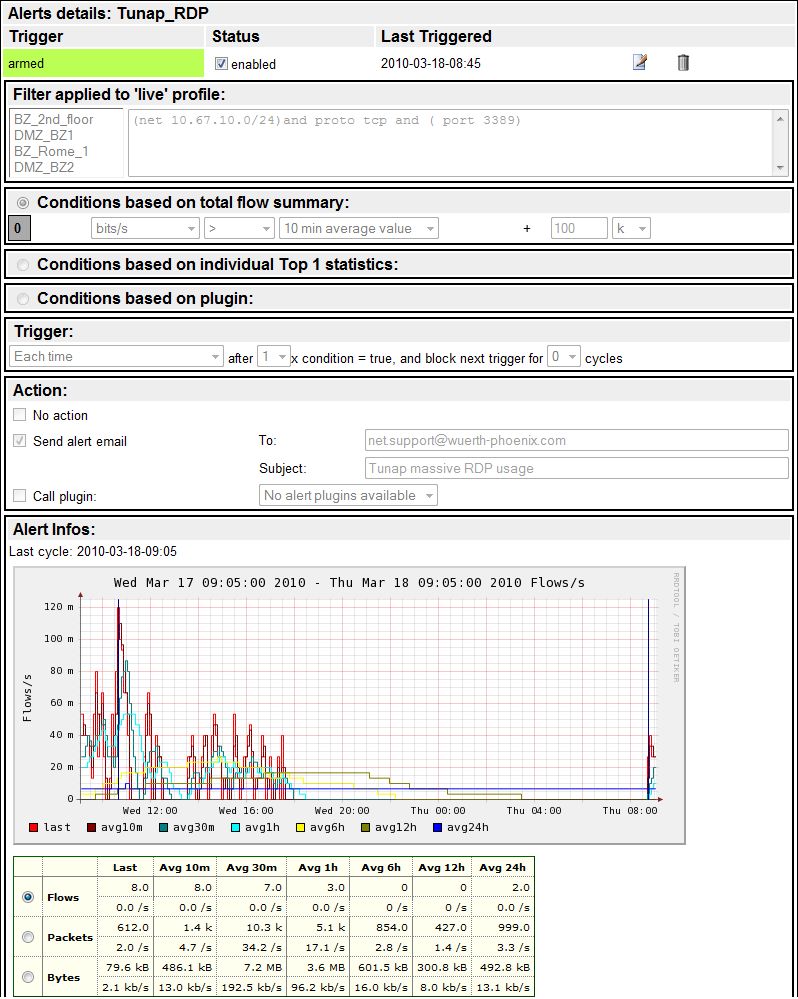
Quello che abbiamo fatto e’ stato di configurare un allarme che si attiva se l’ utilizzo medio del protocollo in questione (RDP) su di una specifica WAN supera la soglia dei 100 Kbps per un periodo di 10 minuti. L’ utilizzo delle medie su di un periodo ci permette di avere delle segnalazioni puntuali nel caso ci sia un vero disservizio evitando nel contempo segnalazioni inutili (falsi positivi) nel caso di brevi picchi di utilizzo.
Nell’ immagine seguente, l’ esempio del controllo che ci notifica i raggiungimenti delle soglie definite e che ci permette di avere la visualizzazione grafica delle medie delle ultime 24 ore

Andrea di Lernia
Profit Center Manager at Würth Phoenix
Hi everybody, I’m Andrea and my contribution to this blog is to give hints of the monitoring issue from an IT manager point of view. I was born in Bolzano in 1965 and my professional path started 25 years ago operating on the technical field as programmer, system/database administrator, network engineer, consultancy and so on. I’ve been living in Milan for 10 years working for multinational IT companies and I decided to return to Bolzano after my marriage and the birth of my daughter.
I love sailing and diving in the summer, skiing in the winter and travelling off-road with my Landcruiser anytime
Author

Latest posts by Andrea di Lernia
02. 09. 2015
NetEye
VoIP-Monitoring mit IP SLA
06. 05. 2015
Garante della Privacy, NetEye
Archiviazione dei log e poi?
06. 05. 2015
Log Management, NetEye
What to do with all those logs?