30. 09. 2026
Atlassian, Service Management

19. 12. 2025
Giuseppe Di Garbo
Atlassian, Service Management
Jira Service Management Customer Detail Fields: A Practical Use Case
In this post I want to share a real use case I recently worked on with a client using Jira Service Management.
The requirement was simple to explain, but not that trivial to implement properly: they wanted to report on tickets by DepartmentNumber for their internal users (the same department structure already defined in Active Directory).
Let’s see how I approached it, and why Customer Detail Fields turned out to be the right tool for the job.
Customer Detail Fields: The Basics
Customer Detail Fields are attributes attached to a customer profile, not to a ticket.
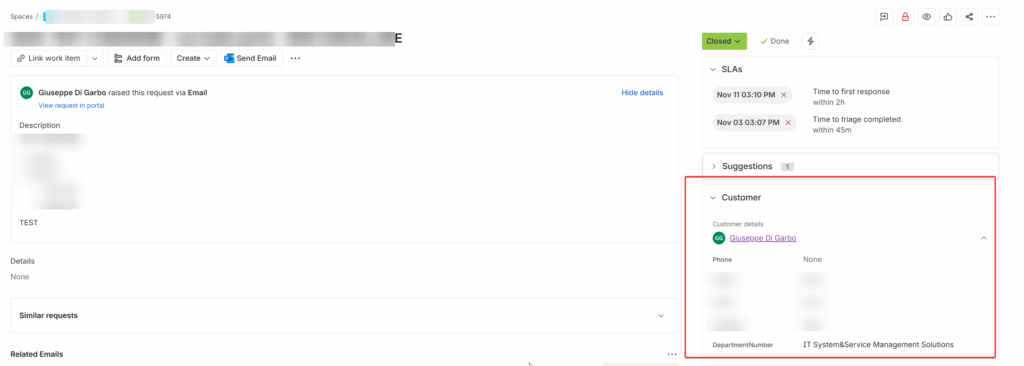
Think of them as stable information about who the customer is, such as:
- Company
- Department number
- Cost center
- Location
- Employee type
Once defined, these fields are available across all service desks and can be used in:
- Reporting
- Queues
- SLAs
- Automation rules
This already makes them very different from classic issue custom fields, which are tied to a single request and often end up duplicated or inconsistent.
Customers and Organizations
In Jira Service Management there’s an important distinction to keep in mind:
- Customers are individual users who create requests
- Organizations are logical groups of customers, usually representing a business unit or company
Organizations work well for access control and high-level reporting, but they often fall short when you need more granular insights. In our case, users from different internal departments were part of the same organization, which made it impossible to break down reports any further.
This is exactly where Customer Detail Fields come into play: They let you enrich each customer profile with structured information that goes beyond organizational membership.
For example:
- Organization: Finance
- DepartmentNumber: 2003
With this setup, you can keep using organizations as usual, while also reporting, filtering and automating at the department level, cleanly and without workarounds or duplicated fields on every ticket.
The Actual Problem
The client wanted to answer questions like:
- Which departments open the most tickets?
- How do SLAs perform per department?
- Are some departments generating recurring issues?
The data already existed in Active Directory, but JSM had no visibility of it. Manually maintaining this information in JSM was not an option.
So the goal was clear: Synchronize DepartmentNumber from Active Directory into JSM customer profiles.
The Proposed Solution
I implemented a small, robust script to manage the integration with a very clear flow:
- Extract all Active Directory users with:
- A valid email address
- A non-empty DepartmentNumber
- For each user:
- Find the corresponding JSM
customerIdvia Atlassian API (using the email address) - Update the DepartmentNumber Customer Detail Field via Jira Service Management Customer Details API
- Find the corresponding JSM
- Log every step, including errors, with timestamps
Nothing fancy, just reliable and easy to maintain.
Requirements
To make this integration work properly, a few prerequisites need to be in place:
- The script must be executed inside the client’s environment, so it can securely access Active Directory without exposing LDAP services externally.
- A dedicated read-only Active Directory account is required to extract users and their
DepartmentNumber. No write permissions are needed. - The script must use an Atlassian account with an API token that has the Administer Jira global permission, which is required to update Customer Detail Fields via the Jira Service Management API.
These requirements keep the integration simple, secure, and aligned with least-privilege principles, while still allowing full automation.
Why This Works Well
This approach has a few clear advantages:
- Active Directory remains the single source of truth
- No duplicated data on tickets
- Clean and consistent reporting
- Easy to extend with automation rules later
- Works at scale, without manual effort
Most importantly, the department information becomes part of the customer, not just another field on an issue.
Final Thoughts
Customer Detail Fields are often overlooked, but they are extremely useful when you need real customer context in Jira Service Management.
If you find yourself adding the same information to every ticket, or struggling with reporting limits, it’s usually a sign that the data belongs on the customer profile instead.
In my case, syncing DepartmentNumber was a small change with a big impact on reporting and visibility, exactly the kind of improvement that makes service management more effective, without adding complexity.
Useful Links and Resources
If you want to go deeper or implement something similar yourself, these Atlassian resources are a good starting point:
These Solutions are Engineered by Humans
Did you find this article interesting? Does it match your skill set? Our customers often present us with problems that need customized solutions. In fact, we’re currently hiring for roles just like this and others here at Würth IT Italy.

Giuseppe Di Garbo
Consultant at Würth IT Italy
Hi everybody. I’m Giuseppe and I was born in Milan in 1979. Since the early years of university, I was attracted by the Open Source world and operating system GNU\Linux. After graduation I had the opportunity to participate in a project of a startup for the realization of an Internet Service Provider. Before joining Würth Phoenix (now Würth IT Italy) as SI consultant, I gained great experience as an IT consultant on projects related to business continuity and implementation of open source software compliant to ITIL processes of incident, change and service catalog management. My free time is completely dedicated to my wife and, as soon as possible, run away from Milan and his caotic time and trekking discover our beautiful mountain near Lecco for relax and lookup the (clean) sky.
Author

Latest posts by Giuseppe Di Garbo
30. 09. 2026
Atlassian
Workforce Management in Jira Service Management: From Ticket Assignment to Capacity Management
23. 06. 2026
Atlassian
Customer Feedback in Jira Service Management: CSAT and Native Surveys Explained
29. 09. 2025
Atlassian, Service Management
Streamlining Service Request Management with ITIL4 and Jira Service Management
30. 06. 2025
Atlassian, Service Management
Creating Jira Service Management Requests from a Public Website? Here’s the Secure, No-API Way