30. 09. 2026
Atlassian, Service Management

30. 12. 2025
Gabriele Cecco
Atlassian, Service Management
Jira Service Management: The Great Architect’s Dilemma, Single Project vs Multiple Projects
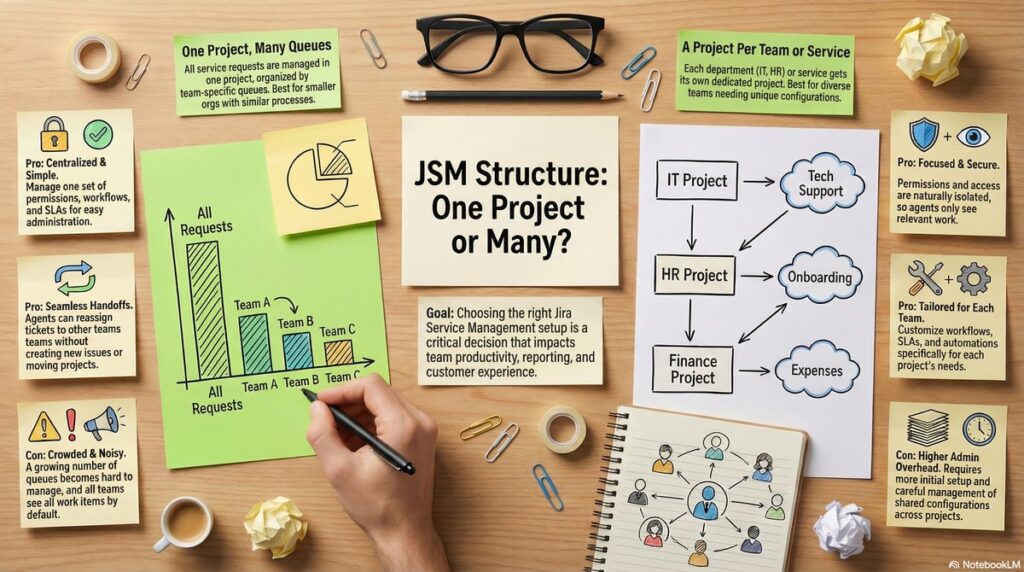
When setting up Jira Service Management (JSM), one of the most fundamental questions administrators face is, “Should we consolidate everything into one giant project, or split our teams into separate projects?”, this choice impacts agent productivity, reporting clarity, portal experience, permission management, SLA differentiation, and workflow control.
There is no perfect universal configuration, the right answer depends on your company’s size, team structure, maturity, SLA policies, and specific goals. So let’s explore the most common strategies to structure your JSM instance and weigh the pros and cons of each.
The “All-in-One” Approach, Single Project with Multiple Queues
In this model, all service requests enter a single JSM project, and you use multiple queues to organize work by team or category. This allows for a centralized administrative model, agents focusing on queues that match their responsibilities, and customers seeing a unified portal experience.
This approach is ideal for smaller organizations, teams with similar SLAs and workflows, and when you aim to minimize the number of service projects. It provides a centralized one-stop shop administration, queue routing and queue management that can be controlled via JQL filters, and custom fields without the need to split service teams into separate projects.
Pros
- Centralized administration: A single set of permissions, schemes, workflows and SLAs to manage
- Easy internal transitions: Simply update a field to effectively change ownership without moving issues between projects
- Uninterrupted support flow: Agents can easily reassign or escalate the same ticket to any specialist without needing to create a duplicate issue, ensuring a seamless hand-off and uninterrupted support flow
Cons
- Queue proliferation: As teams grow, many queues can accumulate, so discovery and maintenance of filters becomes harder
- Visibility boundaries: JSM does not natively support queue-level visibility per team, unless you build an issue security scheme – everyone in the same project sees all work items and queues
- Performance considerations: Very large projects with tens of thousand of issues and intricate JQL scans can slow down the queue loading experience
The Modular Approach, Multiple Projects
The general consensus among many experienced Jira administrators, which is also reflected in community discussions about structuring JSM (see Multiple Projects versus a Single Project in Jira Service Management on Atlassian Community), is to split projects by team or service once complexity grows.
Approach A, Diversified by Team (Organizational Model)
In this pattern each department (for example IT, HR, Finance) gets its own service project. This supports clear separation of responsibilities, permissions and SLAs, and is easier to scale operationally when teams grow.
Pros
- Natural security isolation: Permissions and access can be scoped per project, with no need for a complex issue security level/scheme
- Focused queues: Agents see only relevant queues for their domain, reducing noise and improving productivity
- Team-specific configuration: Workflows, SLAs, notifications and automation rules can be tailored per project
Cons
- Administrative overhead: Shared schemes need careful management, and changes that span multiple projects require replication or shared schemes expertise
- Initial setup investment: More time up front to define project structures and consistent naming standards
- Increased uncertainty for customers: End users may not know which team owns their issue, making it harder for them to select the correct portal or request type
Approach B, Diversified by Service (Functional Model)
Here projects are organized not just by team but by service boundaries or client contexts, for example “Internal IT,” “Customer Software Support,” “Hardware Maintenance,” or even different external customers in an MSP scenario, each with its own service project.
Pros
- A more intuitive customer journey: Users choose a service category that matches their problem, without needing to know how teams are structured internally
- Custom portals per service: Each service/project can have a tailored help center page, request types, branding, SLAs, etc.
- Highly specialized request types: Avoid overloading a single portal with many unrelated request types
- Client-specific SLA and experience: Particularly useful for MSPs or multi-tenant support
Cons
- Administrative overhead: Shared schemes need careful management, while changes that span multiple projects require replication or shared schemes expertise
- Initial setup investment: More time up front to define project structures and consistent naming standards
- Fragmentation risks: If a request is opened in the wrong project, moving it to the correct one becomes more complex, and the distribution of request types across multiple portals can make the submission experience less intuitive for users
Both patterns offer greater separation than a single monolithic project, but the choice between team-centric and service-centric segmentation depends on whether your priority is organizational separation or customer service experience customization.
Choosing the Right Model
The choice between one project and many projects isn’t black and white. Documentation such as Support multiple clients with a single Jira site reflects that you can serve multiple client groups either within a single project or with multiple projects – it’s about how you define portals and request types for your audience.
If teams are small and share similar processes, a single project with well-organized queues may be an efficient start. But if teams require distinct permissions, SLAs, or dedicated branding, then multiple projects provide clearer separation and scalable growth.
Looking across multiple projects for leadership or reporting? Use Dashboards or marketplace tools to create cross-project views even when work is distributed across multiple service projects.
Special Thanks and Recommended Creators
I’d like to take a moment to thank and recommend two amazing creators who have helped me, and many others, deepen our knowledge of the Atlassian ecosystem and especially Jira:
- Ravi Sagar, whose Jira and ITSM tutorials have taught many foundational concepts about Jira administration and workflows – he was one of the first content creators to bring Jira tutorials on YouTube, helping many admins get started
- Alex Ortiz and his channel Apetech Tech Tutorials, which offers clear, practical Jira training covering administration, workflows, JQL, automation and project setup – excellent for both beginners and advanced users
Follow both channels for ongoing tips and deep dives into Jira workflows, administration, Service Management and agile practices.
Other References & Resources
- Atlassian Community: Multiple Projects versus a Single Project in Jira Service Management, discussion on structuring JSM projects
- Atlassian Support: Use queues to triage requests for your agents
- Atlassian Support: Support multiple clients with a single Jira site, guidance on single vs multiple service project models
- Praecipio: Queues vs Dashboards in Jira Service Management, insights on queue visibility scopes
These Solutions are Engineered by Humans
Did you like this article? Does it reflect your skills? Würth Phoenix is always looking for talented, enthusiastic individuals to help us drive our business. In fact, we’re currently hiring for many different roles here at Würth IT Italy.

Gabriele Cecco
Technical Consultant at Würth IT Italy
I’m Gabriele Cecco, a consultant at Wuerth Phoenix with extensive experience in ITSM processes. Over the years, I’ve worked with various ITSM software tools, and since 2020, I’ve specialized in the Atlassian suite, earning certifications and helping many companies configure their Atlassian products.
In my free time, I enjoy listening to science and entertainment podcasts, watching movies and TV series, and traveling. I’m passionate about exploring the world, and when I’m not traveling abroad, I love spending weekends in South Tyrol with my wife and our minivan, Windy.
Author

Latest posts by Gabriele Cecco
16. 03. 2025
AI, Atlassian, Service Management
Understanding Customer Sentiment in Jira Service Management to Enhance Support
31. 12. 2024
Atlassian, Service Management
How to Use the New ‘Request Type Groups’ Feature in Jira Service Management
30. 12. 2024
Atlassian, Service Management
How to Schedule Issues with the New Calendar View in Jira Service Management